
Just over a year ago I blogged about the enhancements that were made to the sqlserver.page_split Event in SQL Server 2012 to make it easier to identify what the splitting object was and the type of split that was being performed. Sadly what I discovered writing that post was that even with the extra information about the split type, the event didn’t give you enough information to really focus on the problematic splits that lead to fragmentation and page density issues in the database. I didn’t do a whole lot with this again until recently when a question was posted by Ami Levin (Blog | Twitter) on the MVP email list that commented that the page_split event was broken in SQL Server 2012 based on a presentation he’d seen by Guy Glantser (Blog | Twitter).
Let me start off by saying, the event isn’t broken, it tracks page splits, but it doesn’t differentiate between an end page split that occurs for an ever increasing index, versus a mid-page split for a random index that leads to fragmentation and page density issues in the database. Both of these are technically splits inside the storage engine, even if we as DBA’s don’t really care about the end-page split for a increasing key value like an IDENTITY column in the database. I had Ami pass my information along to the presenter and we traded a few emails on the subject of tracking splits with the specific focus on trying to pull out the mid-page, fragmenting splits. While going through things for the third time, it dawned on me that this is incredibly simple, based one of the demo’s that was sent to me. Just over a year ago, I also blogged about tracking transaction log activity in SQL Server 2012 using the sqlserver.transaction_log event, which can be used to track mid-page splits in a database.
Last year when I wrote about the sqlserver.transaction_log event, there were 10 columns output by the event in CTP1, but as of RC0, the events output has changed and only 9 columns are output by the event.
Check It Out!

SELECT
    oc.name,
    oc.type_name,
    oc.description
FROM sys.dm_xe_packages AS p
INNER JOIN sys.dm_xe_objects AS o
    ON p.guid = o.package_guid
INNER JOIN sys.dm_xe_object_columns AS oc
    ON oc.object_name = o.name
        AND oc.object_package_guid = o.package_guid
WHERE o.name = 'transaction_log'
  AND oc.column_type = 'data';
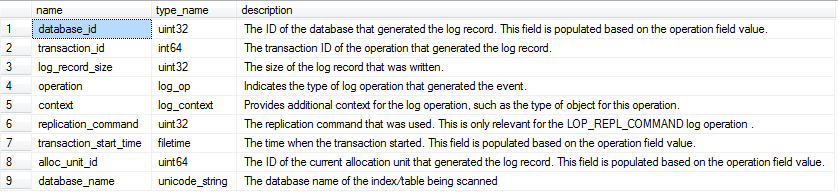
For the purposes of identifying the mid-page splits, we want to look at the operation column that is output by the event, which contains the specific operation being logged. In the case of a mid-page split occurring, the operation will be a LOP_DELETE_SPLIT, which marks the delete of rows from a page as a result of the split. To build our event session, we are going to need the map_key for the LOP_DELETE_SPLIT log_op map. This can be obtained from the sys.dm_xe_map_values DMV:
SELECT *
FROM sys.dm_xe_map_values
WHERE name = 'log_op'
  AND map_value = 'LOP_DELETE_SPLIT';
With the map_key value, we have a couple of ways to collect the information with our targets. We could collect everything into an event_file, but that doesn’t really make sense for this event. Instead the best target for this type of information is the histogram target which will bucket our results based on how we configure the target and tell us how frequently the event fires based on our bucketing criteria. If we don’t know anything about the server in question, we can start off with a very general event session that has a predicate on the operation only, and then aggregate the information in the histogram target based on the database_id to find the databases that have the most mid-page splits occurring in them in the instance.
-- If the Event Session exists DROP it
IF EXISTS (SELECT 1
            FROM sys.server_event_sessions
            WHERE name = 'SQLskills_TrackPageSplits')
    DROP EVENT SESSION [SQLskills_TrackPageSplits] ON SERVER

-- Create the Event Session to track LOP_DELETE_SPLIT transaction_log operations in the server
CREATE EVENT SESSION [SQLskills_TrackPageSplits]
ON    SERVER
ADD EVENT sqlserver.transaction_log(
    WHERE operation = 11  -- LOP_DELETE_SPLIT
)
ADD TARGET package0.histogram(
    SET filtering_event_name = 'sqlserver.transaction_log',
        source_type = 0, -- Event Column
        source = 'database_id');
GO

-- Start the Event Session
ALTER EVENT SESSION [SQLskills_TrackPageSplits]
ON SERVER
STATE=START;
GO
This event session will allow you to track the worst splitting database on the server, and the event data can be parsed out of the histogram target. To demonstrate this, we can create a database that has tables and indexes prone to mid-page splits and run a default workload to test the event session:
USE [master];
GO
-- Drop the PageSplits database if it exists
IF DB_ID('PageSplits') IS NOT NULL
BEGIN
    ALTER DATABASE PageSplits SET SINGLE_USER WITH ROLLBACK IMMEDIATE;
    DROP DATABASE PageSplits;
END
GO
-- Create the database
CREATE DATABASE PageSplits
GO
USE [PageSplits]
GO
-- Create a bad splitting clustered index table
CREATE TABLE BadSplitsPK
( ROWID UNIQUEIDENTIFIER NOT NULL DEFAULT NEWID() PRIMARY KEY,
  ColVal INT NOT NULL DEFAULT (RAND()*1000),
  ChangeDate DATETIME2 NOT NULL DEFAULT CURRENT_TIMESTAMP);
GO
--  This index should mid-split based on the DEFAULT column value
CREATE INDEX IX_BadSplitsPK_ColVal ON BadSplitsPK (ColVal);
GO
--  This index should end-split based on the DEFAULT column value
CREATE INDEX IX_BadSplitsPK_ChangeDate ON BadSplitsPK (ChangeDate);
GO
-- Create a table with an increasing clustered index
CREATE TABLE EndSplitsPK
( ROWID INT IDENTITY NOT NULL PRIMARY KEY,
  ColVal INT NOT NULL DEFAULT (RAND()*1000),
  ChangeDate DATETIME2 NOT NULL DEFAULT DATEADD(mi, RAND()*-1000, CURRENT_TIMESTAMP));
GO
--  This index should mid-split based on the DEFAULT column value
CREATE INDEX IX_EndSplitsPK_ChangeDate ON EndSplitsPK (ChangeDate);
GO
-- Insert the default values repeatedly into the tables
WHILE 1=1
BEGIN
    INSERT INTO dbo.BadSplitsPK DEFAULT VALUES;
    INSERT INTO dbo.EndSplitsPK DEFAULT VALUES;
    WAITFOR DELAY '00:00:00.005';
END
GO
If we startup this workload and allow it to run for a couple of minutes, we can then query the histogram target for our session to find the database that has the mid-page splits occurring.
-- Query the target data to identify the worst splitting database_id
SELECT
    n.value('(value)[1]', 'bigint') AS database_id,
    DB_NAME(n.value('(value)[1]', 'bigint')) AS database_name,
    n.value('(@count)[1]', 'bigint') AS split_count
FROM
(SELECT CAST(target_data as XML) target_data
 FROM sys.dm_xe_sessions AS s
 JOIN sys.dm_xe_session_targets t
     ON s.address = t.event_session_address
 WHERE s.name = 'SQLskills_TrackPageSplits'
  AND t.target_name = 'histogram' ) as tab
CROSS APPLY target_data.nodes('HistogramTarget/Slot') as q(n)

With the database_id of the worst splitting database, we can then change our event session configuration to only look at this database, and then change our histogram target configuration to bucket on the alloc_unit_id so that we can then track down the worst splitting indexes in the database experiencing the worst mid-page splits.
-- Drop the Event Session so we can recreate it
-- to focus on the highest splitting database
DROP EVENT SESSION [SQLskills_TrackPageSplits]
ON SERVER

-- Create the Event Session to track LOP_DELETE_SPLIT transaction_log operations in the server
CREATE EVENT SESSION [SQLskills_TrackPageSplits]
ON    SERVER
ADD EVENT sqlserver.transaction_log(
    WHERE operation = 11  -- LOP_DELETE_SPLIT
      AND database_id = 8 -- CHANGE THIS BASED ON TOP SPLITTING DATABASE!
)
ADD TARGET package0.histogram(
    SET filtering_event_name = 'sqlserver.transaction_log',
        source_type = 0, -- Event Column
        source = 'alloc_unit_id');
GO

-- Start the Event Session Again
ALTER EVENT SESSION [SQLskills_TrackPageSplits]
ON SERVER
STATE=START;
GO
With the new event session definition, we can now rerun our problematic workload for a 2 minute period and look at the worst splitting indexes based on the alloc_unit_id’s that are in the histogram target:
-- Query Target Data to get the top splitting objects in the database:
SELECT
    o.name AS table_name,
    i.name AS index_name,
    tab.split_count,
    i.fill_factor
FROM (    SELECT
            n.value('(value)[1]', 'bigint') AS alloc_unit_id,
            n.value('(@count)[1]', 'bigint') AS split_count
        FROM
        (SELECT CAST(target_data as XML) target_data
         FROM sys.dm_xe_sessions AS s
         JOIN sys.dm_xe_session_targets t
             ON s.address = t.event_session_address
         WHERE s.name = 'SQLskills_TrackPageSplits'
          AND t.target_name = 'histogram' ) as tab
        CROSS APPLY target_data.nodes('HistogramTarget/Slot') as q(n)
) AS tab
JOIN sys.allocation_units AS au
    ON tab.alloc_unit_id = au.allocation_unit_id
JOIN sys.partitions AS p
    ON au.container_id = p.partition_id
JOIN sys.indexes AS i
    ON p.object_id = i.object_id
        AND p.index_id = i.index_id
JOIN sys.objects AS o
    ON p.object_id = o.object_id
WHERE o.is_ms_shipped = 0;

With this information we can now go back and change our FillFactor specifications and retest/monitor the impact to determine whether we’ve had the appropriate reduction in mid-page splits to accommodate the time between our index rebuild operations:
-- Change FillFactor based on split occurences
ALTER INDEX PK__BadSplit__97BD02EB726FCA55 ON BadSplitsPK REBUILD WITH (FILLFACTOR=70)
ALTER INDEX IX_BadSplitsPK_ColVal ON BadSplitsPK REBUILD WITH (FILLFACTOR=70)
ALTER INDEX IX_EndSplitsPK_ChangeDate ON EndSplitsPK REBUILD WITH (FILLFACTOR=80)
GO

-- Stop the Event Session to clear the target
ALTER EVENT SESSION [SQLskills_TrackPageSplits]
ON SERVER
STATE=STOP;
GO

-- Start the Event Session Again
ALTER EVENT SESSION [SQLskills_TrackPageSplits]
ON SERVER
STATE=START;
GO
With the reset performed we can again start up our workload generation and begin monitoring the effect of the FillFactor specifications on the indexes with our code. After another 2 minute period, the following splits were noted.

With this information we can go back and again attempt to tune our FillFactor values for the worst splitting indexes and rinse/repeat until we determine the best FillFactor for each of the indexes to minimize splits. This is an incredibly powerful tool for the DBA moving into SQL Server 2012, and will definitely change how we perform index fragmentation analysis and troubleshoot problems with excessive log generation in SQL Server 2012 onwards.
Cheers!
24 thoughts on “Tracking Problematic Pages Splits in SQL Server 2012 Extended Events – No Really This Time!”
Thank you for this post. I am new to extended events and this was an excellent explanation of how this works. Now I just need to break down the queries so I really understand how it all works and start writing my own events.
Pretty awesome! Thanks 🙂
Keep up the good work
The question I have is how can you determine “how costly” a page split may be? As an example, we have an archive table that is being written to constantly. There are never any updates, and monthly there is a purge process that clears these.
The PK is an integer; it comes from the parent table’s identity column.
This table shows hundreds of page splits in a matter of minutes.
But just how costly is this? The number of splits may be high, but if there is very little overhead in these splits, there is no point in reducing the number of page splits.
Great article Jonathan! Once again, you have give me some great tools. Without even asking!
This just helped a problem I was facing by having a bunch of 0 fill factor indexes. Thanks you rock!!!!!
I have to say that this is a weakness of mine but now that I am day 21 of your series you have really got through to me well.
Cracking stuff.
This still shows the “good/normal” splits (IX_EndSplitsPK_ChangeDate). Are these page splits something we need to worry about if it’s based on an ascending key, such as an identity INT? I’d prefer not to lower the fillfactor (and increase the index size) if these page splits have minimal impact.
The ChangeDate column on the EndSplits table is completely random and does have page splits happening.
Congratulation and thank you for this very good post.
Your examples (scripts) make your post clear.
Very good work!
Hi Jonathan, great post, very interesting and informative approach to the issue.
I’m using 2014 and the top splitting object in the db query doesn’t return anything, it’s as though everything is system – I have the db_id set correctly so I was wondering if something has changed in 2014?
Thanks
Martyn
Did you run the script in the context of that database? It won’t be able to resolve the allocation_unit_id to an index/object if it is not in the correct database when you parse the XML the second time.
Necro-posting I know, but…
While showing the most mid-page splits, does it really identify problem indexes?
For my regular page splits analysis I divide the number of splits over a period of time by the number of batches over that same period of time to get Page Splits per 100 batches. This gets me a value of page splits that is related to activity so I don’t say that page splits are high during a certain period of time if activity was very high.
I’m trying to figure out a way of applying the same concept to this method, at a table level.
Mid page splits are the problemattic splits, so yes this method really does identify the problem indexes at the table level by their allocation unit number.
I agree that it does a masterful job of identifying the problem splits but is there a way to normalize the *number* of splits to the level of activity?
For example: If I show 1,000 page splits over an hour on a index during a time 100 batches processed that’s 10 splits every 1 batch but if I show 1,000 splits an hour on an index during a time 10,000 batches processed that’s one split per 10 batches.
Is there a way to do this with Extended Events?
Maybe I am looking at this wrong but I think a number of page splits relative to activity is much more informative than an absolute number.
Jeff, the number of splits also related to row size (lower row density will encourage a higher volume). I think your metric has to depend on your workload and the amount of fragmentation you are prepared to put up with on a particular table before it begins to hurt query performance. So I don’t think there will be an absolute level . I expect to use this to determine whether the indexing strategy can be improved, since page splitting leads towards decreased concurrency.
Hi @Jonathan Kehayias, Is this XE Session expensive in terms of overhead? I would like to run it for 2 hours in a production server.
Thanks
Luis
I haven’t experienced any impacts from it on any system I have used it on but YMMV depending on your workload. Test it before you use it in production is the best I can tell you, I’m not responsible for performance impacts if it happens to be the first workload that it has an effect to.
Great article, but is there a way to get cpu time used for the split. Obviously it is not in the sys.dm_ex_object_columns table.
Nothing measures the CPU time of the page split that I know of natively. Your only option would be using xperf with a stack walk and then using symbols to materialize the callstacks and then correlating the CPU usage for them directly from there, but that’s a lot of work for not a whole lot of gain in my opinion. What would you do with the CPU information for a single page split exactly?
I’ve been using your extended event for several months now, but when querying for bad page splits I was getting duplicate rows (index_id) with differing bad page split counts. After a fairly detailed analysis I finally determined that the container_ids in sys.allocation_units could differ for the same allocation_unit_id (type_desc in ‘IN_ROW_DATA’,’LOB_DATA’,’ROW_OVERFLOW_DATA’,etc.). Since I was only interested in total bad page splits I modified your query as shown below:
SELECT o.[name] AS table_name,
i.[name] AS index_name,
sub.split_count,
i.fill_factor
FROM (SELECT tab.alloc_unit_id, SUM (tab.split_count) split_count
FROM (SELECT n.value(‘(value)[1]’, ‘bigint’) AS alloc_unit_id,
n.value(‘(@count)[1]’, ‘bigint’) AS split_count
FROM (SELECT CAST(target_data as XML) target_data
FROM sys.dm_xe_sessions AS s
JOIN sys.dm_xe_session_targets t
ON s.[address] = t.event_session_address
WHERE s.[name] = ‘SQLskills_TrackPageSplits’
AND t.target_name = ‘histogram’ ) as tab
CROSS APPLY target_data.nodes(‘HistogramTarget/Slot’) as q(n) ) AS tab
GROUP BY tab.alloc_unit_id) sub
JOIN sys.allocation_units AS au
ON sub.alloc_unit_id = au.allocation_unit_id
JOIN sys.partitions AS p
ON au.container_id = p.partition_id
JOIN sys.indexes AS i
ON p.object_id = i.object_id
AND p.index_id = i.index_id
JOIN sys.objects AS o
ON p.object_id = o.object_id
WHERE o.is_ms_shipped = 0;
Great article Jonathan,
One question. I think the answer will be its not able to be done via a histogram and another, more painful storage method would be needed to pull it off.
Lets say that not only do I want to capture the page splits per index but I also want to add the database_id for said index to the query. I have an environment with several databases of the exact same schema on it and need to know which database the split happened on.
From my understanding, the histogram is a light weight way to capture an aggregate of an action but it’s limitation is that it can only have a single dimension to aggregate against.
Is there a way to do such a calculation in a light weight way?
No, for scenarios like this I just use a database_id filter on the event session and collect for a single database at a time and work through it iteratively. There isn’t a way to have multiple columns in the bucket unfortunately. I’ve asked for that as a feature over 10 years ago and it’s still not possible.
Hi Jonathan,
I am trying change the target to a file instead of histogram. but it is throwing below error. Could you please help fixing the code?
— operations in the server
CREATE EVENT SESSION [TrackPageSplits] ON SERVER
ADD EVENT [sqlserver].[transaction_log] (
WHERE [operation] = 11 — LOP_DELETE_SPLIT
AND [database_id] = 12 –select database_id,name as dbname from sys.databases where name = ‘Company’ CHANGE THIS BASED ON TOP SPLITTING DATABASE!
)
ADD TARGET [package0].[asynchronous_file_target]
(SET filtering_event_name = ‘sqlserver.transaction_log’,
source_type = 0,
source = ‘alloc_unit_id’,
FILENAME = N’C:\xevents\pagesplits\track_pagesplits_for_specific_db.xel’,
METADATAFILE = N’C:\xevents\pagesplits\track_pagesplits_for_specific_db.xem’)
WITH (max_dispatch_latency = 1 seconds);
GO
The file target doesn’t have the same parameters as the histogram target.
This is excellent information, thank you. If I understand this correctly, the split count is cumulative. I’ve implemented the extended event as discussed and have a remote job that runs every six hours (0:00, 6:00, 12:00, 18:00) to query the information and record it in a table in a different SQL instance. If I look at the difference between each capture, for various tables I a pattern that looks like:
Between 00:00 and 06:00: 500 page splits (split count is 3500 at 00:00 and 4000 at 06:00)
Between 06:00 and 12:00: 500 page splits
Between 12:00 and 18:00: 500 page splits
Between 18:00 and 00:00: 15,000 page splits
The implication is that nightly batch processing results in the vast majority of page splits. Does this sound reasonable?