The post SQL Server Diagnostic Information Queries for December 2019 appeared first on Glenn Berry.
]]>This month, I have done more minor improvements, especially for SQL Server 2019.
I have a T-SQL script that you can use to check whether your instance of SQL Server has been patched to mitigate against the Spectre/Meltdown CPU vulnerability. This works for SQL Server 2008 through SQL Server 2017, for on-premises and cloud-based VM (IaaS) usage. You can get the query for this here.
I often make additional minor updates to the queries periodically during the month, so if you are in doubt, downloading the latest version is always a good idea.
Rather than having a separate blog post for each version, I have just put the links for all eleven major versions in this single post. There are two separate links for each version. The first one on the top left is the actual diagnostic query script, and the one below on the right is the matching blank results spreadsheet, with labeled tabs that correspond to each query in the set.
Here are links to the latest versions of these queries for SQL Managed Instance, Azure SQL Database, SQL Server 2019, SQL Server 2017, SQL Server 2016 SP2, and SQL Server 2016:
SQL Managed Instance Diagnostic Information Queries
Azure SQL Database Diagnostic Information Queries
SQL Server 2019 Diagnostic Information Queries
SQL Server 2017 Diagnostic Information Queries
SQL Server 2016 SP2 Diagnostic Information Queries
SQL Server 2016 Diagnostic Information Queries
Here are links to the most recent versions of these scripts for SQL Server 2014 and older:
Since SQL Server 2014 and older are out of Mainstream support from Microsoft (and because fewer of my customers are using these old versions of SQL Server), I am not going to be updating the scripts for these older versions of SQL Server every single month going forward. SQL Server 2008 R2 and older are also now out of extended support from Microsoft.
I started this policy a while ago, and so far, I have not heard any complaints.
SQL Server 2014 Diagnostic Information Queries
SQL Server 2012 Diagnostic Information Queries
SQL Server 2008 R2 Diagnostic Information Queries
SQL Server 2008 Diagnostic Information Queries
SQL Server 2005 Diagnostic Information Queries
The basic instructions for using these queries is that you should run each query in the set, one at a time (after reading the directions for that query). It is not really a good idea to simply run the entire batch in one shot, especially the first time you run these queries on a particular server, since some of these queries can take some time to run, depending on your workload and hardware. I also think it is very helpful to run each query, look at the results (and my comments on how to interpret the results) and think about the emerging picture of what is happening on your server as you go through the complete set. I have quite a few comments and links in the script on how to interpret the results after each query.
After running each query, you need to click on the top left square of the results grid in SQL Server Management Studio (SSMS) to select all of the results, and then right-click and select “Copy with Headers” to copy all of the results, including the column headers to the Windows clipboard. Then you paste the results into the matching tab in the blank results spreadsheet.
About half of the queries are instance specific and about half are database specific, so you will want to make sure you are connected to a database that you are concerned about instead of the master system database. Running the database-specific queries while being connected to the master database is a very common mistake that I see people making when they run these queries.
Note: These queries are stored on Dropbox. I occasionally get reports that the links to the queries and blank results spreadsheets do not work, which is most likely because Dropbox is blocked wherever people are trying to connect. I am not planning on moving these to Github any time soon.
I also occasionally get reports that some of the queries simply don’t work. This usually turns out to be an issue where people have some of their user databases in 80 compatibility mode, which breaks many DMV queries, or that someone is running an incorrect version of the script for their version of SQL Server.
It is very important that you are running the correct version of the script that matches the major version of SQL Server that you are running. There is an initial query in each script that tries to confirm that you are using the correct version of the script for your version of SQL Server. If you are not using the correct version of these queries for your version of SQL Server, some of the queries are not going to work correctly.
If you want to understand how to better run and interpret these queries, you should consider listening to my six related Pluralsight courses, which are Azure SQL Database: Diagnosing Performance Issues with DMVs, SQL Server 2017: Diagnosing Performance Issues with DMVs, SQL Server 2017: Diagnosing Configuration Issues with DMVs, SQL Server 2014 DMV Diagnostic Queries – Part 1, SQL Server 2014 DMV Diagnostic Queries – Part 2, and SQL Server 2014 DMV Diagnostic Queries – Part 3. All five of these courses are pretty short and to the point, at 91, 164, 106, 67, 77, and 68 minutes respectively. Listening to these six courses is really the best way to thank me for maintaining and improving these scripts…
Please let me know what you think of these queries, and whether you have any suggestions for improvements. Thanks!
The post SQL Server Diagnostic Information Queries for December 2019 appeared first on Glenn Berry.
]]>The post SQL Server Diagnostic Information Queries for November 2019 appeared first on Glenn Berry.
]]>I have a T-SQL script that you can use to check whether your instance of SQL Server has been patched to mitigate against the Spectre/Meltdown CPU vulnerability. This works for SQL Server 2008 through SQL Server 2017, for on-premises and cloud-based VM (IaaS) usage. You can get the query for this here.
I often make additional minor updates to the queries periodically during the month, so if you are in doubt, downloading the latest version is always a good idea.
Rather than having a separate blog post for each version, I have just put the links for all eleven major versions in this single post. There are two separate links for each version. The first one on the top left is the actual diagnostic query script, and the one below on the right is the matching blank results spreadsheet, with labeled tabs that correspond to each query in the set.
Here are links to the latest versions of these queries for SQL Managed Instance, Azure SQL Database, SQL Server 2019, SQL Server 2017, SQL Server 2016 SP2, and SQL Server 2016:
SQL Managed Instance Diagnostic Information Queries
Azure SQL Database Diagnostic Information Queries
SQL Server 2019 Diagnostic Information Queries
SQL Server 2017 Diagnostic Information Queries
SQL Server 2016 SP2 Diagnostic Information Queries
SQL Server 2016 Diagnostic Information Queries
Here are links to the most recent versions of these scripts for SQL Server 2014 and older:
Since SQL Server 2014 and older are out of Mainstream support from Microsoft (and because fewer of my customers are using these old versions of SQL Server), I am not going to be updating the scripts for these older versions of SQL Server every single month going forward. SQL Server 2008 R2 and older are also now out of extended support from Microsoft.
I started this policy a while ago, and so far, I have not heard any complaints.
SQL Server 2014 Diagnostic Information Queries
SQL Server 2012 Diagnostic Information Queries
SQL Server 2008 R2 Diagnostic Information Queries
SQL Server 2008 Diagnostic Information Queries
SQL Server 2005 Diagnostic Information Queries
The basic instructions for using these queries is that you should run each query in the set, one at a time (after reading the directions for that query). It is not really a good idea to simply run the entire batch in one shot, especially the first time you run these queries on a particular server, since some of these queries can take some time to run, depending on your workload and hardware. I also think it is very helpful to run each query, look at the results (and my comments on how to interpret the results) and think about the emerging picture of what is happening on your server as you go through the complete set. I have quite a few comments and links in the script on how to interpret the results after each query.
After running each query, you need to click on the top left square of the results grid in SQL Server Management Studio (SSMS) to select all of the results, and then right-click and select “Copy with Headers” to copy all of the results, including the column headers to the Windows clipboard. Then you paste the results into the matching tab in the blank results spreadsheet.
About half of the queries are instance specific and about half are database specific, so you will want to make sure you are connected to a database that you are concerned about instead of the master system database. Running the database-specific queries while being connected to the master database is a very common mistake that I see people making when they run these queries.
Note: These queries are stored on Dropbox. I occasionally get reports that the links to the queries and blank results spreadsheets do not work, which is most likely because Dropbox is blocked wherever people are trying to connect. I am not planning on moving these to Github any time soon.
I also occasionally get reports that some of the queries simply don’t work. This usually turns out to be an issue where people have some of their user databases in 80 compatibility mode, which breaks many DMV queries, or that someone is running an incorrect version of the script for their version of SQL Server.
It is very important that you are running the correct version of the script that matches the major version of SQL Server that you are running. There is an initial query in each script that tries to confirm that you are using the correct version of the script for your version of SQL Server. If you are not using the correct version of these queries for your version of SQL Server, some of the queries are not going to work correctly.
If you want to understand how to better run and interpret these queries, you should consider listening to my six related Pluralsight courses, which are Azure SQL Database: Diagnosing Performance Issues with DMVs, SQL Server 2017: Diagnosing Performance Issues with DMVs, SQL Server 2017: Diagnosing Configuration Issues with DMVs, SQL Server 2014 DMV Diagnostic Queries – Part 1, SQL Server 2014 DMV Diagnostic Queries – Part 2, and SQL Server 2014 DMV Diagnostic Queries – Part 3. All five of these courses are pretty short and to the point, at 91, 164, 106, 67, 77, and 68 minutes respectively. Listening to these six courses is really the best way to thank me for maintaining and improving these scripts…
Please let me know what you think of these queries, and whether you have any suggestions for improvements. Thanks!
The post SQL Server Diagnostic Information Queries for November 2019 appeared first on Glenn Berry.
]]>The post SQL Server Diagnostic Information Queries for October 2019 appeared first on Glenn Berry.
]]>I have a T-SQL script that you can use to check whether your instance of SQL Server has been patched to mitigate against the Spectre/Meltdown CPU vulnerability. This works for SQL Server 2008 through SQL Server 2017, for on-premises and cloud-based VM (IaaS) usage. You can get the query for this here.
I often make additional minor updates to the queries periodically during the month, so if you are in doubt, downloading the latest version is always a good idea.
Rather than having a separate blog post for each version, I have just put the links for all eleven major versions in this single post. There are two separate links for each version. The first one on the top left is the actual diagnostic query script, and the one below on the right is the matching blank results spreadsheet, with labeled tabs that correspond to each query in the set.
Here are links to the latest versions of these queries for SQL Managed Instance, Azure SQL Database, SQL Server 2019, SQL Server 2017, SQL Server 2016 SP2, and SQL Server 2016:
SQL Managed Instance Diagnostic Information Queries
Azure SQL Database Diagnostic Information Queries
SQL Server 2019 Diagnostic Information Queries
SQL Server 2017 Diagnostic Information Queries
SQL Server 2016 SP2 Diagnostic Information Queries
SQL Server 2016 Diagnostic Information Queries
Here are links to the most recent versions of these scripts for SQL Server 2014 and older:
Since SQL Server 2014 and older are out of Mainstream support from Microsoft (and because fewer of my customers are using these old versions of SQL Server), I am not going to be updating the scripts for these older versions of SQL Server every single month going forward. SQL Server 2008 R2 and older are also now out of extended support from Microsoft.
I started this policy a while ago, and so far, I have not heard any complaints.
SQL Server 2014 Diagnostic Information Queries
SQL Server 2012 Diagnostic Information Queries
SQL Server 2008 R2 Diagnostic Information Queries
SQL Server 2008 Diagnostic Information Queries
SQL Server 2005 Diagnostic Information Queries
The basic instructions for using these queries is that you should run each query in the set, one at a time (after reading the directions for that query). It is not really a good idea to simply run the entire batch in one shot, especially the first time you run these queries on a particular server, since some of these queries can take some time to run, depending on your workload and hardware. I also think it is very helpful to run each query, look at the results (and my comments on how to interpret the results) and think about the emerging picture of what is happening on your server as you go through the complete set. I have quite a few comments and links in the script on how to interpret the results after each query.
After running each query, you need to click on the top left square of the results grid in SQL Server Management Studio (SSMS) to select all of the results, and then right-click and select “Copy with Headers” to copy all of the results, including the column headers to the Windows clipboard. Then you paste the results into the matching tab in the blank results spreadsheet.
About half of the queries are instance specific and about half are database specific, so you will want to make sure you are connected to a database that you are concerned about instead of the master system database. Running the database-specific queries while being connected to the master database is a very common mistake that I see people making when they run these queries.
Note: These queries are stored on Dropbox. I occasionally get reports that the links to the queries and blank results spreadsheets do not work, which is most likely because Dropbox is blocked wherever people are trying to connect. I am not planning on moving these to Github any time soon.
I also occasionally get reports that some of the queries simply don’t work. This usually turns out to be an issue where people have some of their user databases in 80 compatibility mode, which breaks many DMV queries, or that someone is running an incorrect version of the script for their version of SQL Server.
It is very important that you are running the correct version of the script that matches the major version of SQL Server that you are running. There is an initial query in each script that tries to confirm that you are using the correct version of the script for your version of SQL Server. If you are not using the correct version of these queries for your version of SQL Server, some of the queries are not going to work correctly.
If you want to understand how to better run and interpret these queries, you should consider listening to my six related Pluralsight courses, which are Azure SQL Database: Diagnosing Performance Issues with DMVs, SQL Server 2017: Diagnosing Performance Issues with DMVs, SQL Server 2017: Diagnosing Configuration Issues with DMVs, SQL Server 2014 DMV Diagnostic Queries – Part 1, SQL Server 2014 DMV Diagnostic Queries – Part 2, and SQL Server 2014 DMV Diagnostic Queries – Part 3. All five of these courses are pretty short and to the point, at 91, 164, 106, 67, 77, and 68 minutes respectively. Listening to these six courses is really the best way to thank me for maintaining and improving these scripts…
Please let me know what you think of these queries, and whether you have any suggestions for improvements. Thanks!
The post SQL Server Diagnostic Information Queries for October 2019 appeared first on Glenn Berry.
]]>The post SQL Server Diagnostic Information Queries for September 2019 appeared first on Glenn Berry.
]]>I have a T-SQL script that you can use to check whether your instance of SQL Server has been patched to mitigate against the Spectre/Meltdown CPU vulnerability. This works for SQL Server 2008 through SQL Server 2017, for on-premises and cloud-based VM (IaaS) usage. You can get the query for this here.
I often make additional minor updates to the queries periodically during the month, so if you are in doubt, downloading the latest version is always a good idea.
Rather than having a separate blog post for each version, I have just put the links for all eleven major versions in this single post. There are two separate links for each version. The first one on the top left is the actual diagnostic query script, and the one below on the right is the matching blank results spreadsheet, with labeled tabs that correspond to each query in the set.
Here are links to the latest versions of these queries for SQL Managed Instance, Azure SQL Database, SQL Server 2019, SQL Server 2017, SQL Server 2016 SP2, and SQL Server 2016:
SQL Managed Instance Diagnostic Information Queries
Azure SQL Database Diagnostic Information Queries
SQL Server 2019 Diagnostic Information Queries
SQL Server 2017 Diagnostic Information Queries
SQL Server 2016 SP2 Diagnostic Information Queries
SQL Server 2016 Diagnostic Information Queries
Here are links to the most recent versions of these scripts for SQL Server 2014 and older:
Since SQL Server 2014 and older are out of Mainstream support from Microsoft (and because fewer of my customers are using these old versions of SQL Server), I am not going to be updating the scripts for these older versions of SQL Server every single month going forward. SQL Server 2008 R2 and older are also now out of extended support from Microsoft.
I started this policy a while ago, and so far, I have not heard any complaints.
SQL Server 2014 Diagnostic Information Queries
SQL Server 2012 Diagnostic Information Queries
SQL Server 2008 R2 Diagnostic Information Queries
SQL Server 2008 Diagnostic Information Queries
SQL Server 2005 Diagnostic Information Queries
The basic instructions for using these queries is that you should run each query in the set, one at a time (after reading the directions for that query). It is not really a good idea to simply run the entire batch in one shot, especially the first time you run these queries on a particular server, since some of these queries can take some time to run, depending on your workload and hardware. I also think it is very helpful to run each query, look at the results (and my comments on how to interpret the results) and think about the emerging picture of what is happening on your server as you go through the complete set. I have quite a few comments and links in the script on how to interpret the results after each query.
After running each query, you need to click on the top left square of the results grid in SQL Server Management Studio (SSMS) to select all of the results, and then right-click and select “Copy with Headers” to copy all of the results, including the column headers to the Windows clipboard. Then you paste the results into the matching tab in the blank results spreadsheet.
About half of the queries are instance specific and about half are database specific, so you will want to make sure you are connected to a database that you are concerned about instead of the master system database. Running the database-specific queries while being connected to the master database is a very common mistake that I see people making when they run these queries.
Note: These queries are stored on Dropbox. I occasionally get reports that the links to the queries and blank results spreadsheets do not work, which is most likely because Dropbox is blocked wherever people are trying to connect. I am not planning on moving these to Github any time soon.
I also occasionally get reports that some of the queries simply don’t work. This usually turns out to be an issue where people have some of their user databases in 80 compatibility mode, which breaks many DMV queries, or that someone is running an incorrect version of the script for their version of SQL Server.
It is very important that you are running the correct version of the script that matches the major version of SQL Server that you are running. There is an initial query in each script that tries to confirm that you are using the correct version of the script for your version of SQL Server. If you are not using the correct version of these queries for your version of SQL Server, some of the queries are not going to work correctly.
If you want to understand how to better run and interpret these queries, you should consider listening to my five related Pluralsight courses, which are SQL Server 2017: Diagnosing Performance Issues with DMVs, SQL Server 2017: Diagnosing Configuration Issues with DMVs, SQL Server 2014 DMV Diagnostic Queries – Part 1, SQL Server 2014 DMV Diagnostic Queries – Part 2, and SQL Server 2014 DMV Diagnostic Queries – Part 3. All five of these courses are pretty short and to the point, at 164, 106, 67, 77, and 68 minutes respectively. Listening to these five courses is really the best way to thank me for maintaining and improving these scripts…
Please let me know what you think of these queries, and whether you have any suggestions for improvements. Thanks!
The post SQL Server Diagnostic Information Queries for September 2019 appeared first on Glenn Berry.
]]>The post SQL Server Diagnostic Information Queries for August 2019 appeared first on Glenn Berry.
]]>I have a T-SQL script that you can use to check whether your instance of SQL Server has been patched to mitigate against the Spectre/Meltdown CPU vulnerability. This works for SQL Server 2008 through SQL Server 2017, for on-premises and cloud-based VM (IaaS) usage. You can get the query for this here.
I often make additional minor updates to the queries periodically during the month, so if you are in doubt, downloading the latest version is always a good idea.
Rather than having a separate blog post for each version, I have just put the links for all eleven major versions in this single post. There are two separate links for each version. The first one on the top left is the actual diagnostic query script, and the one below on the right is the matching blank results spreadsheet, with labeled tabs that correspond to each query in the set.
Here are links to the latest versions of these queries for SQL Managed Instance, Azure SQL Database, SQL Server 2019, SQL Server 2017, SQL Server 2016 SP2, and SQL Server 2016:
SQL Managed Instance Diagnostic Information Queries
Azure SQL Database Diagnostic Information Queries
SQL Server 2019 Diagnostic Information Queries
SQL Server 2017 Diagnostic Information Queries
SQL Server 2016 SP2 Diagnostic Information Queries
SQL Server 2016 Diagnostic Information Queries
Here are links to the most recent versions of these scripts for SQL Server 2014 and older:
Since SQL Server 2014 and older are out of Mainstream support from Microsoft (and because fewer of my customers are using these old versions of SQL Server), I am not going to be updating the scripts for these older versions of SQL Server every single month going forward. SQL Server 2008 R2 and older are also now out of extended support from Microsoft.
I started this policy a while ago, and so far, I have not heard any complaints.
SQL Server 2014 Diagnostic Information Queries
SQL Server 2012 Diagnostic Information Queries
SQL Server 2008 R2 Diagnostic Information Queries
SQL Server 2008 Diagnostic Information Queries
SQL Server 2005 Diagnostic Information Queries
The basic instructions for using these queries is that you should run each query in the set, one at a time (after reading the directions for that query). It is not really a good idea to simply run the entire batch in one shot, especially the first time you run these queries on a particular server, since some of these queries can take some time to run, depending on your workload and hardware. I also think it is very helpful to run each query, look at the results (and my comments on how to interpret the results) and think about the emerging picture of what is happening on your server as you go through the complete set. I have quite a few comments and links in the script on how to interpret the results after each query.
After running each query, you need to click on the top left square of the results grid in SQL Server Management Studio (SSMS) to select all of the results, and then right-click and select “Copy with Headers” to copy all of the results, including the column headers to the Windows clipboard. Then you paste the results into the matching tab in the blank results spreadsheet.
About half of the queries are instance specific and about half are database specific, so you will want to make sure you are connected to a database that you are concerned about instead of the master system database. Running the database-specific queries while being connected to the master database is a very common mistake that I see people making when they run these queries.
Note: These queries are stored on Dropbox. I occasionally get reports that the links to the queries and blank results spreadsheets do not work, which is most likely because Dropbox is blocked wherever people are trying to connect. I am not planning on moving these to Github any time soon.
I also occasionally get reports that some of the queries simply don’t work. This usually turns out to be an issue where people have some of their user databases in 80 compatibility mode, which breaks many DMV queries, or that someone is running an incorrect version of the script for their version of SQL Server.
It is very important that you are running the correct version of the script that matches the major version of SQL Server that you are running. There is an initial query in each script that tries to confirm that you are using the correct version of the script for your version of SQL Server. If you are not using the correct version of these queries for your version of SQL Server, some of the queries are not going to work correctly.
If you want to understand how to better run and interpret these queries, you should consider listening to my five related Pluralsight courses, which are SQL Server 2017: Diagnosing Performance Issues with DMVs, SQL Server 2017: Diagnosing Configuration Issues with DMVs, SQL Server 2014 DMV Diagnostic Queries – Part 1, SQL Server 2014 DMV Diagnostic Queries – Part 2, and SQL Server 2014 DMV Diagnostic Queries – Part 3. All five of these courses are pretty short and to the point, at 164, 106, 67, 77, and 68 minutes respectively. Listening to these five courses is really the best way to thank me for maintaining and improving these scripts…
Please let me know what you think of these queries, and whether you have any suggestions for improvements. Thanks!
The post SQL Server Diagnostic Information Queries for August 2019 appeared first on Glenn Berry.
]]>The post Diagnostic Information Queries for SQL Managed Instance appeared first on Glenn Berry.
]]>I am still working on adding new managed instance-specific queries to the set.
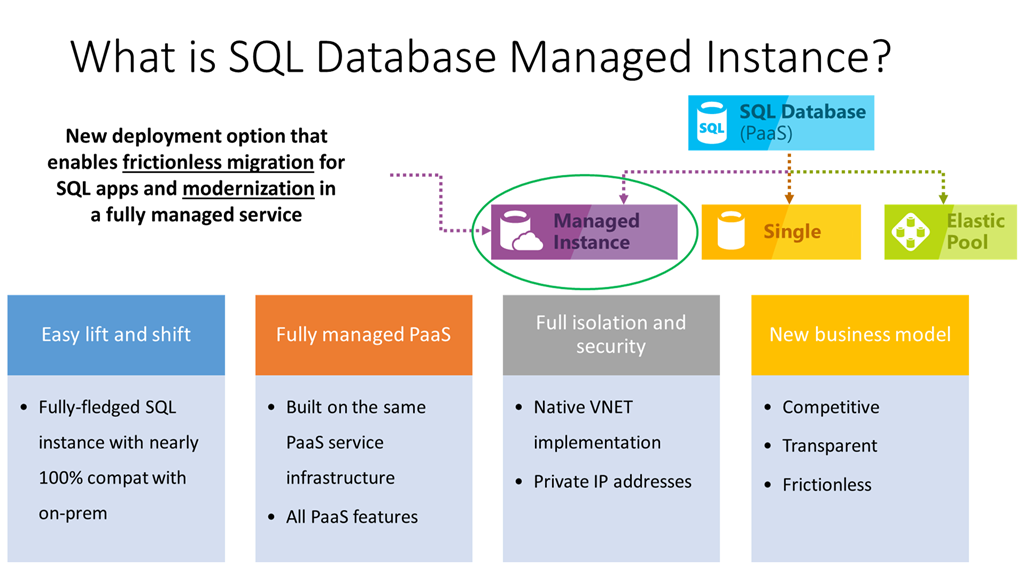
You can get these queries and the matching results spreadsheet from the links below:
I’ll be adding these to my monthly update blog post where I have all of the other diagnostic information queries. As always, please send me any feedback that you have about these. Thanks!
The post Diagnostic Information Queries for SQL Managed Instance appeared first on Glenn Berry.
]]>The post SQL Server Diagnostic Information Queries for July 2019 appeared first on Glenn Berry.
]]>I have a T-SQL script that you can use to check whether your instance of SQL Server has been patched to mitigate against the Spectre/Meltdown CPU vulnerability. This works for SQL Server 2008 through SQL Server 2017, for on-premises and cloud-based VM (IaaS) usage. You can get the query for this here.
I often make additional minor updates to the queries periodically during the month, so if you are in doubt, downloading the latest version is always a good idea.
Rather than having a separate blog post for each version, I have just put the links for all ten major versions in this single post. There are two separate links for each version. The first one on the top left is the actual diagnostic query script, and the one below on the right is the matching blank results spreadsheet, with labeled tabs that correspond to each query in the set.
Here are links to the latest versions of these queries for Azure SQL Database, SQL Server 2019, SQL Server 2017, SQL Server 2016 SP2, and SQL Server 2016:
Azure SQL Database Diagnostic Information Queries
SQL Server 2019 Diagnostic Information Queries
SQL Server 2017 Diagnostic Information Queries
SQL Server 2016 SP2 Diagnostic Information Queries
SQL Server 2016 Diagnostic Information Queries
Here are links to the most recent versions of these scripts for SQL Server 2014 and older:
Since SQL Server 2014 and older are out of Mainstream support from Microsoft (and because fewer of my customers are using these old versions of SQL Server), I am not going to be updating the scripts for these older versions of SQL Server every single month going forward. SQL Server 2008 R2 and older are also now out of extended support from Microsoft.
I started this policy a while ago, and so far, I have not heard any complaints.
SQL Server 2014 Diagnostic Information Queries
SQL Server 2012 Diagnostic Information Queries
SQL Server 2008 R2 Diagnostic Information Queries
SQL Server 2008 Diagnostic Information Queries
SQL Server 2005 Diagnostic Information Queries
The basic instructions for using these queries is that you should run each query in the set, one at a time (after reading the directions for that query). It is not really a good idea to simply run the entire batch in one shot, especially the first time you run these queries on a particular server, since some of these queries can take some time to run, depending on your workload and hardware. I also think it is very helpful to run each query, look at the results (and my comments on how to interpret the results) and think about the emerging picture of what is happening on your server as you go through the complete set. I have quite a few comments and links in the script on how to interpret the results after each query.
After running each query, you need to click on the top left square of the results grid in SQL Server Management Studio (SSMS) to select all of the results, and then right-click and select “Copy with Headers” to copy all of the results, including the column headers to the Windows clipboard. Then you paste the results into the matching tab in the blank results spreadsheet.
About half of the queries are instance specific and about half are database specific, so you will want to make sure you are connected to a database that you are concerned about instead of the master system database. Running the database-specific queries while being connected to the master database is a very common mistake that I see people making when they run these queries.
Note: These queries are stored on Dropbox. I occasionally get reports that the links to the queries and blank results spreadsheets do not work, which is most likely because Dropbox is blocked wherever people are trying to connect. I am not planning on moving these to Github any time soon.
I also occasionally get reports that some of the queries simply don’t work. This usually turns out to be an issue where people have some of their user databases in 80 compatibility mode, which breaks many DMV queries, or that someone is running an incorrect version of the script for their version of SQL Server.
It is very important that you are running the correct version of the script that matches the major version of SQL Server that you are running. There is an initial query in each script that tries to confirm that you are using the correct version of the script for your version of SQL Server. If you are not using the correct version of these queries for your version of SQL Server, some of the queries are not going to work correctly.
If you want to understand how to better run and interpret these queries, you should consider listening to my five related Pluralsight courses, which are SQL Server 2017: Diagnosing Performance Issues with DMVs, SQL Server 2017: Diagnosing Configuration Issues with DMVs, SQL Server 2014 DMV Diagnostic Queries – Part 1, SQL Server 2014 DMV Diagnostic Queries – Part 2, and SQL Server 2014 DMV Diagnostic Queries – Part 3. All five of these courses are pretty short and to the point, at 164, 106, 67, 77, and 68 minutes respectively. Listening to these five courses is really the best way to thank me for maintaining and improving these scripts…
Please let me know what you think of these queries, and whether you have any suggestions for improvements. Thanks!
The post SQL Server Diagnostic Information Queries for July 2019 appeared first on Glenn Berry.
]]>The post SQL Server Diagnostic Information Queries for June 2019 appeared first on Glenn Berry.
]]>I have a T-SQL script that you can use to check whether your instance of SQL Server has been patched to mitigate against the Spectre/Meltdown CPU vulnerability. This works for SQL Server 2008 through SQL Server 2017, for on-premises and cloud-based VM (IaaS) usage. You can get the query for this here.
I often make additional minor updates to the queries periodically during the month, so if you are in doubt, downloading the latest version is always a good idea.
Rather than having a separate blog post for each version, I have just put the links for all ten major versions in this single post. There are two separate links for each version. The first one on the top left is the actual diagnostic query script, and the one below on the right is the matching blank results spreadsheet, with labeled tabs that correspond to each query in the set.
Here are links to the latest versions of these queries for Azure SQL Database, SQL Server 2019, SQL Server 2017, SQL Server 2016 SP2, SQL Server 2016, and SQL Server 2014:
Azure SQL Database Diagnostic Information Queries
SQL Server 2019 Diagnostic Information Queries
SQL Server 2017 Diagnostic Information Queries
SQL Server 2016 SP2 Diagnostic Information Queries
SQL Server 2016 Diagnostic Information Queries
SQL Server 2014 Diagnostic Information Queries
Here are links to the most recent versions of these scripts for SQL Server 2012 and older:
Since SQL Server 2012 and older are out of Mainstream support from Microsoft (and because fewer of my customers are using these old versions of SQL Server), I am not going to be updating the scripts for these older versions of SQL Server every single month going forward. I started this policy a while ago, and so far, I have not heard any complaints.
SQL Server 2012 Diagnostic Information Queries
SQL Server 2008 R2 Diagnostic Information Queries
SQL Server 2008 Diagnostic Information Queries
SQL Server 2005 Diagnostic Information Queries
The basic instructions for using these queries is that you should run each query in the set, one at a time (after reading the directions for that query). It is not really a good idea to simply run the entire batch in one shot, especially the first time you run these queries on a particular server, since some of these queries can take some time to run, depending on your workload and hardware. I also think it is very helpful to run each query, look at the results (and my comments on how to interpret the results) and think about the emerging picture of what is happening on your server as you go through the complete set. I have quite a few comments and links in the script on how to interpret the results after each query.
After running each query, you need to click on the top left square of the results grid in SQL Server Management Studio (SSMS) to select all of the results, and then right-click and select “Copy with Headers” to copy all of the results, including the column headers to the Windows clipboard. Then you paste the results into the matching tab in the blank results spreadsheet.
About half of the queries are instance specific and about half are database specific, so you will want to make sure you are connected to a database that you are concerned about instead of the master system database. Running the database-specific queries while being connected to the master database is a very common mistake that I see people making when they run these queries.
Note: These queries are stored on Dropbox. I occasionally get reports that the links to the queries and blank results spreadsheets do not work, which is most likely because Dropbox is blocked wherever people are trying to connect. I am not planning on moving these to Github any time soon.
I also occasionally get reports that some of the queries simply don’t work. This usually turns out to be an issue where people have some of their user databases in 80 compatibility mode, which breaks many DMV queries, or that someone is running an incorrect version of the script for their version of SQL Server.
It is very important that you are running the correct version of the script that matches the major version of SQL Server that you are running. There is an initial query in each script that tries to confirm that you are using the correct version of the script for your version of SQL Server. If you are not using the correct version of these queries for your version of SQL Server, some of the queries are not going to work correctly.
If you want to understand how to better run and interpret these queries, you should consider listening to my five related Pluralsight courses, which are SQL Server 2017: Diagnosing Performance Issues with DMVs, SQL Server 2017: Diagnosing Configuration Issues with DMVs, SQL Server 2014 DMV Diagnostic Queries – Part 1, SQL Server 2014 DMV Diagnostic Queries – Part 2, and SQL Server 2014 DMV Diagnostic Queries – Part 3. All five of these courses are pretty short and to the point, at 164, 106, 67, 77, and 68 minutes respectively. Listening to these five courses is really the best way to thank me for maintaining and improving these scripts…
Please let me know what you think of these queries, and whether you have any suggestions for improvements. Thanks!
The post SQL Server Diagnostic Information Queries for June 2019 appeared first on Glenn Berry.
]]>The post SQL Server Diagnostic Information Queries for May 2019 appeared first on Glenn Berry.
]]>I have a T-SQL script that you can use to check whether your instance of SQL Server has been patched to mitigate against the Spectre/Meltdown CPU vulnerability. This works for SQL Server 2008 through SQL Server 2017, for on-premises and cloud-based VM (IaaS) usage. You can get the query for this here.
I often make additional minor updates to the queries periodically during the month, so if you are in doubt, downloading the latest version is always a good idea.
Rather than having a separate blog post for each version, I have just put the links for all ten major versions in this single post. There are two separate links for each version. The first one on the top left is the actual diagnostic query script, and the one below on the right is the matching blank results spreadsheet, with labeled tabs that correspond to each query in the set.
Here are links to the latest versions of these queries for Azure SQL Database, SQL Server 2019, SQL Server 2017, SQL Server 2016 SP2, SQL Server 2016, and SQL Server 2014:
Azure SQL Database Diagnostic Information Queries
SQL Server 2019 Diagnostic Information Queries
SQL Server 2017 Diagnostic Information Queries
SQL Server 2016 SP2 Diagnostic Information Queries
SQL Server 2016 Diagnostic Information Queries
SQL Server 2014 Diagnostic Information Queries
Here are links to the most recent versions of these scripts for SQL Server 2012 and older:
Since SQL Server 2012 and older are out of Mainstream support from Microsoft (and because fewer of my customers are using these old versions of SQL Server), I am not going to be updating the scripts for these older versions of SQL Server every single month going forward. I started this policy a while ago, and so far, I have not heard any complaints.
SQL Server 2012 Diagnostic Information Queries
SQL Server 2008 R2 Diagnostic Information Queries
SQL Server 2008 Diagnostic Information Queries
SQL Server 2005 Diagnostic Information Queries
The basic instructions for using these queries is that you should run each query in the set, one at a time (after reading the directions for that query). It is not really a good idea to simply run the entire batch in one shot, especially the first time you run these queries on a particular server, since some of these queries can take some time to run, depending on your workload and hardware. I also think it is very helpful to run each query, look at the results (and my comments on how to interpret the results) and think about the emerging picture of what is happening on your server as you go through the complete set. I have quite a few comments and links in the script on how to interpret the results after each query.
After running each query, you need to click on the top left square of the results grid in SQL Server Management Studio (SSMS) to select all of the results, and then right-click and select “Copy with Headers” to copy all of the results, including the column headers to the Windows clipboard. Then you paste the results into the matching tab in the blank results spreadsheet.
About half of the queries are instance specific and about half are database specific, so you will want to make sure you are connected to a database that you are concerned about instead of the master system database. Running the database-specific queries while being connected to the master database is a very common mistake that I see people making when they run these queries.
Note: These queries are stored on Dropbox. I occasionally get reports that the links to the queries and blank results spreadsheets do not work, which is most likely because Dropbox is blocked wherever people are trying to connect. I am not planning on moving these to Github any time soon.
I also occasionally get reports that some of the queries simply don’t work. This usually turns out to be an issue where people have some of their user databases in 80 compatibility mode, which breaks many DMV queries, or that someone is running an incorrect version of the script for their version of SQL Server.
It is very important that you are running the correct version of the script that matches the major version of SQL Server that you are running. There is an initial query in each script that tries to confirm that you are using the correct version of the script for your version of SQL Server. If you are not using the correct version of these queries for your version of SQL Server, some of the queries are not going to work correctly.
If you want to understand how to better run and interpret these queries, you should consider listening to my five related Pluralsight courses, which are SQL Server 2017: Diagnosing Performance Issues with DMVs, SQL Server 2017: Diagnosing Configuration Issues with DMVs, SQL Server 2014 DMV Diagnostic Queries – Part 1, SQL Server 2014 DMV Diagnostic Queries – Part 2, and SQL Server 2014 DMV Diagnostic Queries – Part 3. All five of these courses are pretty short and to the point, at 164, 106, 67, 77, and 68 minutes respectively. Listening to these five courses is really the best way to thank me for maintaining and improving these scripts…
Please let me know what you think of these queries, and whether you have any suggestions for improvements. Thanks!
The post SQL Server Diagnostic Information Queries for May 2019 appeared first on Glenn Berry.
]]>The post SQL Server Diagnostic Information Queries for April 2019 appeared first on Glenn Berry.
]]>I have a T-SQL script that you can use to check whether your instance of SQL Server has been patched to mitigate against the Spectre/Meltdown CPU vulnerability. This works for SQL Server 2008 through SQL Server 2017, for on-premises and cloud-based VM (IaaS) usage. You can get the query for this here.
I often make additional minor updates to the queries periodically during the month, so if you are in doubt, downloading the latest version is always a good idea.
Rather than having a separate blog post for each version, I have just put the links for all ten major versions in this single post. There are two separate links for each version. The first one on the top left is the actual diagnostic query script, and the one below on the right is the matching blank results spreadsheet, with labeled tabs that correspond to each query in the set.
Here are links to the latest versions of these queries for Azure SQL Database, SQL Server 2019, SQL Server 2017, SQL Server 2016 SP2, SQL Server 2016, and SQL Server 2014:
Azure SQL Database Diagnostic Information Queries
SQL Server 2019 Diagnostic Information Queries
SQL Server 2017 Diagnostic Information Queries
SQL Server 2016 SP2 Diagnostic Information Queries
SQL Server 2016 Diagnostic Information Queries
SQL Server 2014 Diagnostic Information Queries
Here are links to the most recent versions of these scripts for SQL Server 2012 and older:
Since SQL Server 2012 and older are out of Mainstream support from Microsoft (and because fewer of my customers are using these old versions of SQL Server), I am not going to be updating the scripts for these older versions of SQL Server every single month going forward. I started this policy a while ago, and so far, I have not heard any complaints.
SQL Server 2012 Diagnostic Information Queries
SQL Server 2008 R2 Diagnostic Information Queries
SQL Server 2008 Diagnostic Information Queries
SQL Server 2005 Diagnostic Information Queries
The basic instructions for using these queries is that you should run each query in the set, one at a time (after reading the directions for that query). It is not really a good idea to simply run the entire batch in one shot, especially the first time you run these queries on a particular server, since some of these queries can take some time to run, depending on your workload and hardware. I also think it is very helpful to run each query, look at the results (and my comments on how to interpret the results) and think about the emerging picture of what is happening on your server as you go through the complete set. I have quite a few comments and links in the script on how to interpret the results after each query.
After running each query, you need to click on the top left square of the results grid in SQL Server Management Studio (SSMS) to select all of the results, and then right-click and select “Copy with Headers” to copy all of the results, including the column headers to the Windows clipboard. Then you paste the results into the matching tab in the blank results spreadsheet.
About half of the queries are instance specific and about half are database specific, so you will want to make sure you are connected to a database that you are concerned about instead of the master system database. Running the database-specific queries while being connected to the master database is a very common mistake that I see people making when they run these queries.
Note: These queries are stored on Dropbox. I occasionally get reports that the links to the queries and blank results spreadsheets do not work, which is most likely because Dropbox is blocked wherever people are trying to connect. I am not planning on moving these to Github any time soon.
I also occasionally get reports that some of the queries simply don’t work. This usually turns out to be an issue where people have some of their user databases in 80 compatibility mode, which breaks many DMV queries, or that someone is running an incorrect version of the script for their version of SQL Server.
It is very important that you are running the correct version of the script that matches the major version of SQL Server that you are running. There is an initial query in each script that tries to confirm that you are using the correct version of the script for your version of SQL Server. If you are not using the correct version of these queries for your version of SQL Server, some of the queries are not going to work correctly.
If you want to understand how to better run and interpret these queries, you should consider listening to my five related Pluralsight courses, which are SQL Server 2017: Diagnosing Performance Issues with DMVs, SQL Server 2017: Diagnosing Configuration Issues with DMVs, SQL Server 2014 DMV Diagnostic Queries – Part 1, SQL Server 2014 DMV Diagnostic Queries – Part 2, and SQL Server 2014 DMV Diagnostic Queries – Part 3. All five of these courses are pretty short and to the point, at 164, 106, 67, 77, and 68 minutes respectively. Listening to these five courses is really the best way to thank me for maintaining and improving these scripts…
Please let me know what you think of these queries, and whether you have any suggestions for improvements. Thanks!
The post SQL Server Diagnostic Information Queries for April 2019 appeared first on Glenn Berry.
]]>