The post Microsoft Offering SQL Server 2012 Service Pack 1 on Microsoft Update appeared first on Glenn Berry.
]]>
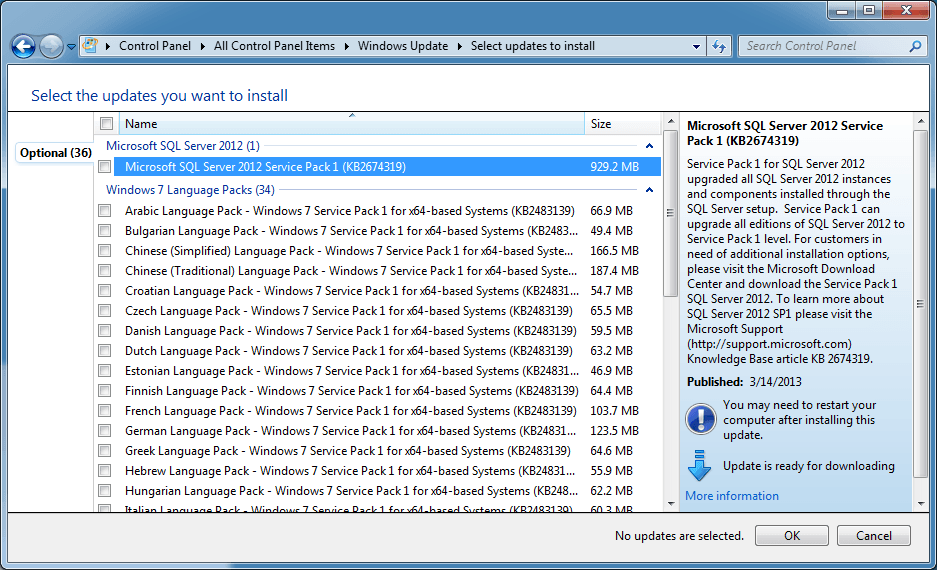
Figure 1: SQL Server 2012 Service Pack 1 on Microsoft Update
Personally, I like the fact that more people will be reminded about SQL Server 2012 Service Pack 1 (as long as they are running Microsoft Update), but I still think it is better to manually download and install SQL Server 2012 Service Pack 1 yourself, rather than pulling it down from Microsoft Update. I think that database professionals should maintain their SQL Server instances explicitly, by design.
If you are going to move to the SQL Server 2012 Service Pack 1 branch, I think you should make sure to also install SQL Server 2012 Service Pack 1 Cumulative Update 3 while you are at it. Microsoft has been very busy fixing many important issues (and actually adding some new functionality) with the early CUs for SQL Server 2012.
The post Microsoft Offering SQL Server 2012 Service Pack 1 on Microsoft Update appeared first on Glenn Berry.
]]>The post Microsoft Update offering SQL Server 2012 SP1 Cumulative Update 2 appeared first on Glenn Berry.
]]>
Figure 1: Update Rollup for SQL Server 2012 Service Pack 1 (KB2790947) in Microsoft Update
Microsoft Update is an optional component that you have to install on your server or client machine. Once you do that, you will get notifications about certain updates for products like Microsoft Office, Visual Studio, and SQL Server to name a few products that are covered.
When I first saw this optional update, I initially thought it was some sort of special, out-of-band QFE fix for SQL Server 2012 Service Pack 1. Then I decided to Bing the KB2790947 article that was referenced (since I don’t memorize KB article numbers like Kimberly L. Tripp does), and I discovered that it was simply SQL Server 2012 Service Pack 1 Cumulative Update 2, which was released on January 21, 2013. This is interesting (at least to me), since Microsoft has always made people jump through some hoops to get a Cumulative Update for SQL Server.
Normally, you have to first discover that a new CU has been released, then you have to find the KB article for it, and then “request the hotfix download”, after which you will get a link e-mailed to you that lets you download a self-extracting executable with the CU setup program. This whole process is somewhat obscure and complicated, and many people seem to have problems understanding how it works.
Even though I am a big proponent of staying current with SQL Server Cumulative Updates (which makes me a target for some criticism), I don’t know if I like CUs being offered as Optional Updates in Microsoft Update. I think you should have a good test and deployment plan in place for whenever you install a SQL Server Service Pack or Cumulative Update on a production SQL Server instance. The complexity of your testing and deployment plan will vary based on your resources and organization, but any testing and any specific deployment plan is much better than having someone just “accidentally” deploy a SQL Server Cumulative Update when they decide to install all of their pending Microsoft Updates.
I would much rather install a Service Pack or Cumulative Update “on purpose” during a maintenance window after the organization had gone through the testing and deployment planning process. I am curious about whether this is actually going to be a change in how SQL Server is serviced going forward, or whether this was a one time occurrence?
What do you think about this?
Update: I have heard from a contact at Microsoft about this subject. Here is what they had to say:
“This was a special case. This was to address the issue described in KB2793634. The WU will offer either CU2 (if the SP1 instance has taken a hotfix or CU to date) or an individual hotfix if not. The latter of course is to not force customers on the CU servicing train just to obtain the update.”
So, my interpretation is that nothing has really changed as far as Microsoft’s servicing policy goes, since this was just a special case to fix the issue described in KB2793634 with either SP1 CU2 or just an individual hotfix, depending on the previous patch level of your machine.
The post Microsoft Update offering SQL Server 2012 SP1 Cumulative Update 2 appeared first on Glenn Berry.
]]>The post Windows Update vs. Microsoft Update appeared first on Glenn Berry.
]]>In Figure 1, you can see where it says “You receive updates: For Windows and other products from Microsoft Update”. This means that I have installed Microsoft Update on this machine, so it will look for updates for more Microsoft products besides just the operating system itself and Internet Explorer. If you are running any of these other common Microsoft applications on your machine, I think you should also be running Microsoft Update instead of just Windows Update.

Figure 1: Windows and Microsoft Update Applet in Control Panel
Depending on what type of machine you are dealing with, you will want to use different settings for Windows/Microsoft Update. If you are dealing with mission critical, production servers, you will want your servers to be using a Windows Server Update Services (WSUS) server to get your updates instead of pulling them down directly from Microsoft over the internet. In an ideal world, your organization would have a dedicated team that would review each update that is released by Microsoft on Patch Tuesday, install it on some test machines, and then run a full suite of automated regression tests after each update, before approving individual updates to become available on the WSUS server for internal distribution. In real life, I don’t see this level of effort and attention very often.
What seems to happen quite often in real life is that people simply disable Windows Update on their servers and never install Microsoft Update. They also don’t do any manual updates on their servers. After the initial build and provisioning of the server, they never install any updates whatsoever, whether it is BIOS updates, firmware updates, driver updates, OS updates, or application updates. Personally, I think this is a mistake, actually being what I would call “server neglect”. Of course there is some risk whenever you make any modifications of any sort to a production server, but using a combination of good judgment, planning, and testing can reduce your risks significantly.
If you are using Windows or Microsoft Update, on a production server, you should change how Windows installs important updates to “Checks for updates but let me choose whether to download and install them” (as you see in Figure 2) rather than the Microsoft recommended setting of “Install updates automatically (recommended)”. This will avoid having unplanned server restarts at roughly 3:15AM on the Wednesday morning following Microsoft Patch Tuesday each month, as important updates are installed starting at 3:00AM. With this setting, you will know when new updates are available, and you can start your planning and testing process.
On the average desktop machine, you should go ahead and use the install updates automatically setting (otherwise you will probably forget, and be more vulnerable to Zero Day attacks).

Figure 2: Windows and Microsoft Update Settings
You should also make sure that the “Give me updates for Microsoft products and check for new optional Microsoft software when I update Windows” checkbox under Microsoft Update is checked.
The post Windows Update vs. Microsoft Update appeared first on Glenn Berry.
]]>