The post Building an Intel Haswell Desktop System for SQL Server 2012 Development appeared first on Glenn Berry.
]]>That means you will have to get a new motherboard to use a Haswell processor. You should get a Z87 chipset motherboard so that you can get a nice feature set with the motherboard. You want to make sure you get a motherboard that has four memory slots, instead of two, so you can have 32GB of RAM. You also want to pay attention to how many total SATA III ports you are getting. The Z87 chipset natively supports six SATA III ports (with hardware RAID support), and many motherboards will have an extra Marvell controller that can support either two or four more SATA III ports (with hardware RAID support). Having SATA III support is vital for modern SATA III solid state drives.
This system will have an Intel Core i7-4770K quad-core processor (plus hyper-threading), and 16GB of RAM (which can be expanded to 32GB of RAM for about $129.00 more). You could also back down to an Intel Core i5-4670K processor, which is a quad-core without hyper-threading. The Core i5 has a slightly lower base and Turbo clock speed and a smaller 6MB L3 cache compared to the Core i7, but it is $80.00 less at Micro Center. Both of these processors have Intel HD Graphics 4600 integrated graphics, which save you the cost and extra power usage of getting a discrete video card. You would probably have to spend about $100.00 to get a discrete video card that has better performance than the Intel HD Graphics 4600 integrated graphics, and I just don’t think you will need to do that for normal desktop usage.
This system will have better CPU and memory performance than many older production database servers (although you are limited to 32GB of RAM). Depending on what you want to do with this system, you may need or want to add additional SATA III SSDs or conventional hard drives. If you skip the optical drive, you can add seven more drives to this system before you run out of drive bays and SATA III ports. With enough fast SSDs, you may have better I/O performance (under a light load) than many production database servers. On the other hand, you won’t have redundant components (such as dual power supplies) like you would have with a rack-mounted database server. You will also have SATA consumer-level SSDs that cannot handle a heavy server workload with consistent performance as well as expensive enterprise-level SAS SSDs.
Below, I have links to the manufacturer information about each component, along with links to the components at Micro Center and NewEgg.
Motherboard Gigabyte GA-Z87X-UD4H Micro Center NewEgg
This Gigabyte motherboard has a total of eight SATA III slots between two separate controllers, with hardware RAID support (with no cache memory). In my experience, Gigabyte motherboards typically let you install server operating systems (including Windows Server 2008 R2 or Windows Server 2012) without any driver issues. Another alternative would be Windows 8 Professional, with Hyper-V, so you can run Windows Server 2012 in VMs. Micro Center is currently selling these for an insanely low sale price of $114.99, plus you get $40.00 more off the motherboard when you buy it with an eligible processor. Update: This motherboard actually uses an Intel NIC, that Intel (in their infinite wisdom) does not allow you to install the NIC drivers on a server operating system, such as Windows Server 2012.
Processor Intel Core i7-4770K Micro Center NewEgg
This is the “top of the line” Haswell desktop processor, with an unlocked multiplier. It is also the main Core i7 processor that Micro Center carries and is eligible for their $40.00 motherboard/processor bundle discount. It does support VT-x with Extended Page Tables for hardware virtualization support, but it does not support VT-d for directed IO with virtualization. If you are really concerned about VT-d, you can always get an Intel Core i7-3770 (that does have VT-d) from NewEgg or Micro Center. It will cost $309.99 at New Egg or $249.99 at Micro Center, and you would not get the motherboard bundle discount from Micro Center. I would say that with a decent number of good SSDs, you are much less likely to have any I/O bottlenecks with virtualization.
Power Supply Corsair CX500M Micro Center NewEgg
This is a high-quality, modular power supply that can easily support a system like this. It has an 80 Plus Bronze efficiency rating, which is pretty good. A lower wattage power supply is more efficient at lower output levels than a higher wattage power supply, so a power supply like this will save you money over time and be less expensive to buy.
Case Fractal Design Define R4 Micro Center NewEgg
These Fractal Design cases get universally excellent reviews, and they are very easy to work on when you are building the system, with excellent cable management features. They are also very quiet, with sound deadening foam inside. This case has eight 2.5”/3.5” drive bays and two USB 3.0 ports on the top front of the case. It does not have any silly gaming features.
Memory Crucial Ballistix Sport 16GB DDR3-1600 Micro Center NewEgg
This is pretty decent memory that is eligible for the $10.00 bundle discount from Micro Center when you buy it with a motherboard. NewEgg’s price is actually a little cheaper on this one item. You could also spend more money on higher speed memory, which you may or may notice that much benefit from in real life.
System Drive 256GB Samsung 840 Pro SSD Micro Center NewEgg
These are one of the top consumer SSDs available right now, with lots of good reviews. I have bought a number of these and they are very fast. They are also eligible for a $20.00 bundle discount from Micro Center when you buy them with a motherboard or processor.
Optical Drive 24X LG DVDRW OEM Micro Center NewEgg
I still like to have an optical drive, even though I rarely use it. If you have an external USB optical drive, you can use that to install the OS, or you could use a thumb drive.
As you can see below, if you are lucky enough to live near a Micro Center, you can save a significant amount of money by getting all of these components from Micro Center instead of NewEgg. You will have to pay sales tax at Micro Center, while you probably won’t at NewEgg. Most of the components (except the case) have free shipping from NewEgg.
| Item | Model | Micro Center Price | NewEgg Price |
| Motherboard | Gigabyte GA-Z87X-UD4H | 114.99 – 40.00 Bundle | 189.99 w/FS |
| Processor | Intel Core i7-4770K | 279.99 | 339.99 w/FS |
| Power Supply | Corsair CX500M | 59.99 – 10.00 MIR | 69.99 – 10.00 MIR |
| Case | Fractal Design Define R4 | 89.99 | 99.99 + 9.99 Ship |
| Memory | Crucial Ballistix Sport | 129.99 – 10.00 Bundle | 115.99 w/FS |
| System Drive | 256GB Samsung 840 Pro | 239.99 – 20.00 Bundle | 239.99 w/FS |
| Optical Drive | 24X LG DVDRW OEM | 15.99 | 17.99 w/FS |
| Total | 850.93 | 1073.92 |
I’ll also have a post up in the near future that talks about how to build an Intel Sandy Bridge-E or Intel Ivy Bridge-E system, that can have six-cores (plus hyper-threading) and 64GB of RAM. One of those systems will be considerably more expensive, due to a more expensive motherboard, more expensive processor, and more RAM.
The post Building an Intel Haswell Desktop System for SQL Server 2012 Development appeared first on Glenn Berry.
]]>The post First Intel Haswell Desktop Build appeared first on Glenn Berry.
]]>Since most of her computer time is spent on Facebook and Gmail, I figured that a Haswell Core i5 processor would be more than sufficient. I also wanted the system to use the the least amount of electricity possible and to be as quiet as possible (without going to any extreme measures). Here are the exact components that I selected:
LG 24X SATA DVD-RW (OEM) $15.99
Samsung 256GB 840 Pro SSD $229.99
Crucial 16GB (2×8) DDR3 1600MHz RAM $79.99
Corsair 430W CX-430M modular power supply $59.99
Gigabyte GA-Z87-D3HP LGA 1150 motherboard $119.99
Intel Core i5-4670K boxed processor $199.99
Fractal Design Define R4 case $109.99
The Fractal Design Define R4 case is very easy to work with, with lots of room and openings to route the cables in a separate compartment under the motherboard. It also has sound deadening material lining the inside of the case. It also has eight 3.5/2.5 internal drive bays with drive carriers that easily accommodate 2.5” SSDs, with screw holes in the right positions.
The Gigabyte GA-Z87-D3HP motherboard is a mid-range Z87 motherboard that has six SATA III ports and four memory slots, along with lots of USB 3.0 ports. I did not see any reason to get a high-end gaming-oriented motherboard. I did enable Extreme Memory Profile (XMP) in the BIOS for a mild overclock.
The 22nm, 3.4GHz Intel Core i5-4670K is the top-of-the-line, unlocked Core i5 desktop processor that has the improved HD4600 integrated graphics, which are more than capable of handling normal desktop and non-extreme gaming usage. Using the integrated graphics would save money and electrical usage compared to discrete graphics. I decided to just use the included, stock air cooler for now. Since it is a K-series, unlocked processor, it does not have VT-d virtualization support for directed I/O, but that was not a factor for this system. You can see the CPU tab from CPU-Z in Figure 1.
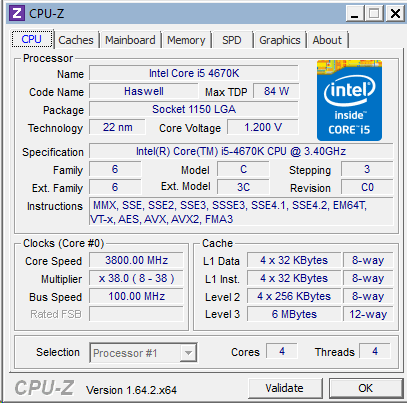
Figure 1: CPU tab of CPU-Z for Intel Core i5-4670K
I would have like to have gotten a Seasonic modular, fan-less power supply, but Micro Center no longer carries them. I ended up with a pretty nice 430 watt, Corsair 430M modular power supply that is 80PLUS Bronze rated. The reason for getting a low wattage power supply is that power supplies are less efficient when they are only putting out a small fraction of their rated output, so if you know that you are building a system that will only use a small amount of electricity, you are better off to get a good quality, low wattage power supply rather than a 750-1000 watt power supply. Don’t make the mistake of getting a $19.99. no-name 400 watt power supply though.
The 256GB Samsung 840 Pro SSD is still one of the best desktop SSDs available right now, and there was an $20.00 discount if I bought it along with a processor or motherboard. It is actually available for $10.00 less on Amazon right now, but I did not want to wait… You should make sure to download the Samsung Magician software, so you can easily download and install the latest firmware and optimize your OS for an SSD. This is more important with Windows 7 than for Windows 8. Figure 2 shows the CrystalDiskMark results for the Samsung 840 Pro SSD.
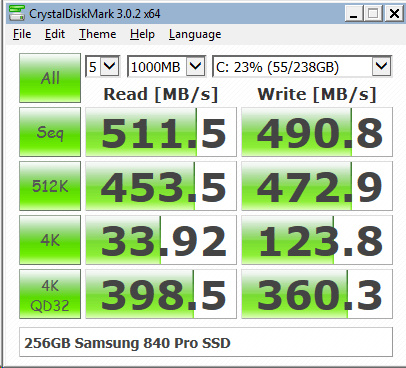
Figure 2: CrystalDiskMark Results for 256GB Samsung 840 Pro SSD
As you can see in Figure 3, this relatively modest system has a Windows Experience Index (WEI) score of 6.7, with the lowest scores being for the integrated graphics. A 6.7 score is not bad at all, and the other scores are 7.7-7.9. Not too bad for a system that cost slightly over $800.00 and only draws 25 watts at idle.
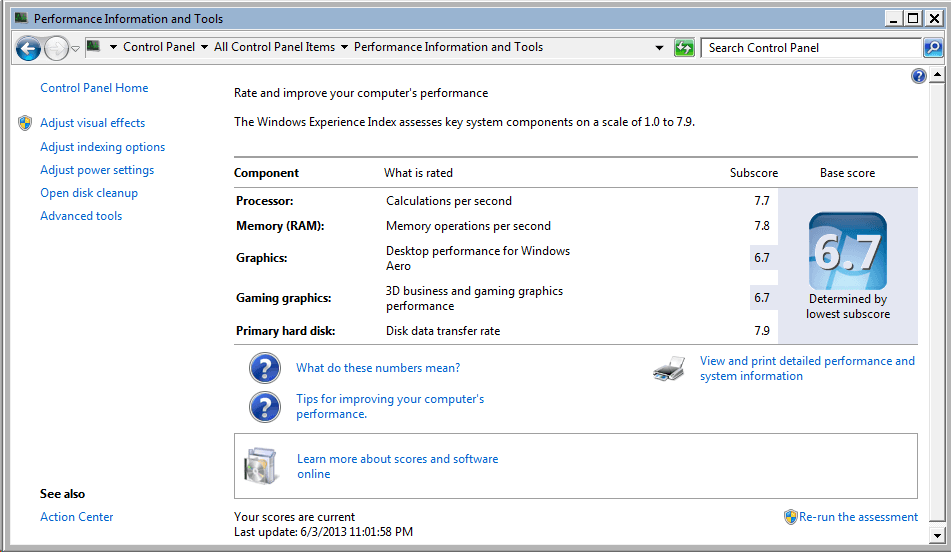
Figure 3: WEI Results for Core i5-4670K System
As you can see in Figure 4, this system has a 32-bit Geekbench score of 10090, which is quite good for a Core i5 system.
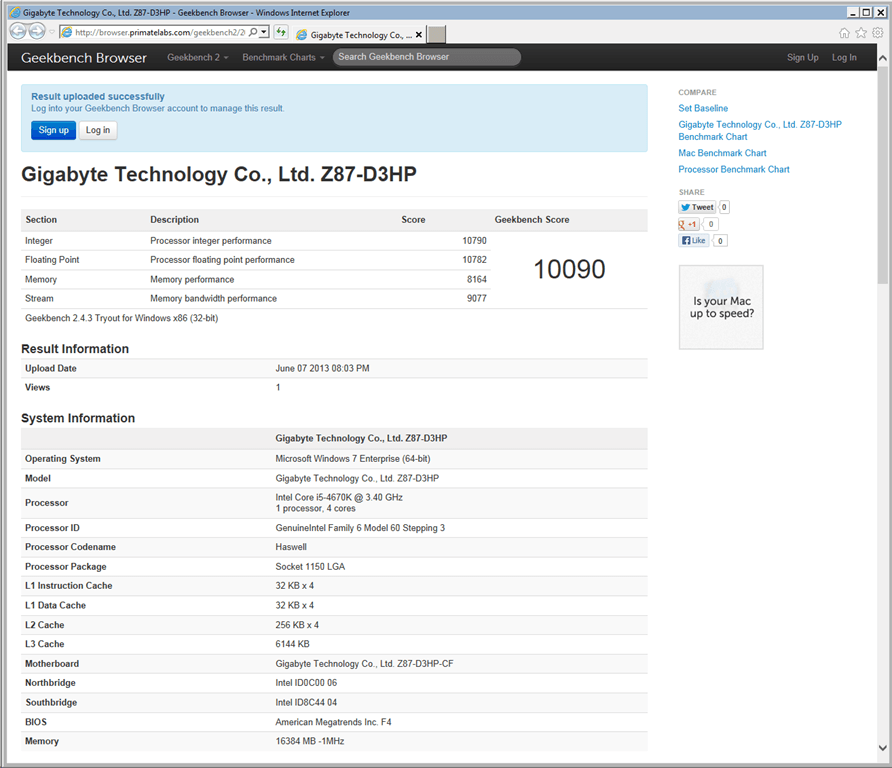
Figure 4: Geekbench 2.4.3 Results
The post First Intel Haswell Desktop Build appeared first on Glenn Berry.
]]>