The post New CPU Microcode Updates for Intel Processors appeared first on Glenn Berry.
]]>A number of system vendors and motherboard manufacturers have special sites where you can more easily locate the latest BIOS update for your system. You should make a point of periodically checking to see if any BIOS updates are available for your systems. Here is a list of some of the more popular vendors:
Dell (Server)
I have written quite a bit about Spectre and Meltdown, including my latest article for SQLPerformance.com here.
The post New CPU Microcode Updates for Intel Processors appeared first on Glenn Berry.
]]>The post Checking Your SQL Server Instance for Spectre/Meltdown Patches appeared first on Glenn Berry.
]]>SQL Server Guidance to protect against speculative execution side-channel vulnerabilities (SQL Server)
Windows Server guidance to protect against speculative execution side-channel vulnerabilities (Windows Server)
Windows Client Guidance for IT Pros to protect against speculative execution side-channel vulnerabilities (Windows Client)
The basic guidance is that depending on the environment where you are running SQL Server (on-premises or not, virtualized or not, in a cloud IaaS VM or not) and whether you are using any open extensibility interfaces or not (things like some types of CLR assemblies, some types of linked servers, etc.), you are going to want to strongly consider patching several layers of your system. These may include:
- Operating System patches
- Registry changes
- SQL Server patches
- BIOS/UEFI updates
- Possible changes in how/whether you use any open extensibility interfaces in SQL Server
The Microsoft guidance about SQL Server gives some pretty clear scenarios and guidelines for making the decision on what to patch or change.
Checking Your Operating System and Hardware
Once you have decided what to patch, the next issue is checking your patch and update status at all of these different layers of the system. Microsoft has a PowerShell script that lets you check the patch status of your operating system and your processor microcode (for Intel processors).
This Microsoft KB article explains this in more detail and has a link to download the PowerShell Module for operating systems prior to Windows Server 2016.
If you want to do a quick and easy check of a client operating system for an end-user (or your Mom) without having to deal with PoSH, you can download and run the InSpectre utility (with an easy GUI) to check the patch status of your operating system and your processor microcode.
Checking SQL Server
Finally, you need to check your SQL Server patch status. I have developed (and had a number of people help test) a T-SQL script that will check your SQL Server instance to see whether you have installed the relevant SQL Server patches or not. This script will work on SQL Server 2008 through SQL Server 2017 for on-premises instances or for Azure IaaS instances. This is not designed to work on Azure SQL Database. You can download it here.
Please let me know if you have any suggestions about this. I also want to thank the people who have tested this script and given me feedback!
The post Checking Your SQL Server Instance for Spectre/Meltdown Patches appeared first on Glenn Berry.
]]>The post Performance Effects of Meltdown and Partial Spectre Fixes on Intel Core i7-7500U Laptop appeared first on Glenn Berry.
]]>Last night, I installed the Windows 10 January 2018 Security Update (KB4056892) on this system, and then used PowerShell to check my status, with the results as shown in Figure 1. These are the relevant results:
Speculation control settings for CVE-2017-5715 [branch target injection] (This is Spectre variant 2)
Hardware support for branch target injection mitigation is present: False
Windows OS support for branch target injection mitigation is present: True
Windows OS support for branch target injection mitigation is enabled: False
Windows OS support for branch target injection mitigation is disabled by system policy: False
Windows OS support for branch target injection mitigation is disabled by absence of hardware support: True
Speculation control settings for CVE-2017-5754 [rogue data cache load] (This is Meltdown)
Hardware requires kernel VA shadowing: True
Windows OS support for kernel VA shadow is present: True
Windows OS support for kernel VA shadow is enabled: True
Windows OS support for PCID performance optimization is enabled: True [not required for security]
Suggested actions
* Install BIOS/firmware update provided by your device OEM that enables hardware support for the branch target injection mitigation mitigation
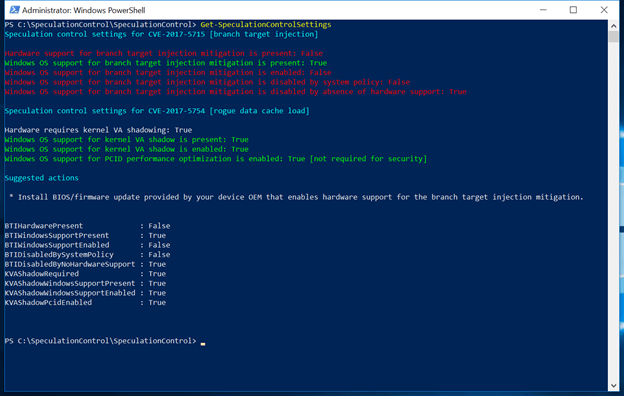
Figure 1: After Windows 10 Security Update, but before BIOS Update
After I had installed the Windows 10 January 2018 Security Update (KB4056892) on this system, I ran both the CPU-Z 1.82.1 CPU benchmark and the CrystalDiskMark 6.0.0 synthetic disk benchmark three times, to get a performance baseline before I installed the new BIOS (that has the microcode update to enable the Spectre variant 2 fixes). Some results from these test runs are shown in Figures 3 and 5 below.
Following Microsoft’s guidance, I located and installed the latest BIOS for my HP Spectre x360 laptop, which is version F.42. Then, I again used PowerShell to check my status, with the results as shown in Figure 2. These are the relevant results:
Speculation control settings for CVE-2017-5715 [branch target injection] (This is Spectre variant 2)
Hardware support for branch target injection mitigation is present: True
Windows OS support for branch target injection mitigation is present: True
Windows OS support for branch target injection mitigation is enabled: True
Speculation control settings for CVE-2017-5754 [rogue data cache load] (This is Meltdown)
Hardware requires kernel VA shadowing: True
Windows OS support for kernel VA shadow is present: True
Windows OS support for kernel VA shadow is enabled: True
Windows OS support for PCID performance optimization is enabled: True [not required for security]
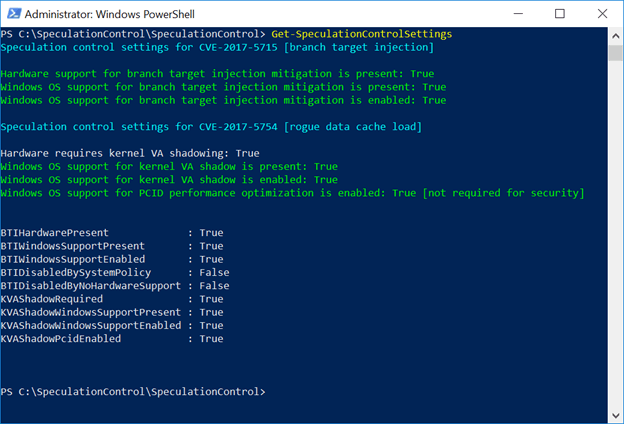
Figure 2: After Windows 10 Security Update and BIOS Update
Figure 3 shows one of the CPU-Z 1.82.1 benchmark run results before the BIOS update, showing a CPU Single Thread score of 373.9, and a CPU Multi Thread score of 1000.2.
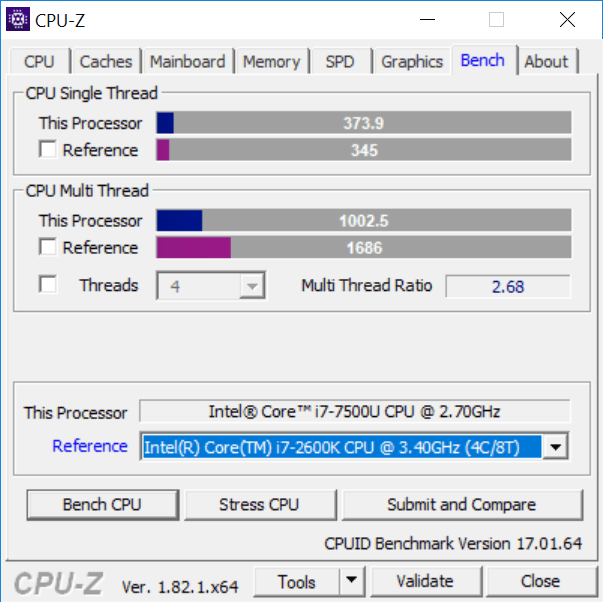
Figure 3: After Windows 10 Security Update, but before BIOS Update
Figure 4 shows one of the CPU-Z 1.82.1 benchmark run results after the BIOS update, showing a CPU Single Thread score of 317.5, and a CPU Multi Thread score of 971.8. That is about a 15.1% reduction in single-threaded CPU performance and a 2.8% reduction in multi-threaded CPU performance, at least on this quick synthetic CPU benchmark.
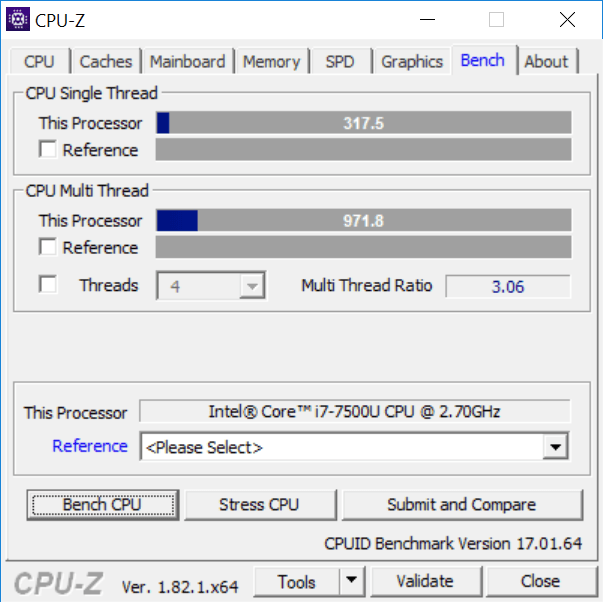
Figure 4: After Windows 10 Security Update and BIOS Update
Figure 5 shows one of the CrystalDiskMark 6.0.0 benchmark run results before the BIOS update.
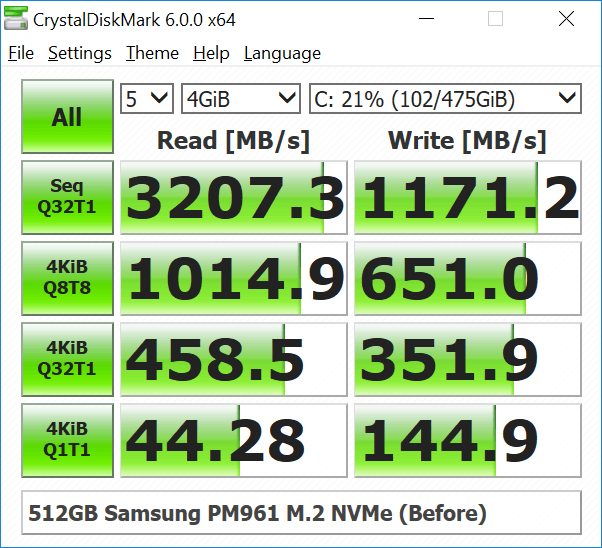
Figure 5: After Windows 10 Security Update, but before BIOS Update
Figure 6 shows one of the CrystalDiskMark 6.0.0 benchmark run results after the BIOS update.
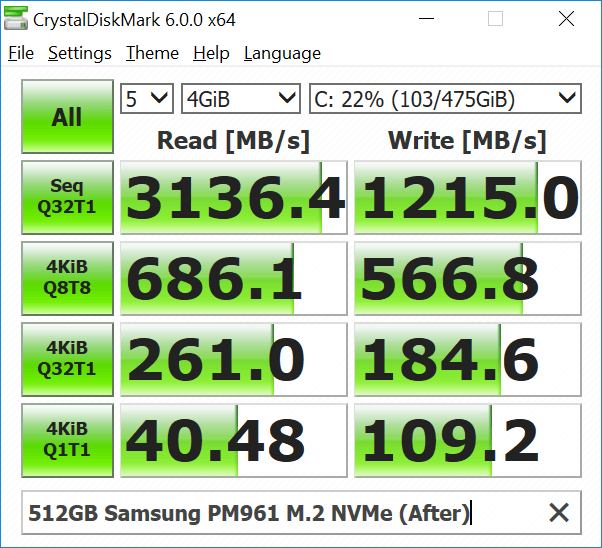
Figure 6: After Windows 10 Security Update and BIOS Update
What these limited synthetic benchmark test results show is that installing the CPU microcode updates (which are a required part of the Spectre variant 2 fix) seems to have a pretty significant effect on single-threaded CPU performance in the CPU-Z benchmark. We also see a very significant effect on random I/O performance in CrystalDiskMark 6.0.0 using the default test settings with a 4GB test file.
Microsoft’s Terry Myerson has a pretty detailed post on this subject
Understanding the performance impact of Spectre and Meltdown mitigations on Windows Systems
Intel has published some client benchmark results for 6th, 7th, and 8th Generation Core processors, as shown here:
Intel Security Issue Update: Initial Performance Data Results for Client Systems
The post Performance Effects of Meltdown and Partial Spectre Fixes on Intel Core i7-7500U Laptop appeared first on Glenn Berry.
]]>The post Checking Your Meltdown and Spectre Mitigation Status in Windows appeared first on Glenn Berry.
]]>Spectre
CVE-2017-5753 (Bounds Check Bypass)
CVE-2017-5715 (Branch Target Injection)
Meltdown
CVE-2017-5754 (Rogue Data Cache Load)
Checking Your Meltdown and Spectre Mitigation Status in Windows
Microsoft has released a PowerShell module that you can easily use to check whether you have the operating system patch that helps mitigate CVE-2017-5715 (Spectre – Branch Target Injection) installed and enabled, along with a BIOS/CPU microcode update that is also required as part of the mitigation.
The script also shows whether you have the operating system patch to mitigate CVE-2017-5754 (Meltdown – Rogue Data Cache Load) installed and enabled, along with whether you have OS support for the PCID performance optimization, which relies on hardware support in your processor for the process-context identifiers (PCID) feature to reduce the performance impact of the CVE-2017-5754 patch.
This Microsoft KB article explains this in more detail and has a link to download the PowerShell Module for operating systems prior to Windows Server 2016.
I have a Dell Precision 5520 laptop with an Intel Xeon E3-1505M v6 processor, running Windows 10 Professional Version 1709 (OS Build 16299.192) with the January 2018 Security Update (KB4056892) installed. I have also installed BIOS version 1.7.0 for the Dell Precision 5520, which has the firmware update to help mitigate CVE-2017-5715.
Figure 1 shows the results I get after installing both of these updates.
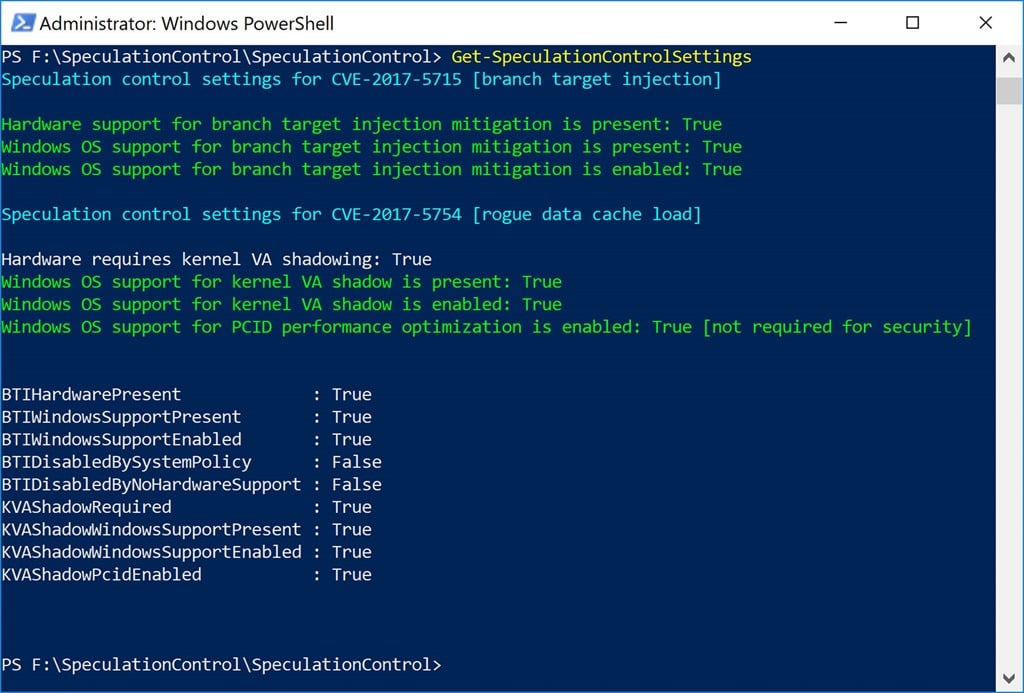
Figure 1: Get-SpeculationControlSettings Results on Fully Patched Dell Precision 5520
I also have a ASRock Fatal1ty X399 Professional Gaming desktop system with an AMD Ryzen Threadripper 1950X processor, running Windows 10 Professional Version 1709 (OS Build 16299.192) with the January 2018 Security Update (KB4056892) installed. I have the latest BIOS version 2.00 for the ASRock Fatal1ty X399 Professional Gaming (which does not include the CVE-2017-5715 firmware fix). ASRock has not released an updated BIOS for this issue yet.
Figure 2 shows the results after installing the Windows 10 January 2018 Security Update. It is also notable that the Get-SpeculationControlSettings module does not think that this modern AMD processor needs kernel VA shadowing (meaning that it is not vulnerable to CVE-2017-5754).
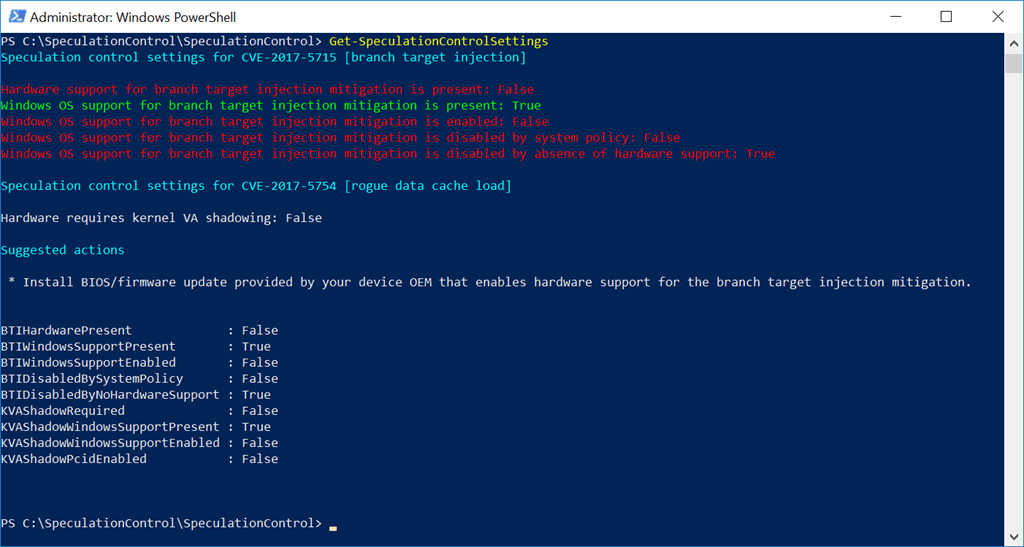
Figure 2: Get-SpeculationControlSettings Results on Partially Patched ASRock Fatal1ty X399 Professional Gaming
This Microsoft KB article explains in great detail how to interpret the results of Get-SpeculationControlSettings
Understanding Get-SpeculationControlSettings PowerShell script output
The post Checking Your Meltdown and Spectre Mitigation Status in Windows appeared first on Glenn Berry.
]]>The post Microsoft SQL Server Updates for Meltdown and Spectre Exploits appeared first on Glenn Berry.
]]>Security researchers at Graz University (who were involved with the initial discovery of these issues) have put up a site, complete with cute logos, with some useful information about these two exploits. The most detailed information so far about the attack methods comes from Google Project Zero, as shown here: Reading privileged memory with a side-channel. Their testing shows some limited vulnerability for some older AMD processors.
AMD is pretty adamant that their processors are not vulnerable to these exploits, as shown by this statement from AMD’s Tom Lendacky:
“AMD processors are not subject to the types of attacks that the kernel
page table isolation feature protects against. The AMD microarchitecture
does not allow memory references, including speculative references, that
access higher privileged data when running in a lesser privileged mode
when that access would result in a page fault.
Disable page table isolation by default on AMD processors by not setting
the X86_BUG_CPU_INSECURE feature, which controls whether X86_FEATURE_PTI
is set.”
Linus Torvalds also seems pretty confident that AMD is not affected, as witnessed by his comments in a recent code check-in:
“Exclude AMD from the PTI enforcement. Not necessarily a fix, but if AMD is so confident that they are not affected, then we should not burden users with the overhead”
Paul Alcorn has a pretty good write-up about this issue here. Yesterday, Phoronix published some early benchmark results against a patched version of Linux that were pretty alarming for some use cases (synthetic IO benchmarks and PostgreSQL database performance).
Redhat has published some information about the performance impact of OS fixes on several different workload types. The most notable is what they define as
“Measureable: 8-19% – Highly cached random memory, with buffered I/O, OLTP database workloads, and benchmarks with high kernel-to-user space transitions are impacted between 8-19%. Examples include OLTP Workloads (tpc), sysbench, pgbench, netperf (< 256 byte), and fio (random I/O to NvME)”
More details about these findings and some mitigation methods for RHEL are available in these links:
It seems like the various fixes for these issues are going to hit database and virtualization performance harder than most other use cases. I wonder whether it will be possible for Intel to at least partially fix the issue with a stepping change on any Intel processors that are still in production (i.e. they make an actual hardware fix using the same existing processor design) that lets them send out replacement processors that work in some existing servers.
If you are old enough to remember the old Pentium FDIV bug in 1994, Intel initially tried to minimize the issue, saying that it was very rare. Then, they tried to make people prove that they were hitting the bug by running an Intel utility. Finally, they caved in to bad PR and ended up sending out replacement CPUs to a lot of people, no questions asked, which cost them $475 million back in the day. I remember swapping out my CPU, because I was a geek back then too!
Early this morning, Microsoft published this KB article: SQL Server Guidance to protect against speculative execution side-channel vulnerabilities. According to Microsoft, the following versions of SQL Server are impacted when running on x86 and x64 processor systems: SQL Server 2008, SQL Server 2008R2, SQL Server 2012, SQL Server 2014, SQL Server 2016, SQL Server 2017.
Microsoft has already issued two Cumulative Updates that include fixes to help mitigate this issue (along with the other important hotfixes included in each CU).
I suspect that there will be an out of band CU or hotfix for SQL Server 2014 SP2 relatively soon, since it is still in Mainstream support. Even though SQL Server 2012 and older are out of Mainstream support, Microsoft will probably develop and release hotfixes for those releases relatively soon since this is a security issue.
Microsoft has also started pushing out an out of band OS update for Windows 10 (KB4056892) that is meant to mitigate this issue. There are similar updates for most other supported Microsoft operating systems. Here is the current information for Windows Server:
Windows Server guidance to protect against speculative execution side-channel vulnerabilities
Here is Microsoft’s current security advisory advice:
ADV180002 | Guidance to mitigate speculative execution side-channel vulnerabilities
Microsoft has also released this statement about how they have been handling this for Microsoft Azure
Here is what I plan on doing over the next couple of weeks as this starts to shake out:
- Find out what Intel has to say about this issue (beyond this vague initial statement)
- Find out if possible, which Intel processor families are affected by the issue
- Find out whether newer Intel processor families are less affected than older Intel processor families
- Find out if Intel can fix the issue with a hardware change for current production processors like the Xeon Scalable Processor Family
- Do some before/after testing with CPU-Z, Geekbench, CrystalDiskMark, and DiskSpd to see how performance is affected by the patches
- Do some SQL Server testing with some common, easy tasks, such as big sequential reads, running DBCC CHECKDB, running full backups and restores to see how SQL Server is affected by the OS patch
Here is what I think you should be doing:
Plan on getting your database servers patched as soon as possible, which will include OS patches, SQL Server patches, and possible firmware or BIOS/UEFI updates as they become available.
Be ready to do some workload and query tuning as necessary if your workload performance is negatively affected by these various patches and updates.
Think harder about upgrading to new hardware, a newer version of your OS, and a newer version of SQL Server that is still fully supported.
For personal and client workstation systems, you should be checking to see if there are any firmware or BIOS/UEFI updates that become available, both for these issues and as a general best practice.
I am collecting some resources about this issue from the server vendors as shown in the links below:
Cisco
Dell
Microprocessor Side-Channel Attacks (CVE-2017-5715, CVE-2017-5753, CVE-2017-5754): Impact on Dell EMC products (Dell Enterprise Servers, Storage and Networking)
Microprocessor Side-Channel Attacks (CVE-2017-5715, CVE-2017-5753, CVE-2017-5754): Impact on Dell products (This is for client hardware)
Fujitsu
CPU hardware vulnerable to side-channel attacks (CVE-2017-5715, CVE-2017-5753, CVE-2017-5754)
HPE
Huawei
IBM
Lenovo
The post Microsoft SQL Server Updates for Meltdown and Spectre Exploits appeared first on Glenn Berry.
]]>