The post Using TPC-E OLTP Benchmark Scores to Compare Processors appeared first on Glenn Berry.
]]>Imagine a legacy system that is a Dell PowerEdge 2950 with one 45nm, quad-core, 3.0GHz Intel Xeon X5450 “Harpertown” processor, along with 64GB of RAM. That processor has a 1333MHz FSB and a 12MB L2 cache. It has the 45nm Core2 Quad “Harpertown” microarchitecture, which means that it does not support Intel hyper-threading or Intel Turbo Boost, and it uses the older symmetric multiprocessing (SMP) architecture instead of the newer non-uniform memory access (NUMA) architecture.
Nearest TPC-E Comparable Result for Existing System
There is a TPC-E result from 12/11/2007 for a Dell PowerEdge 2900 system with one 65nm, quad-core, 2.66GHz Intel Xeon X5355 “Clovertown” processor, along with 48GB of RAM. That processor has a 1333MHz FSB and an 8MB L2 cache. It has the 65nm Core2 Quad “Clovertown” microarchitecture, which means that it also does not support Intel hyper-threading or Intel Turbo Boost, and it also uses the older SMP architecture. The Intel Xeon 5300 series is one Intel Tick release older than the Intel Xeon 5400 series, so there is a relatively small difference in their relative performance. This actual TPC-E score is 144.88. The Dell system from 2007 was running SQL Server 2005 on Windows Server 2003.
Comparing that Dell TPC-E system to the existing system, we have to make some adjustments to account for the clock speed difference, L2 cache size difference and the Intel Tick release difference. A 3.0GHz clock speed is 12.4% higher than a 2.66GHz, and I estimate that the combination of a larger L2 cache and the newer Tick release would be another 10% difference. If we multiply 144.88 times 1.224, we get a result of 177.33 as an estimated TPC-E score for the current legacy system.
Nearest TPC-E Comparable Result for New System
There is also a TPC-E result from 11/21/2012 for an HP Proliant DL380p Gen 8 system with two 32nm, eight-core, 2.9GHz Intel Xeon E5-2690 “Sandy Bridge-EP” processors, along with 256GB of RAM. This has the 32nm Sandy Bridge-EP microarchitecture, which means that it supports both Intel hyper-threading and Intel Turbo Boost, and it uses the newer NUMA architecture. It also has PCI-E 3.0 support. The actual TPE-E result for this system is 1881.76. This system is running on Windows Server 2012 and SQL Server 2012.
Since we want to minimize our SQL Server 2012 core-based license costs, we are considering only using one actual Xeon E5-2600 series processor in the new server, possibly with a lower core count. The best choices for SQL Server 2012 are the four-core 3.3GHz Intel Xeon E5-2643, the six-core 2.9GHz Intel Xeon E5-2667, and the eight-core 2.9GHz Intel Xeon E5-2690. These three processors have slightly different base and Turbo clock speeds and different L3 cache sizes (although the size per core is the same) and different core counts that must be accounted for. We also need to account for the fact that we will only have one physical processor in the system instead of two.
With a NUMA architecture in a two-socket machine, you will get quite good scaling as you go from one processor to two processors. I believe we should use an estimate of 55% (i.e. one processor will have 55% of the scalability of two identical processors in the NUMA architecture system). We will have to adjust for the core-count difference in the six-core and quad-core processors. We also need to adjust for the higher base clock speed difference in the quad-core Xeon E5-2643 system.
The two-socket Xeon E5-2690 system has an actual TPC-E score of 1881.76. If we multiply that by .55 we get an estimated TPC-E score of 1034.97 with one Xeon E5-2690. If we multiply that by .75, we get an estimated TPC-E score of 776.23 with one Xeon E5-2667.
If we take the 1034.97 estimate for a single eight-core Xeon E5-2690 and multiply that by .50, we get a result of 517.49 for the four-core Xeon E5-2643. We also need to multiply that by 1.138 to account for the 3.3GHz base clock speed compared to the base 2.9GHz clock speed. This gives us an estimated TPC-E score of 588.90 for a single Xeon E5-2643 processor.
The table below summarizes these TPC-E score estimates.
| Processor | Physical Cores | Estimated TPC-E Score |
| Xeon X5450 | 4 | 177.33 |
| Xeon E5-2643 | 4 | 588.90 |
| Xeon E5-2667 | 6 | 776.23 |
| Xeon E5-2690 | 8 | 1034.97 |
The post Using TPC-E OLTP Benchmark Scores to Compare Processors appeared first on Glenn Berry.
]]>The post Microsoft Update offering SQL Server 2012 SP1 Cumulative Update 2 appeared first on Glenn Berry.
]]>
Figure 1: Update Rollup for SQL Server 2012 Service Pack 1 (KB2790947) in Microsoft Update
Microsoft Update is an optional component that you have to install on your server or client machine. Once you do that, you will get notifications about certain updates for products like Microsoft Office, Visual Studio, and SQL Server to name a few products that are covered.
When I first saw this optional update, I initially thought it was some sort of special, out-of-band QFE fix for SQL Server 2012 Service Pack 1. Then I decided to Bing the KB2790947 article that was referenced (since I don’t memorize KB article numbers like Kimberly L. Tripp does), and I discovered that it was simply SQL Server 2012 Service Pack 1 Cumulative Update 2, which was released on January 21, 2013. This is interesting (at least to me), since Microsoft has always made people jump through some hoops to get a Cumulative Update for SQL Server.
Normally, you have to first discover that a new CU has been released, then you have to find the KB article for it, and then “request the hotfix download”, after which you will get a link e-mailed to you that lets you download a self-extracting executable with the CU setup program. This whole process is somewhat obscure and complicated, and many people seem to have problems understanding how it works.
Even though I am a big proponent of staying current with SQL Server Cumulative Updates (which makes me a target for some criticism), I don’t know if I like CUs being offered as Optional Updates in Microsoft Update. I think you should have a good test and deployment plan in place for whenever you install a SQL Server Service Pack or Cumulative Update on a production SQL Server instance. The complexity of your testing and deployment plan will vary based on your resources and organization, but any testing and any specific deployment plan is much better than having someone just “accidentally” deploy a SQL Server Cumulative Update when they decide to install all of their pending Microsoft Updates.
I would much rather install a Service Pack or Cumulative Update “on purpose” during a maintenance window after the organization had gone through the testing and deployment planning process. I am curious about whether this is actually going to be a change in how SQL Server is serviced going forward, or whether this was a one time occurrence?
What do you think about this?
Update: I have heard from a contact at Microsoft about this subject. Here is what they had to say:
“This was a special case. This was to address the issue described in KB2793634. The WU will offer either CU2 (if the SP1 instance has taken a hotfix or CU to date) or an individual hotfix if not. The latter of course is to not force customers on the CU servicing train just to obtain the update.”
So, my interpretation is that nothing has really changed as far as Microsoft’s servicing policy goes, since this was just a special case to fix the issue described in KB2793634 with either SP1 CU2 or just an individual hotfix, depending on the previous patch level of your machine.
The post Microsoft Update offering SQL Server 2012 SP1 Cumulative Update 2 appeared first on Glenn Berry.
]]>The post SQL Server 2012 RTM Cumulative Update 6 appeared first on Glenn Berry.
]]>This cumulative update is only for the RTM branch of SQL Server 2012. It will not install or work with SQL Server 2012 Service Pack 1 (or any other version or service pack level). The fixes in this cumulative update are not yet available in a cumulative update for SQL Server 2012 Service Pack 1. You will have to wait about a month for SQL Server 2012 Service Pack 1 CU3 to be released.
Microsoft has the RTM and Service Pack 1 branches of SQL Server 2012 out of synch as far as cumulative update releases are concerned, with the RTM branch being “ahead” of the Service Pack 1 branch. That means that if you have “done the right thing” by moving to SQL Server 2012 Service Pack 1, you have to wait about a month to reach parity with the RTM branch. Microsoft did not have this issue for SQL Server 2005, 2008, or 2008 R2 (except for a slight delay right after a new service pack was released), and they are not currently planning on fixing this issue (as far as I have been able to determine).
The post SQL Server 2012 RTM Cumulative Update 6 appeared first on Glenn Berry.
]]>The post Building a Larger Capacity SQL Server 2012 Workstation appeared first on Glenn Berry.
]]>A desktop, 3rd generation Intel Core i7 Ivy Bridge processor (such as a Core i7-3770K or Core i7-3770) has four physical cores, plus hyper-threading for a total of eight logical cores. Intel desktop processors are single-processor only, so you could not use them in a dual-socket motherboard (if one existed for Socket 1155). The Socket 1155 motherboards that these processors require will have either two or four memory slots that can have 8GB sticks of DDR3 RAM, so you are limited to 16GB or 32GB of RAM.
The next step up (in terms of capacity) from a desktop Socket 1155 motherboard is a desktop Socket 2011 motherboard for either a desktop four-core Core i7-3820 processor,or a six-core Core i7-3930K series processor These are Sandy Bridge-E processors, that have hyper-threading (so you will get either eight or twelve logical cores), and they support up to 64GB of RAM, with eight memory slots each having a 8GB stick of DDR3 RAM. Socket 2011 replaced the older Socket 1366 motherboards that were used with the 1st generation Core i7 processors, such as the classic Intel Core i7-920 (Nehalem) from late-2008.
The six-core Core i7-3930K costs $499.99 at Micro Center, while the four-core, Core i7-3820 costs $229.99 at Micro Center, so you are paying quite a hefty premium for those two extra cores (and also getting a slower 3.2GHz base clock speed with the i7-3930K instead of a 3.6GHz base clock speed with the i7-3820). The six-core Core i7-3930K also does not have VT-d support (which gives you better I/O performance with virtualization), unless you have the C2 stepping of the processor.
If you go down the Socket 2011 road, make sure you avoid the six-core Core i7-3970K Extreme Edition processor, which costs $999.99 at Micro Center. This processor does have 15MB of L3 cache (compared to 12MB of L3 cache in the Core i7-3930K processor), and it does have a slightly higher clock speed (3.5GHz Base and 4.0GHz Turbo), but those differences are not worth a doubling in price. The only extreme thing about the Extreme Edition is your extreme foolishness if you buy one!
The Socket 2011 motherboards (with an Intel X79 chipset) will also cost about $100-$150 more than a mid-range Socket 1155, Z77 chipset motherboard. Your RAM cost will also double as you go from 32GB to 64GB of RAM. You will want to make sure you get a motherboard that supports four 6Gbps SATA III ports (which is more difficult to find without getting a high-end gaming motherboard that is much more expensive). You will also have to buy some sort of discrete video card, since these processors do not have integrated graphics.
Another common issue you may run into is that you may not have Intel NIC driver support for server operating systems such as Windows Server 2008 R2 and Windows Server 2012. That is because these are considered desktop motherboards, and the Intel NICs in many of them won’t have driver support for server operating systems, since Intel does not validate them for server usage. One way to avoid this issue if you just want to use Hyper-V 3.0 is to use Windows 8 Professional for your host operating system instead of Windows Server 2012. You could also use Windows 7 along with VMWare Workstation.
Here are a couple of example systems with these two processors.
System 1
- Case $75.00
- Power Supply $125.00
- Motherboard $260.00
- Processor $230.00 (Intel Core i7-3820 from Micro Center)
- RAM $340.00 (64GB of DDR3 RAM)
- Storage $660.00 (three 256GB Samsung 840 Pro SSD)
- Optical drive $25.00
- Graphics card $100.00
Total System $1815.00
System 2
- Case $75.00
- Power Supply $125.00
- Motherboard $260.00
- Processor $500.00 (Intel Core i7-3890K from Micro Center)
- RAM $340.00 (64GB of DDR3 RAM)
- Storage $660.00 (three 256GB Samsung 840 Pro SSD)
- Optical drive $25.00
- Graphics card $100.00
Total System $2085.00
For a virtualization workstation, I would prefer System 1, since it has VT-d support, and it leaves me with extra money to buy a fourth 256GB SSD. System 2 would be better if you really think you will need more CPU capacity for your workstation/test server. Honestly, you would probably be better off building two Socket 1155 systems instead of moving up to a desktop Socket 2011 system, especially from a cost perspective.
The next step above a desktop Socket 2011 system would be a single-socket, workstation/server Socket 2011 motherboard that supported an Intel Xeon E5-1600 or Intel Xeon E5-2600 series processor, along with up to 128GB of ECC DDR3 RAM (with 16GB DIMMs). Finally, you could step up to a dual-socket, workstation/server Socket 2011 motherboard that supported two Intel Xeon E5-2600 series processors, along with up to 256GB of ECC DDR3 RAM (with 16GB DIMMs).
Continuing up this capacity ladder is going to cost an increasing amount of money, to the point where you would probably be better off buying a refurbished, actual rack-mount or tower server from someplace like the Dell Outlet. You can very often get amazing bargains by doing that, as long as you know how to select your components wisely, picking from what systems are in their inventory.
The post Building a Larger Capacity SQL Server 2012 Workstation appeared first on Glenn Berry.
]]>The post SQL Server 2012 Service Pack 1 Cumulative Update 2 appeared first on Glenn Berry.
]]>I have asked Microsoft about whether they plan on getting the two branches (RTM and SP1) back in sync, and so far, the answer is no. What this means (unless they change their mind) is that the SQL Server 2012 RTM branch will have new CU releases come out about a month before the “equivalent” release (with the same hotfixes) is released for the SQL Server 2012 SP1 branch. This penalizes people who have done “the right thing” by moving to SQL Server 2012 Service Pack 1 in a timely fashion. It will also create a problem for people who choose to stay on the latest CU of the RTM branch (to get the most current hotfixes more quickly) when SQL Server 2012 Service Pack 2 is released in late 2013.
Once SQL Server 2012 Service Pack 2 is released, the 2012 RTM branch will be retired, and will be considered a “non-supported service pack” by Microsoft. Someone who is on the latest RTM CU, would have to move to either SP1 or SP2 to be in a fully supported configuration, but they would not want to immediately do this, since both the SP1 and SP2 branches will be behind the RTM branch in terms of released hotfixes. I could see a customer being stuck in this Catch-22 situation for two-three months, until at least a couple of SP2 CUs are released, and the SP2 branch is caught up to the last RTM CU.
The customer could just wait a month, until the next SP1 CU is released, and then install SP1, and then install the latest SP1 CU, but that will involve more installations and more outages than if they did not have this problem. They could also create a Service Pack 1 slipstream installation that incorporated the latest SP1 CU to reduce the amount of installations.
Microsoft could easily fix this issue by getting the RTM and SP1 branches back in synch (either by delaying an upcoming RTM CU by a month or by getting an upcoming SP1 CU ready a month early). At any rate, I can only rant about this so much…
What do you think? Does having the CUs for SQL Server 2012 be out of synch matter or not? I am really curious to hear what people think.
The post SQL Server 2012 Service Pack 1 Cumulative Update 2 appeared first on Glenn Berry.
]]>The post Two New TPC-E Submissions for SQL Server 2012 appeared first on Glenn Berry.
]]>What is notable about this is that the 3218.46 score for a four-socket Xeon E7-4870 system is significantly higher than we have seen for similar four-socket Xeon E7-4870 systems in the past. An especially good comparison is between an IBM System x3850 X5 that was submitted on June 27, 2011 and this latest result for an IBM System x3850 X5 system that was submitted on November 28, 2012. As you can see in Table 1, the newer submission for the same model server has a 12.4% higher score than the older submission. This is for the exact same model server, with the exact same number and model of processors. The first big difference that jumps out is that the newer submission is running SQL Server 2012 Enterprise Edition on top of Windows Server 2012 Standard Edition, while the older submission is running SQL Server 2008 R2 Enterprise Edition on top of Windows Server 2008 R2 Enterprise Edition.
| Date | Model | Processor | Operating System | SQL Server Version/Edition | TPC-E Score |
| 6/27/2011 | System x3850 X5 | Xeon E7-4870 | Windows Server 2008 R2 Enterprise | SQL Server 2008 R2 Enterprise | 2862.61 |
| 11/28/2012 | System x3850 X5 | Xeon E7-4870 | Windows Server 2012 Standard | SQL Server 2012 Enterprise | 3218.46 |
Table 1: Comparing Two IBM System x3850 X5 TPC-E Submissions
Could this 12.4% performance jump be simply due to the newer operating system and the newer version of SQL Server? It is very possible that there were some low level improvements in Windows Server 2012 that work in conjunction with SQL Server 2012 to improve performance (similar to what we saw with Windows Server 2008 R2 combined with SQL Server 2008 R2). With Windows Server 2008 R2, Microsoft did some low-level optimizations so that they could scale from 64 logical processors to 256 logical processors. This work also benefitted smaller systems with fewer logical processors. I think it is likely that some similar work was done with Windows Server 2012, so that it could scale from 256 logical processors to 640 logical processors, so that might explain some of the performance increase. I have some questions in to some of my friends at Microsoft, trying to get some more detailed information about this possibility.
It is also possible that there were improvements in SQL Server 2012 all by itself that contributed to the performance increase. Another possibility is that the TPC-E team at IBM just did a much better job on this newer system. If you dive deeper into the two submissions, you will notice some other differences in the hardware and the environment for the test. The newer submission is a system with 2048GB of RAM and (126) 200GB SAS SSDs for database storage, with a 13.3TB initial database size, while the older submission is a system with 1024GB of RAM and (90) 200GB SAS SSDs for database storage, with a 11.6TB initial database size. As long as you have sufficient I/O capacity to drive the TPC-E workload, the TPC-E score is usually limited by processor performance, so I don’t really think that the RAM and I/O differences are that significant here.
What do you think about this? I would love to hear your opinions and comments!
The post Two New TPC-E Submissions for SQL Server 2012 appeared first on Glenn Berry.
]]>The post Deciding What Processor to Choose for SQL Server 2012 appeared first on Glenn Berry.
]]>Since 2006, Intel has been using a Tick-Tock release model for their processors. What this means is that every two years, they have a Tock release that uses a completely new microarchitecture, which is followed a year later by a Tick release that has a manufacturing process technology shrink, but uses the same microarchitecture as the previous Tock release. Using a smaller process technology typically allows the processor to use less energy and have slightly better performance than the previous Tock release, but the performance jump is not nearly as great as you get with a Tock release. Tick releases are usually pin-compatible with the previous Tock release, so that lets the hardware systems vendors start using the Tick release processor in their existing models much more quickly, usually with just a BIOS update.
Table 1 shows the Tick-Tock release cadence for Intel processors from 2008 through 2016. The dates are obviously more speculative as we go further into the future, since Intel may decide to slow down their release cycle if AMD is unable to give them more viable competition in the next few years.
| Year | Type | Process | Code Name |
| 2008 | Tock | 45nm | Nehalem |
| 2010 | Tick | 32nm | Westmere |
| 2011 | Tock | 32nm | Sandy Bridge |
| 2012 | Tick | 22nm | Ivy Bridge |
| 2013 | Tock | 22nm | Haswell |
| 2014 | Tick | 14nm | Rockwell |
| 2015 | Tock | 14nm | Skylake |
| 2016 | Tick | 10nm | Skymont |
Table 1: Tick-Tock Release Listing
Figure 1 shows how the Tick-Tock model works, with the Tock release (in blue) using the existing manufacturing process technology, while the Tick release (in orange) moves to a new, smaller manufacturing process technology. New Intel processors are first released for the desktop market, and then for the mobile market, followed later by the single-socket server market, the two-socket server market and finally the four-socket server (and above) market coming last. The four-socket server server market does not always get every release because of the lower sales volume and slower release cycle. This explains why there has not been a Sandy Bridge-EX release for the four-socket market.
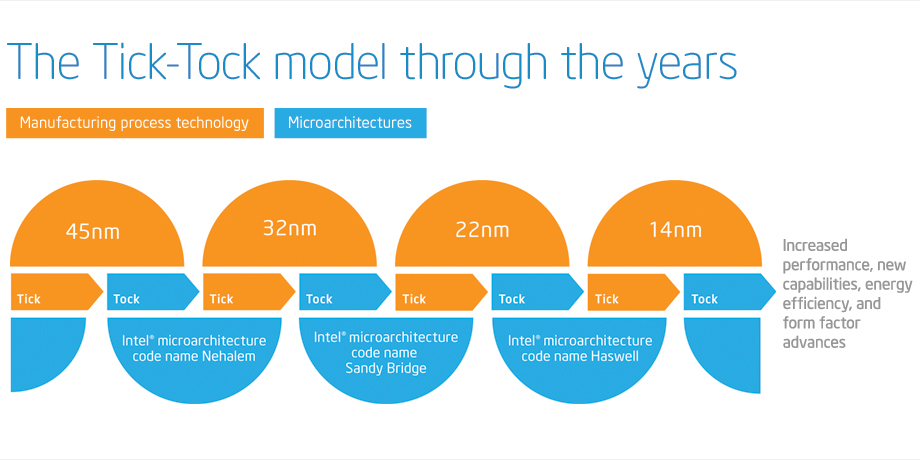
Figure 1: Tick-Tock Model
As you can see from Table 1 and Figure 1, Sandy Bridge is a Tock release that came after the Westmere Tick release. The Xeon E5 product family is Sandy Bridge-EP, which is a newer microarchitecture compared to the Xeon E7 product family, which is Westmere-EX. This difference is very important for SQL Server 2012 core-based licensing purposes! Sandy Bridge has significantly better single-threaded performance compared to Westmere and it also has lower physical core counts. Sandy Bridge-EP is available for both two-socket and four-socket servers, while Westmere-EX is available for two-socket, four-socket, and eight-socket servers.
Currently, we have the Intel Xeon E5-2600 product family (Sandy Bridge-EP) for the two-socket space, the Intel Xeon E5-4600 product family (Sandy Bridge-EP) for the four-socket space, along with the older Intel Xeon E7-2800 product family (Westmere-EX) for the two-socket space, the Intel Xeon E7-4800 product family (Westmere-EX) for the four-socket space, and the Intel Xeon E7-8800 product family (Westmere-EX) for the eight-socket space. The Intel Xeon E7 family was released in Q2 2011, the Xeon E5-2600 family was released in Q1 2012, and the Xeon E5-4600 family was released in Q2 2012. On November 5, 2012, Fujitsu published a new TPC-E OLTP benchmark result for a four-socket, Intel Xeon E5-4650 PRIMERGY RX500 S7 system with a score of 2651.27. This is the first published TPC-E result for the newer, four-socket capable Intel Xeon E5-4600 series, so I think it merits some comparison and discussion.
Table 2 shows the TPC-E scores for five systems that use the the five different Sandy Bridge and Westmere processors that I have been discussing so far. It shows that the two-socket Xeon E5-2690 system has the best single-threaded performance, (when you divide the raw score by the number of physical cores) and that the four-socket Xeon E5-4650 system comes in second place. We also see that the scaling goes down quite a bit as we move from two sockets to four sockets with the Xeon E5 family. If we had perfectly linear scaling, you would expect a four-socket system to have twice the score of a two-socket system that was using the same processor, which is not the case here. Part of this can be attributed to the clock speed difference between the 2.9GHz Xeon E5-2690 and the 2.7GHz Xeon E5-4650.
We can also see that the Intel Xeon E5 family does quite a bit better on TPC-E than the Intel Xeon E7 family does, which is no surprise, since we are comparing the newer Sandy Bridge-EP to the older Westmere-EX. From a performance perspective, the two-socket Xeon E5-2690 does much better than the two-socket Xeon E7-2870. In my opinion, you really should not be using the two-socket Xeon E7-2870 for SQL Server 2012 because of its lower single-threaded performance and higher physical core counts (which means a higher SQL Server 2012 licensing cost).
The four-socket Xeon E7-4870 system has a higher raw score than the four-socket E5-4650 system, but it has 40 physical cores compared to 32 physical cores, which means it will cost significantly more for for SQL Server 2012 core licenses, while it will have lower single-threaded performance. Again, I would prefer a Xeon E5-4650 based system over a Xeon E7-4870 based system for an OLTP workload. You can also see that scaling takes a pretty big hit when you go from four-socket systems to eight-socket systems, even though these are all NUMA-based systems here.
| System | Sockets | Total Cores | Processor Model | TPC-E Score | TPC-E Score/Core |
| Fujitsu PRIMERGY RX300 S7 | 2 | 16 | Intel Xeon E5-2690 | 1871.81 | 116.99 |
| Fujitsu PRIMERGY RX500 S7 | 4 | 32 | Intel Xeon E5-4650 | 2651.27 | 82.85 |
| IBM System x3690 X5 | 2 | 20 | Intel Xeon E7-2870 | 1560.70 | 78.04 |
| IBM System x3850 X5 | 4 | 40 | Intel Xeon E7-4870 | 2862.61 | 71.57 |
| NEC Express5800/A1080a-E | 8 | 80 | Intel Xeon E7-8870 | 4614.22 | 57.68 |
Table 2: TPC-E Score Comparisons for Selected Intel Processors
| System | Sockets | Total Cores | Processor Model | TPC-E Score | SQL 2012 License Cost | Cost/TPC-E |
| Fujitsu PRIMERGY RX300 S7 | 2 | 16 | Intel Xeon E5-2690 | 1871.81 | $109,984 | $57.76/TPC-E |
| Fujitsu PRIMERGY RX500 S7 | 4 | 32 | Intel Xeon E5-4650 | 2651.27 | $219,968 | $82.97/TPC-E |
| IBM System x3690 X5 | 2 | 20 | Intel Xeon E7-2870 | 1560.70 | $137,480 | $88.09/TPC-E |
| IBM System x3850 X5 | 4 | 40 | Intel Xeon E7-4870 | 2862.61 | $274,960 | $96.05/TPC-E |
| NEC Express5800/A1080a-E | 8 | 80 | Intel Xeon E7-8870 | 4614.22 | $549,920 | $119.18/TPC-E |
Table 3: SQL Server 2012 Enterprise Edition License Cost Comparisons by TPC-E Score
Table 3 shows the same five systems with the SQL Server 2012 Enterprise Edition license cost information added. This shows that a two-socket system with Xeon E5-2690 processors gives you the lowest licensing cost per TPC-E score, while Table 2 shows that it also gives you the best TPC-E score per physical processor core. Unless you must have more than 384GB of RAM (with affordable 16GB DIMMs) or more than 768GB of RAM (with much more expensive 32GB DIMMs), there are not too many reasons to go with a higher core-count system for an OLTP workload.
One possible reason is that you are concerned that a two-socket Xeon E5-2690 system simply cannot handle your total database workload. Two processors with a total of 16 physical cores is simply not enough computing capacity for your workload. Depending on the magnitude of your workload, that may be true. If you are currently running a four-socket or larger system that is more than a couple of years old, that may not be true. Bigger systems are not faster systems, and the total load capacity of two socket systems has increased dramatically in the last year with Sandy Bridge-EP. If you are convinced that a two-socket Xeon E5-2690 cannot handle your workload, I would look at a four-socket Xeon E5-4650 system, which also lets you go up to 1.5TB of RAM with 32GB DIMMs. Keep in mind that both Xeon E5-2690 and Xeon E5-4650 systems have PCI-E 3.0 support, which gives you twice the I/O bandwidth of the older PCI-E 2.0 standard found in Westmere-EX servers.
If all of this has made your head hurt, you can always contact us for some deeper hardware consulting!
The post Deciding What Processor to Choose for SQL Server 2012 appeared first on Glenn Berry.
]]>The post Migrating to SQL Server 2012 appeared first on Glenn Berry.
]]>Migrating to SQL Server 2012
How do you design and implement a safe and successful migration from an older
version of SQL Server to SQL Server 2012, with no data loss and virtually no
downtime? What if you have a limited hardware budget for the upgrade effort, and
you are worried about the new core-based licensing in SQL Server 2012? How can
you choose your hardware wisely in light of the new licensing model?
This session will cover several different methods for migrating your
data to SQL Server 2012 while meeting these objectives and minimizing your
hardware and licensing costs. You will also learn how to help make the case that
an upgrade makes good sense from a business perspective.
NOCODP has been holding their meetings in a nice building that is part of the University of Northern Colorado (UNC), which has plenty of free parking. There was a pretty high turnout of about twenty people for this event, which is quite good for a brand new user’s group.
The post Migrating to SQL Server 2012 appeared first on Glenn Berry.
]]>The post Memory Error Recovery in SQL Server 2012 appeared first on Glenn Berry.
]]>There was a presentation at TechEd 2012, called “The Path to Continuous Availability with Windows Server 2012” that talked about this being a new feature in Windows Server 2012, which implies that you will need to be running SQL Server 2012 on top of Windows Server 2012 to get this functionality.
In Windows Server 2012, the feature is called Application Assisted Memory Error Recovery, and it requires the application (such as SQL Server 2012) to register for notifications of bad memory page events using CreateMemoryResourceNotification(). It also requires SQL Server 2012 to use the API QueryWorkingSetEx() to scan the memory for bad pages.
It is likely an Enterprise Edition-only feature, but I have not confirmed this assumption yet.
You will also need ECC RAM, and a processor with a memory controller that supports this. I don’t have a list of processors that support this feature yet, but I am working on it. If I had to guess, I would assume that Intel Nehalem and newer, and AMD Magny-Cours and newer will probably be required.
If you have the hardware support, along with both Windows Server 2012 and SQL Server 2012, you will see a message like this in your SQL Server error log:
Machine supports memory error recovery. SQL memory protection is enabled to recover from memory corruption.
There are a few prerequisites that you must satisfy, but this is still an interesting feature. It is one more argument that you can use when you are trying to make the case to upgrade to SQL Server 2012, on a new server with the latest version of Windows Server.
The post Memory Error Recovery in SQL Server 2012 appeared first on Glenn Berry.
]]>The post Recommended Intel Processors For SQL Server 2012 OLTP Workloads appeared first on Glenn Berry.
]]>With the new core based licensing in SQL Server 2012 Enterprise Edition, you need to pay closer attention to your physical core counts, and whether you are more concerned with extra scalability (from having more physical cores), or whether you want the absolute best OLTP query performance (from having a processor with fewer cores but a higher base clock speed from the same generation). Unlike in the past, having more physical cores will cost you more for your SQL Server 2012 Enterprise Edition licensing costs. You really need to think about what you are trying to accomplish with your database hardware. For example, if you can partition your workload between multiple servers, then you could see much better OLTP performance from using two dual-socket servers instead of one quad-socket server.
So, here are the Intel processors that I recommend in late May 2012 for OLTP workloads, with their high level specifications and some commentary.
Single Socket Server (High Capacity)
Intel Xeon E5-2470 (32nm Sandy Bridge-EN)
- 2.3 GHz, 20MB L3 cache, 8 GT/s Intel QPI 1.1
- 8 cores, Turbo Boost 2.0 (3.1 GHz), hyper-threading
- Three memory channels, six memory slots per processor, 96GB RAM with 16GB DIMMs
Single Socket Server (High Performance)
Intel Xeon E3-1290 V2 (22nm Ivy Bridge)
- 3.7 GHz, 8MB L3 cache, 5 GT/s Intel QPI 1.1
- 4 cores, Turbo Boost 2.0 (4.1 GHz), hyper-threading
- Two memory channels, four memory slots per processor, 32GB RAM with 8GB DIMMs
At least one Tier One vendor (Dell) is offering a single socket server with the new Sandy Bridge-EN processor family. This is the entry level, dual-socket capable Sandy Bridge processor that has lower clock speeds and less memory bandwidth than the Sandy Bridge-EP processor family. Despite this, it does give you the ability to have eight physical cores and 96GB of RAM in a single socket server. You would see much better single-threaded OLTP performance from a new 2nd generation E3-1290 V2 Ivy Bridge processor, but you would be limited to four physical cores and 32GB of RAM. Again, if you can partition your workload, two single socket Xeon E3-1290 V2 based servers would give you much better OLTP performance than one Xeon E5-2470 based server for the same SQL Server 2012 Enterprise Edition licensing cost.
Dual Socket Server (High Capacity)
Intel Xeon E5-2690 (32nm Sandy Bridge-EP)
- 2.9 GHz, 20MB L3 cache, 8 GT/s Intel QPI 1.1
- 8 cores, Turbo Boost 2.0 (3.8 GHz), hyper-threading
- Four memory channels, twelve memory slots per processor, 384GB RAM with 16GB DIMMs
Dual Socket Server (High Performance)
Intel Xeon E5-2643 (32nm Sandy Bridge-EP)
- 3.3 GHz, 10MB L3 cache, 8 GT/s Intel QPI 1.1
- 4 cores, Turbo Boost 2.0 (3.5 GHz), hyper-threading
- Four memory channels, twelve memory slots per processor, 384GB RAM with 16GB DIMMs
Choosing the popular Xeon E5-2690 would cost twice as much for the SQL Server license costs as the quad-core Xeon E5-2643. Once again, if you can partition your workload, two dual socket Xeon E5-2643 based servers would give you better overall OLTP performance than one Xeon E5-2690 based server for the same SQL Server 2012 Enterprise Edition licensing cost. You would have more total memory between the two servers, and more potential I/O capacity, at the cost of buying two servers instead of one server. This might not make sense, especially with the added management and maintenance overhead.
Quad Socket Server (High Capacity)
Intel Xeon E7-4870 (32nm Westmere-EX)
- 2.4 GHz, 30MB L3 cache, 6.4 GT/s Intel QPI 1.0
- 10 cores, Turbo Boost (2.8 GHz), hyper-threading
- Four memory channels, sixteen memory slots per processor, 1024GB RAM with 16GB DIMMs
Quad Socket Server (High Performance)
Intel Xeon E5-4650 (32nm Sandy Bridge-EP)
- 2.7 GHz, 20MB L3 cache, 8 GT/s Intel QPI 1.1
- 8 cores, Turbo Boost 2.0 (3.3 GHz), hyper-threading
- Four memory channels, twelve memory slots per processor, 768GB RAM with 16GB DIMMs
The brand new Xeon E5-4650 will give you significantly better single-threaded OLTP query performance in a quad-socket server than the older E7-4870, at the cost of less total capacity because of the lower core count, smaller L3 cache, and lower RAM capacity. It would save you enough on SQL Server 2012 Enterprise Edition license costs to buy the server itself and still have money left over. Still, as my recent analysis of TPC-E scores by physical core showed, you would get the best possible OLTP performance from a two socket Xeon E5-2690 based system if your workload will fit on a two socket server. I think a high percentage of SQL Server 2012 workloads will run very well on a modern two socket server. You really do take a performance hit when you go from a two-socket server to a four-socket server.
Eight or More Socket Server
Intel Xeon E7-8870 (32nm Westmere-EX)
- 2.4 GHz, 30MB L3 cache, 6.4 GT/s Intel QPI 1.0
- 10 cores, Turbo Boost (2.8 GHz), hyper-threading
- Four memory channels, sixteen memory slots per processor, 2048GB RAM with 16GB DIMMs (eight sockets)
You really only have one choice when you go above a four socket server. Unfortunately, even with Non-Uniform Memory Access (NUMA), you will not see 1:1 scaling as you double your socket counts in a server. The situation is much better than it used to be with the old Symmetrical Multi-Processing (SMP) architecture, but looking at recent TPC-E scores show that the eight-socket Xeon E7-8800 family takes quite a performance hit per physical core compared the four-socket Xeon E7-4800 family. You really want to run your workload on a greater number of lower socket count servers if you can.
I always like to hear what you think about my posts, so be sure to let me know!
The post Recommended Intel Processors For SQL Server 2012 OLTP Workloads appeared first on Glenn Berry.
]]>