The post SQLskills SQL101: Processor Selection for SQL Server appeared first on Glenn Berry.
]]>
SQL Server Licensing
Since SQL Server 2012, Microsoft has been using core-based licensing for SQL Server Enterprise Edition. With non-virtualized servers, you are required to purchase a SQL Server core license for every single physical processor core in the entire host machine, period. Every single physical core present in the host machine must be licensed. It doesn’t matter if you have disabled physical cores in the host BIOS, or if you have exceeded the physical core license limit for SQL Server Standard Edition, you still have to license every single physical core in the machine.
With virtualization, the story is slightly different. Normally, you have to purchase a SQL Server core license for every single vCPU in your virtual machine, with a minimum of four core licenses per VM. The exception to this is if you purchase enough SQL Server core licenses for all of the physical cores in the entire host machine, and if you also purchase Microsoft Software Assurance. If you do this, you can then create as many VMs with as many vCPUs as you like, without worrying about counting the vCPU cores at all.
Windows Server 2016 Licensing
Windows Server 2016 has a new core-based licensing model with a minimum of eight physical core licenses per processor and 16 physical core licenses per host machine. Fortunately, these Windows Server 2016 core licenses are relatively affordable, especially for Windows Server 2016 Standard Edition (which is all that is required for most SQL Server 2016 instances). The danger from this new licensing model is that it may encourage well-meaning server administrators to select a processor with more physical cores than they actually need for SQL Server, in order to “get their money’s worth” from the Windows Server 2016 licenses that they are required to buy for a new server. This could actually be a very expensive mistake from a SQL Server 2016 licensing cost perspective!
Modern Server Processors for SQL Server
Current generation Intel server processors have anywhere from four to twenty-four physical cores in each physical processor. For two-socket servers, this means the Intel Xeon E5-2600 v4 “Broadwell-EP” Product Family. For four-socket and higher servers, this means the Intel Xeon E7-8800 v4 “Broadwell-EX” Product Family. Upcoming server processors from both AMD and Intel will have up to thirty-two physical cores per physical processor.
Previously, I explained the relevant differences between physical sockets, physical cores and logical cores here. One important fact to keep in mind is that Microsoft does not care (for pricing purposes) whether a physical core is fast or slow. Regardless of the performance of the core, the per-core license cost is exactly the same.
Knowing this, you should purposely choose a particular processor SKU that has the best single-threaded performance possible for a given physical core count. A very common mistake I see is where a server administrator purposely selects a low-range or mid-range processor SKU (at a given core count) to save a small amount of money on the hardware. Quite often, they save far less than 1% of the total system cost, but give up anywhere from 20-40% of their single-threaded performance.
For any particular server processor product family, you have a range of available processor SKUs with different physical core counts and other relevant performance specifications, such as base clock speed, L3 cache size, and QPI speed. Generally speaking, the lower core count processors have much better single-threaded CPU performance than the higher core count processors from the same product family. Quite often, you can purposely pick a fast, lower core count processor to both get better single-threaded CPU performance and to save a huge amount of money on your SQL Server 2016 licensing costs.
Conclusion
The key takeaway here is that it is very important to do some thoughtful analysis of your available processor choices for a server when you are going to have a SQL Server workload. The worst thing you can do is to just let someone else (who may not fully understand how SQL Server licensing works) make the choice with no input from you. It is unfortunately all too easy to make a very bad choice that costs significantly more than it should and also gives up a lot of performance.
I have written a number of articles for SQLPerformance.com that get into much more detail on this subject.
The post SQLskills SQL101: Processor Selection for SQL Server appeared first on Glenn Berry.
]]>The post Processor Selection for SQL Server appeared first on Glenn Berry.
]]>I will update this post as I write new posts and articles. Updated March 17, 2018.
SQLskills.com Blog posts:
Upgrading SQL Server– Intel Xeon-W Family
Upgrading SQL Server– Top Five Intel Xeon Scalable Processors for SQL Server Usage
Upgrading SQL Server–Replacing Slow Hardware Part 2
Upgrading SQL Server–Replacing Slow Hardware
Upgrading SQL Server–Preferred AMD EPYC 7000 Processors
Upgrading SQL Server–Preferred Intel Xeon Scalable Processors
Upgrading SQL Server–Generational Performance Increases for Two-Socket Servers
SQL101: AMD EYPC 7000 Series Processors
SQLskills SQL101: Processor Selection for SQL Server
New Flagship Xeon E5 and E7 Processors
Intel Xeon E7 Processor Generational Performance Comparison
More Intel Broadwell Server Processor Families Available
Recommended Intel Xeon E5-2600 v4 Processors for SQL Server
Interesting Upcoming Intel Processors
Intel Xeon E7 v3 Product Family Released
TPC-E Single-Threaded Performance Leaderboard
Intel Xeon E5-2600 v3 Product Family and SQL Server
Recommended Intel Processors For SQL Server 2014 OLTP Workloads
Two New TPC-E Benchmark Results for Intel Xeon Ivy Bridge-EX Processors
Bigger Database Servers Get Faster
One Intel Processor Family to Avoid For SQL Server 2012/2014
Updates on Intel Xeon Ivy Bridge Server Processor Launch Schedules
Using TPC-E OLTP Benchmark Scores to Compare Processors
Intel Xeon E5-2600 v2 Series Processors (Ivy Bridge-EP) in Q3 2013
New AMD-based TPC-E Benchmark Result
Deciding What Processor to Choose for SQL Server 2012
Two Database Server Models Compared
Recommended Intel Processors For SQL Server 2012 OLTP Workloads
Articles from SQLPerformance.com
New AMD Processor Families Compare Well to New Intel Processors
Intel Xeon Scalable Processors and SQL Server 2017
Selecting and Configuring Hardware for SQL Server 2016 Standard Edition
Memory/Storage Technology Hierarchy and SQL Server
Database Hardware and Infrastructure Trends
Practical Processor Selection for SQL Server 2014/2016 OLTP Workloads
Recommended Intel Processors for SQL Server 2014 – March 2015
Database Server Hardware Trends
Recommended Intel Processors for SQL Server 2014 Workloads
Selecting a Processor for SQL Server 2014 – Part 2
Selecting a Processor for SQL Server 2014 – Part 1
SQL Server Database Server Hardware Upgrade Case Study
The post Processor Selection for SQL Server appeared first on Glenn Berry.
]]>The post Deciding What Processor to Choose for SQL Server 2012 appeared first on Glenn Berry.
]]>Since 2006, Intel has been using a Tick-Tock release model for their processors. What this means is that every two years, they have a Tock release that uses a completely new microarchitecture, which is followed a year later by a Tick release that has a manufacturing process technology shrink, but uses the same microarchitecture as the previous Tock release. Using a smaller process technology typically allows the processor to use less energy and have slightly better performance than the previous Tock release, but the performance jump is not nearly as great as you get with a Tock release. Tick releases are usually pin-compatible with the previous Tock release, so that lets the hardware systems vendors start using the Tick release processor in their existing models much more quickly, usually with just a BIOS update.
Table 1 shows the Tick-Tock release cadence for Intel processors from 2008 through 2016. The dates are obviously more speculative as we go further into the future, since Intel may decide to slow down their release cycle if AMD is unable to give them more viable competition in the next few years.
| Year | Type | Process | Code Name |
| 2008 | Tock | 45nm | Nehalem |
| 2010 | Tick | 32nm | Westmere |
| 2011 | Tock | 32nm | Sandy Bridge |
| 2012 | Tick | 22nm | Ivy Bridge |
| 2013 | Tock | 22nm | Haswell |
| 2014 | Tick | 14nm | Rockwell |
| 2015 | Tock | 14nm | Skylake |
| 2016 | Tick | 10nm | Skymont |
Table 1: Tick-Tock Release Listing
Figure 1 shows how the Tick-Tock model works, with the Tock release (in blue) using the existing manufacturing process technology, while the Tick release (in orange) moves to a new, smaller manufacturing process technology. New Intel processors are first released for the desktop market, and then for the mobile market, followed later by the single-socket server market, the two-socket server market and finally the four-socket server (and above) market coming last. The four-socket server server market does not always get every release because of the lower sales volume and slower release cycle. This explains why there has not been a Sandy Bridge-EX release for the four-socket market.
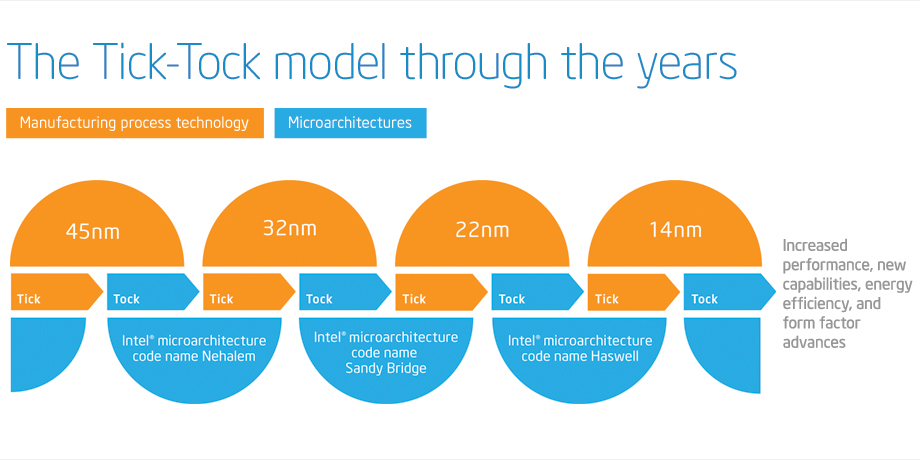
Figure 1: Tick-Tock Model
As you can see from Table 1 and Figure 1, Sandy Bridge is a Tock release that came after the Westmere Tick release. The Xeon E5 product family is Sandy Bridge-EP, which is a newer microarchitecture compared to the Xeon E7 product family, which is Westmere-EX. This difference is very important for SQL Server 2012 core-based licensing purposes! Sandy Bridge has significantly better single-threaded performance compared to Westmere and it also has lower physical core counts. Sandy Bridge-EP is available for both two-socket and four-socket servers, while Westmere-EX is available for two-socket, four-socket, and eight-socket servers.
Currently, we have the Intel Xeon E5-2600 product family (Sandy Bridge-EP) for the two-socket space, the Intel Xeon E5-4600 product family (Sandy Bridge-EP) for the four-socket space, along with the older Intel Xeon E7-2800 product family (Westmere-EX) for the two-socket space, the Intel Xeon E7-4800 product family (Westmere-EX) for the four-socket space, and the Intel Xeon E7-8800 product family (Westmere-EX) for the eight-socket space. The Intel Xeon E7 family was released in Q2 2011, the Xeon E5-2600 family was released in Q1 2012, and the Xeon E5-4600 family was released in Q2 2012. On November 5, 2012, Fujitsu published a new TPC-E OLTP benchmark result for a four-socket, Intel Xeon E5-4650 PRIMERGY RX500 S7 system with a score of 2651.27. This is the first published TPC-E result for the newer, four-socket capable Intel Xeon E5-4600 series, so I think it merits some comparison and discussion.
Table 2 shows the TPC-E scores for five systems that use the the five different Sandy Bridge and Westmere processors that I have been discussing so far. It shows that the two-socket Xeon E5-2690 system has the best single-threaded performance, (when you divide the raw score by the number of physical cores) and that the four-socket Xeon E5-4650 system comes in second place. We also see that the scaling goes down quite a bit as we move from two sockets to four sockets with the Xeon E5 family. If we had perfectly linear scaling, you would expect a four-socket system to have twice the score of a two-socket system that was using the same processor, which is not the case here. Part of this can be attributed to the clock speed difference between the 2.9GHz Xeon E5-2690 and the 2.7GHz Xeon E5-4650.
We can also see that the Intel Xeon E5 family does quite a bit better on TPC-E than the Intel Xeon E7 family does, which is no surprise, since we are comparing the newer Sandy Bridge-EP to the older Westmere-EX. From a performance perspective, the two-socket Xeon E5-2690 does much better than the two-socket Xeon E7-2870. In my opinion, you really should not be using the two-socket Xeon E7-2870 for SQL Server 2012 because of its lower single-threaded performance and higher physical core counts (which means a higher SQL Server 2012 licensing cost).
The four-socket Xeon E7-4870 system has a higher raw score than the four-socket E5-4650 system, but it has 40 physical cores compared to 32 physical cores, which means it will cost significantly more for for SQL Server 2012 core licenses, while it will have lower single-threaded performance. Again, I would prefer a Xeon E5-4650 based system over a Xeon E7-4870 based system for an OLTP workload. You can also see that scaling takes a pretty big hit when you go from four-socket systems to eight-socket systems, even though these are all NUMA-based systems here.
| System | Sockets | Total Cores | Processor Model | TPC-E Score | TPC-E Score/Core |
| Fujitsu PRIMERGY RX300 S7 | 2 | 16 | Intel Xeon E5-2690 | 1871.81 | 116.99 |
| Fujitsu PRIMERGY RX500 S7 | 4 | 32 | Intel Xeon E5-4650 | 2651.27 | 82.85 |
| IBM System x3690 X5 | 2 | 20 | Intel Xeon E7-2870 | 1560.70 | 78.04 |
| IBM System x3850 X5 | 4 | 40 | Intel Xeon E7-4870 | 2862.61 | 71.57 |
| NEC Express5800/A1080a-E | 8 | 80 | Intel Xeon E7-8870 | 4614.22 | 57.68 |
Table 2: TPC-E Score Comparisons for Selected Intel Processors
| System | Sockets | Total Cores | Processor Model | TPC-E Score | SQL 2012 License Cost | Cost/TPC-E |
| Fujitsu PRIMERGY RX300 S7 | 2 | 16 | Intel Xeon E5-2690 | 1871.81 | $109,984 | $57.76/TPC-E |
| Fujitsu PRIMERGY RX500 S7 | 4 | 32 | Intel Xeon E5-4650 | 2651.27 | $219,968 | $82.97/TPC-E |
| IBM System x3690 X5 | 2 | 20 | Intel Xeon E7-2870 | 1560.70 | $137,480 | $88.09/TPC-E |
| IBM System x3850 X5 | 4 | 40 | Intel Xeon E7-4870 | 2862.61 | $274,960 | $96.05/TPC-E |
| NEC Express5800/A1080a-E | 8 | 80 | Intel Xeon E7-8870 | 4614.22 | $549,920 | $119.18/TPC-E |
Table 3: SQL Server 2012 Enterprise Edition License Cost Comparisons by TPC-E Score
Table 3 shows the same five systems with the SQL Server 2012 Enterprise Edition license cost information added. This shows that a two-socket system with Xeon E5-2690 processors gives you the lowest licensing cost per TPC-E score, while Table 2 shows that it also gives you the best TPC-E score per physical processor core. Unless you must have more than 384GB of RAM (with affordable 16GB DIMMs) or more than 768GB of RAM (with much more expensive 32GB DIMMs), there are not too many reasons to go with a higher core-count system for an OLTP workload.
One possible reason is that you are concerned that a two-socket Xeon E5-2690 system simply cannot handle your total database workload. Two processors with a total of 16 physical cores is simply not enough computing capacity for your workload. Depending on the magnitude of your workload, that may be true. If you are currently running a four-socket or larger system that is more than a couple of years old, that may not be true. Bigger systems are not faster systems, and the total load capacity of two socket systems has increased dramatically in the last year with Sandy Bridge-EP. If you are convinced that a two-socket Xeon E5-2690 cannot handle your workload, I would look at a four-socket Xeon E5-4650 system, which also lets you go up to 1.5TB of RAM with 32GB DIMMs. Keep in mind that both Xeon E5-2690 and Xeon E5-4650 systems have PCI-E 3.0 support, which gives you twice the I/O bandwidth of the older PCI-E 2.0 standard found in Westmere-EX servers.
If all of this has made your head hurt, you can always contact us for some deeper hardware consulting!
The post Deciding What Processor to Choose for SQL Server 2012 appeared first on Glenn Berry.
]]>The post Recommended Intel Processors For SQL Server 2012 OLTP Workloads appeared first on Glenn Berry.
]]>With the new core based licensing in SQL Server 2012 Enterprise Edition, you need to pay closer attention to your physical core counts, and whether you are more concerned with extra scalability (from having more physical cores), or whether you want the absolute best OLTP query performance (from having a processor with fewer cores but a higher base clock speed from the same generation). Unlike in the past, having more physical cores will cost you more for your SQL Server 2012 Enterprise Edition licensing costs. You really need to think about what you are trying to accomplish with your database hardware. For example, if you can partition your workload between multiple servers, then you could see much better OLTP performance from using two dual-socket servers instead of one quad-socket server.
So, here are the Intel processors that I recommend in late May 2012 for OLTP workloads, with their high level specifications and some commentary.
Single Socket Server (High Capacity)
Intel Xeon E5-2470 (32nm Sandy Bridge-EN)
- 2.3 GHz, 20MB L3 cache, 8 GT/s Intel QPI 1.1
- 8 cores, Turbo Boost 2.0 (3.1 GHz), hyper-threading
- Three memory channels, six memory slots per processor, 96GB RAM with 16GB DIMMs
Single Socket Server (High Performance)
Intel Xeon E3-1290 V2 (22nm Ivy Bridge)
- 3.7 GHz, 8MB L3 cache, 5 GT/s Intel QPI 1.1
- 4 cores, Turbo Boost 2.0 (4.1 GHz), hyper-threading
- Two memory channels, four memory slots per processor, 32GB RAM with 8GB DIMMs
At least one Tier One vendor (Dell) is offering a single socket server with the new Sandy Bridge-EN processor family. This is the entry level, dual-socket capable Sandy Bridge processor that has lower clock speeds and less memory bandwidth than the Sandy Bridge-EP processor family. Despite this, it does give you the ability to have eight physical cores and 96GB of RAM in a single socket server. You would see much better single-threaded OLTP performance from a new 2nd generation E3-1290 V2 Ivy Bridge processor, but you would be limited to four physical cores and 32GB of RAM. Again, if you can partition your workload, two single socket Xeon E3-1290 V2 based servers would give you much better OLTP performance than one Xeon E5-2470 based server for the same SQL Server 2012 Enterprise Edition licensing cost.
Dual Socket Server (High Capacity)
Intel Xeon E5-2690 (32nm Sandy Bridge-EP)
- 2.9 GHz, 20MB L3 cache, 8 GT/s Intel QPI 1.1
- 8 cores, Turbo Boost 2.0 (3.8 GHz), hyper-threading
- Four memory channels, twelve memory slots per processor, 384GB RAM with 16GB DIMMs
Dual Socket Server (High Performance)
Intel Xeon E5-2643 (32nm Sandy Bridge-EP)
- 3.3 GHz, 10MB L3 cache, 8 GT/s Intel QPI 1.1
- 4 cores, Turbo Boost 2.0 (3.5 GHz), hyper-threading
- Four memory channels, twelve memory slots per processor, 384GB RAM with 16GB DIMMs
Choosing the popular Xeon E5-2690 would cost twice as much for the SQL Server license costs as the quad-core Xeon E5-2643. Once again, if you can partition your workload, two dual socket Xeon E5-2643 based servers would give you better overall OLTP performance than one Xeon E5-2690 based server for the same SQL Server 2012 Enterprise Edition licensing cost. You would have more total memory between the two servers, and more potential I/O capacity, at the cost of buying two servers instead of one server. This might not make sense, especially with the added management and maintenance overhead.
Quad Socket Server (High Capacity)
Intel Xeon E7-4870 (32nm Westmere-EX)
- 2.4 GHz, 30MB L3 cache, 6.4 GT/s Intel QPI 1.0
- 10 cores, Turbo Boost (2.8 GHz), hyper-threading
- Four memory channels, sixteen memory slots per processor, 1024GB RAM with 16GB DIMMs
Quad Socket Server (High Performance)
Intel Xeon E5-4650 (32nm Sandy Bridge-EP)
- 2.7 GHz, 20MB L3 cache, 8 GT/s Intel QPI 1.1
- 8 cores, Turbo Boost 2.0 (3.3 GHz), hyper-threading
- Four memory channels, twelve memory slots per processor, 768GB RAM with 16GB DIMMs
The brand new Xeon E5-4650 will give you significantly better single-threaded OLTP query performance in a quad-socket server than the older E7-4870, at the cost of less total capacity because of the lower core count, smaller L3 cache, and lower RAM capacity. It would save you enough on SQL Server 2012 Enterprise Edition license costs to buy the server itself and still have money left over. Still, as my recent analysis of TPC-E scores by physical core showed, you would get the best possible OLTP performance from a two socket Xeon E5-2690 based system if your workload will fit on a two socket server. I think a high percentage of SQL Server 2012 workloads will run very well on a modern two socket server. You really do take a performance hit when you go from a two-socket server to a four-socket server.
Eight or More Socket Server
Intel Xeon E7-8870 (32nm Westmere-EX)
- 2.4 GHz, 30MB L3 cache, 6.4 GT/s Intel QPI 1.0
- 10 cores, Turbo Boost (2.8 GHz), hyper-threading
- Four memory channels, sixteen memory slots per processor, 2048GB RAM with 16GB DIMMs (eight sockets)
You really only have one choice when you go above a four socket server. Unfortunately, even with Non-Uniform Memory Access (NUMA), you will not see 1:1 scaling as you double your socket counts in a server. The situation is much better than it used to be with the old Symmetrical Multi-Processing (SMP) architecture, but looking at recent TPC-E scores show that the eight-socket Xeon E7-8800 family takes quite a performance hit per physical core compared the four-socket Xeon E7-4800 family. You really want to run your workload on a greater number of lower socket count servers if you can.
I always like to hear what you think about my posts, so be sure to let me know!
The post Recommended Intel Processors For SQL Server 2012 OLTP Workloads appeared first on Glenn Berry.
]]>