The post Upgrading SQL Server– Intel Xeon-W Family appeared first on Glenn Berry.
]]>These processors are essentially Xeon versions of the Skylake-X Core i9 HEDT processors with all of the professional features enabled such as extended memory support, vPro, Intel’s AMT, and the standard enterprise Reliability, Serviceability and Availability (RAS) features. They will require a new C422 chipset, and they will not work in existing X299 chipset motherboards.
These processors give you another possible choice for buying or building a powerful, professional level workstation. Value-wise, a system based on one of the AMD Ryzen Threadripper processors is going to be a much better option for most people. Anandtech is a decent write-up here.
Additional Resources
My new Pluralsight course, SQL Server: Upgrading and Migrating to SQL Server 2016 has just been published. This is my eleventh course for Pluralsight, but the complete list of my courses is here.
Building on this online course is a new three day class, IEUpgrade: Immersion Event on Upgrading SQL Server, taught by myself and Tim Radney. The first round of this course will be taught in Chicago from October 11-13, 2017.
Finally, I will be presenting a half-day session called Migrating to SQL Server 2017 at the PASS Summit 2017 in Seattle, WA from October 31- November 3, 2017. You can use this code: BL150GG to register for the PASS 2017 Summit to get a $150 discount.
Here is a link to the complete series about upgrading SQL Server.
The post Upgrading SQL Server– Intel Xeon-W Family appeared first on Glenn Berry.
]]>The post Upgrading SQL Server– Database Experimentation Assistant appeared first on Glenn Berry.
]]>Here is how Microsoft describes the DEA tool:
“Database Experimentation Assistant (DEA) is a new A/B testing solution for SQL Server upgrades. It will assist in evaluating a targeted version of SQL for a given workload. Customers who are upgrading from previous SQL Server versions (SQL Server 2005 and above) to any new version of the SQL Server will be able to use these analysis metrics provided, such as queries that have compatibility errors, degraded queries, query plans, and other workload comparison data, to help them build higher confidence, making it a successful upgrade experience.”
Unlike the Database Migration Assistant (DMA) that I discussed previously, installing and using DEA is a little more involved. What this tool allows you to do is to record a production or at least production-like workload on one version of SQL Server than then replay that same workload on a different version of SQL Server (on a different server) to see how the new version performs with your data and workload. It could also be used to compare different hardware, storage, or different configuration settings.
The Microsoft Data Migration blog is a good source of addition information about both DMA and DEA.
Additional Resources
My new Pluralsight course, SQL Server: Upgrading and Migrating to SQL Server 2016 has just been published. This is my eleventh course for Pluralsight, but the complete list of my courses is here.
Building on this online course is a new three day class, IEUpgrade: Immersion Event on Upgrading SQL Server, taught by myself and Tim Radney. The first round of this course will be taught in Chicago from October 11-13, 2017.
Finally, I will be presenting a half-day session called Migrating to SQL Server 2017 at the PASS Summit 2017 in Seattle, WA from October 31- November 3, 2017. You can use this code: BL150GG to register for the PASS 2017 Summit to get a $150 discount.
Here is a link to the complete series about upgrading SQL Server.
The post Upgrading SQL Server– Database Experimentation Assistant appeared first on Glenn Berry.
]]>The post Upgrading SQL Server– Microsoft Data Migration Assistant 3.2 appeared first on Glenn Berry.
]]>This tool can be used for three main purposes. First, you can use it to find breaking changes, behavior changes, and deprecated features between a legacy version of SQL Server as the source (SQL Server 2005 and later) and a newer version of SQL Server as the target (SQL Server 2012, SQL Server 2014, SQL Server 2016, and Azure SQL Database).
Second, it can be used to identify new features in the target version of SQL Server (or Azure SQL Database) that might be useful given your legacy database schema and data size. Be forewarned that DMA has a heavy bias towards Azure SQL Database and other cloud-dependent features. For example, it is very eager to recommend Stretch database for large tables.
Finally, DMA can be used to actually migrate databases between legacy versions of SQL Server and a modern version of SQL Server or Azure SQL Database. An example of an assessment project is shown in Figure 1.
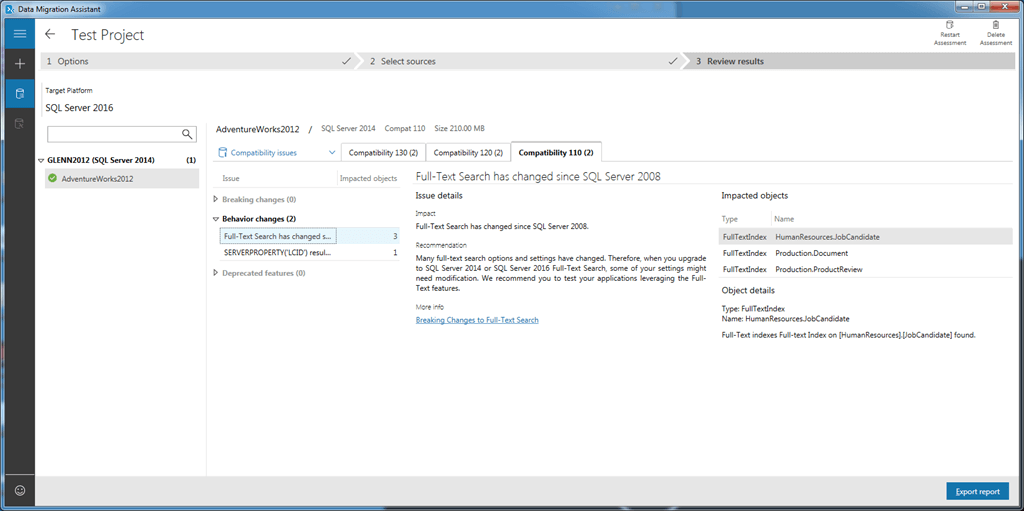
Figure 1: Microsoft Data Migration Assistant 3.2
If you are considering using DMA 3.2 to migrate existing on-premises databases to an Azure SQL Database, Microsoft’s Harini Gupta did some interesting benchmark testing showing how the Azure SQL Database’s service objective (S0, P1, P15, etc.) and the number of parallel tasks for the migration can affect the elapsed time for the migration.
Additional Resources
My new Pluralsight course, SQL Server: Upgrading and Migrating to SQL Server 2016 has just been published. This is my eleventh course for Pluralsight, but the complete list of my courses is here.
Building on this online course is a new three day class, IEUpgrade: Immersion Event on Upgrading SQL Server, taught by myself and Tim Radney. The first round of this course will be taught in Chicago from October 11-13, 2017.
Finally, I will be presenting a half-day session called Migrating to SQL Server 2017 at the PASS Summit 2017 in Seattle, WA from October 31- November 3, 2017. You can use this code: BL150GG to register for the PASS 2017 Summit to get a $150 discount.
Here is a link to the complete series about upgrading SQL Server.
The post Upgrading SQL Server– Microsoft Data Migration Assistant 3.2 appeared first on Glenn Berry.
]]>The post Upgrading SQL Server– SQL Server 2016 Upgrade Considerations appeared first on Glenn Berry.
]]>“Microsoft SQL Server 2016 and Microsoft Azure SQL Database include improvements in data type conversions and in several other operations. Most of these improvements offer increased precision when you deal with floating-point types, as well as with classic datetime types.”
This changed behavior only comes into play when you are running on database compatibility level 130 or later, and it only affects persisted objects (such as persisted computed columns, filtered indexes, indexed views, and indexes that use computed columns).
Because of this potential issue, Microsoft recommends that you do some additional validation checking on your legacy databases before you change their compatibility level to 130 or higher to find out if you might be affected by these changes.
Here are the steps for the validation and correction process:
- Restore the legacy database to SQL Server 2016 or later instance in your test environment
- Enable global trace flag 139
- Run DBCC CHECKDB WITH EXTENDED_LOGICAL_CHECKS, NO_INFOMSGS, TABLERESULTS
- Disable global trace flag 139
- Change the compatibility level of the database to 130 or later
- If Step 3 reveals any issues, then rebuild the objects that it identified
Microsoft has more detail about this change here. Personally, I think this just another step that you should add to your testing plan during an upgrade project.
Additional Resources
My new Pluralsight course, SQL Server: Upgrading and Migrating to SQL Server 2016 has just been published. This is my eleventh course for Pluralsight, but the complete list of my courses is here.
Building on this online course is a new three day class, IEUpgrade: Immersion Event on Upgrading SQL Server, taught by myself and Tim Radney. The first round of this course will be taught in Chicago from October 11-13, 2017.
Finally, I will be presenting a half-day session called Migrating to SQL Server 2017 at the PASS Summit 2017 in Seattle, WA from October 31- November 3, 2017. You can use this code: BL150GG to register for the PASS 2017 Summit to get a $150 discount.
Here is a link to the complete series about upgrading SQL Server.
The post Upgrading SQL Server– SQL Server 2016 Upgrade Considerations appeared first on Glenn Berry.
]]>The post Upgrading SQL Server– Useful Improvements in SQL Server 2017 appeared first on Glenn Berry.
]]>One example are changes in the limits for tempdb initial file size for both tempdb data and log files. In SQL Server 2017, you can set the initial file size as large as 256GB (262,144MB) per file. If you set it to a size larger than 1GB and instant file initialization (IFI) is not enabled, you will get a warning during setup. Keep in mind that IFI only applies to SQL Server data files.
SQL Server 2017 also has a number of new DMV and DMFs that make it easier to manage and monitor your system. One example is sys.dm_db_log_info, which returns the virtual log file (VLF) count and other useful information about your VLFs. This is a more powerful replacement for the old DBCC LOGINFO command.
Another example (which I might be somewhat responsible for, due to much lobbying) are new columns in sys.dm_os_sys_info that reveal very useful processor information, including socket_count, core_count, and cores_per_socket. Getting this information form this DMV is much better that reading the SQL Server Error Log to to to find some of this information.
There are also nice improvements related to doing “smart” differential backups. The sys.dm_db_file_space_usage DMV has a new column, modified_extent_page_count which lets you track differential changes since the last full database backup in order to help decide whether it will be more efficient to take a full database backup instead of a differential backup.
For transaction log backups, there is a new DMF sys.dm_db_log_stats, which has a column called log _since_last_log_backup_mb. By checking the value of this column, you can programmatically decide when to take transaction log backups based on the amount of transaction log activity rather than just on time. This will let you take transaction log backups more frequently during periods of high activity (which can reduce how large the transaction log backup file is and also minimize transaction log file growth. It will also let you take transaction log backups les frequently during periods of low activity, which will reduce the number of transaction log backups that need to be restored, and possibly reduce your RTO times.
Small improvements like this, which are not always well publicized can really make your job easier as a DBA, which is yet another reason to push for an upgrade to SQL Server 2017.
Additional Resources
My new Pluralsight course, SQL Server: Upgrading and Migrating to SQL Server 2016 has just been published. This is my eleventh course for Pluralsight, but the complete list of my courses is here.
Building on this online course is a new three day class, IEUpgrade: Immersion Event on Upgrading SQL Server, taught by myself and Tim Radney. The first round of this course will be taught in Chicago from October 11-13, 2017.
Finally, I will be presenting a half-day session called Migrating to SQL Server 2017 at the PASS Summit 2017 in Seattle, WA from October 31- November 3, 2017. You can use this code: BL150GG to register for the PASS 2017 Summit to get a $150 discount.
Here is a link to the complete series about upgrading SQL Server.
The post Upgrading SQL Server– Useful Improvements in SQL Server 2017 appeared first on Glenn Berry.
]]>The post Upgrading SQL Server– Top Five Intel Xeon Scalable Processors for SQL Server Usage appeared first on Glenn Berry.
]]>New two-socket server models(which are required for these processors), such as the Dell PowerEdge R740 let you choose from 41 of these available 58 processors (which is also somewhat overwhelming). Microsoft charges the same SQL Server core license prices regardless of the performance of each processor core. Given this, you need to try to pick a particular processor with an awareness of that fact to minimize your licensing costs.
Intel Xeon Bronze and Silver Processors
There are two choices in the Intel Xeon Bronze line, and six choices in the Intel Xeon Silver line. For SQL Server usage, you can and SHOULD ignore those eight processor SKUs from the Bronze and Silver lines. The Bronze processors have low base clock speeds, no Turbo Boost, no Hyper-Threading and low memory speeds. The Silver processors have low base clock speeds and low memory speeds.
Intel Xeon Gold and Platinum Processors
There are 22 different choices between the Intel Xeon Gold 5xxx and 6xxx lines, and 11 different choices in the Intel Xeon Platinum line. Out of these 33 different choices, I think five of them are the “best” choices for SQL Server usage, as measured by their single-threaded CPU performance. Even though these processors are more expensive than the Bronze and Silver lines, the extra hardware cost is a small fraction of the overall system cost, including SQL Server core licenses.
Top Five Intel Xeon Scalable Processors for SQL Server Usage
Here is my top five list, which is ranked by base clock speed and L3 cache size per physical core. Picking a processor from this list is going to give you the best performance for each one of your relatively expensive SQL Server 2016 Enterprise Edition core licenses, which cost $7,128.00 each.
- Intel Xeon Gold 5122 (4 cores)
- Intel Xeon Gold 6144 (8 cores)
- Intel Xeon Gold 6128 (6 cores)
- Intel Xeon Gold 6146 (12 cores)
- Intel Xeon Gold 6154 (18 cores)
Figure 1 shows my “preferred” processor models at each physical core count, along with some of their specifications and their price. Note that I have not included the “M” suffix processor models (which offer double the memory support for a $3,000.00 premium). Depending on your workload, you may want those for SQL Server usage, but I wanted to simplify the table somewhat.
You should also notice the huge premium that Intel charges for the highest core count SKUs, and think about whether that makes sense in your situation. If you can split your workload across multiple servers, you will be much better off from a performance and cost perspective with multiple servers with lower core count processors. Some choices are relatively bad (such as the Platinum 8170) due to their low base clock speeds.
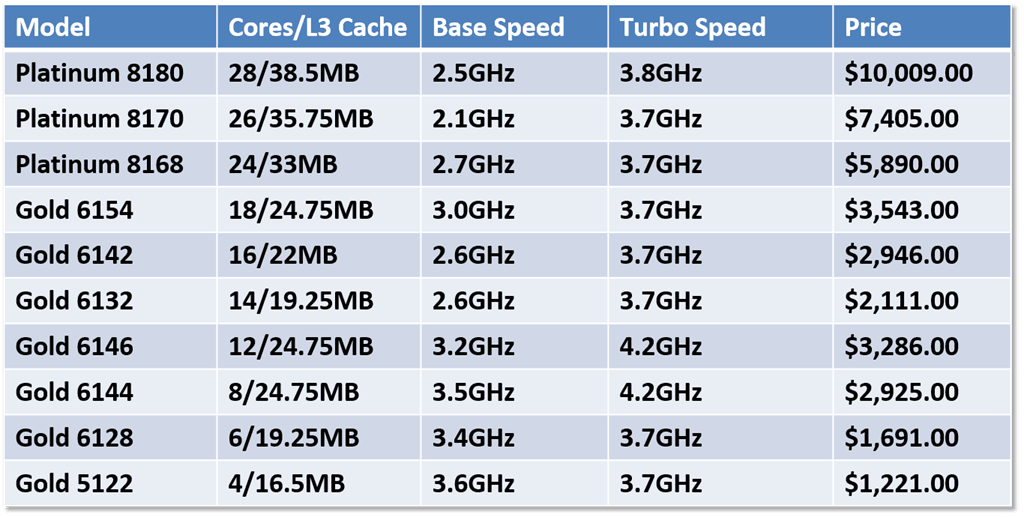
Figure 1: Preferred Intel Skylake-SP Processors for SQL Server Usage
Figure 2 shows some comparative system metrics for a two-socket server with the given processor. These calculations are based on a single actual TPC-E benchmark score for a Lenovo ThinkSystem SR650 server using a pre-release version of SQL Server 2017. I suspect that we will see better results with the release version of SQL Server 2017.
Looking at these numbers, the Raw TPC-E Score is a measurement of the CPU capacity of the system, while Score/Core shows the single-threaded CPU performance for that particular processor. The License cost column shows how much it would cost to purchase SQL Server 2016 Enterprise Edition core licenses for that system.
The first thing jumps out to me is that the Platinum 8170 is a pretty bad choice compared to the Platinum 8168 or Gold 6154. Selecting the Gold 6154 instead of the Platinum 8170 would save you $114,048.00 in SQL Server license costs and $7,724.00 in hardware costs, with roughly the same capacity and much better single-threaded performance (which will be noticeable to your users).
Another good choice would be two database servers with the Gold 6146 instead of one database server with the Platinum 8180. This would save you $57,024.00 in SQL Server license costs and $6,874.00 in CPU costs (which would pay for a good chunk of the second server). Two servers would have more CPU capacity, twice the memory capacity, twice the number of PCIe 3.0 lanes, and much better single-threaded performance.
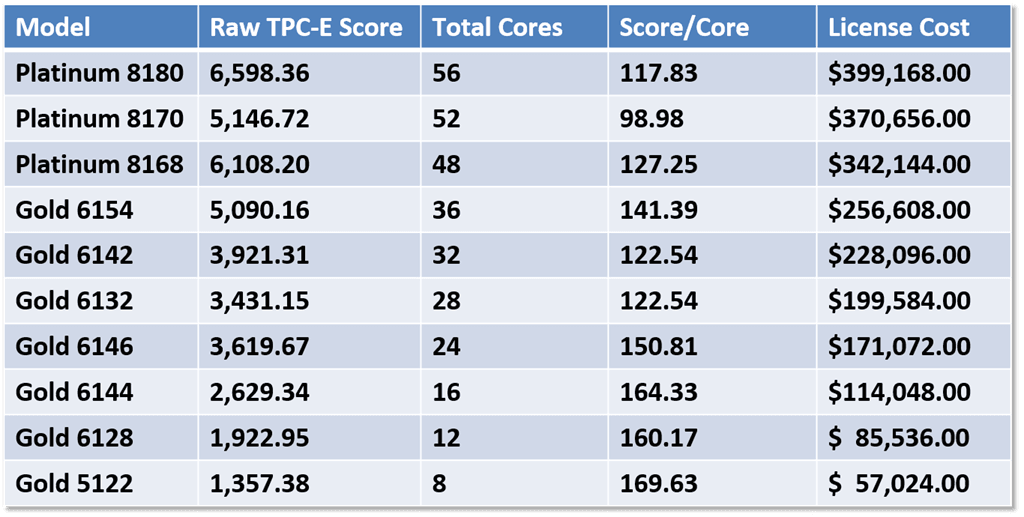
Figure 2: Comparative Two-Socket System Metrics for Intel Skylake-SP Processors
Additional Resources
My new Pluralsight course, SQL Server: Upgrading and Migrating to SQL Server 2016 has just been published. This is my eleventh course for Pluralsight, but the complete list of my courses is here.
Building on this online course is a new three day class, IEUpgrade: Immersion Event on Upgrading SQL Server, taught by myself and Tim Radney. The first round of this course will be taught in Chicago from October 11-13, 2017.
Finally, I will be presenting a half-day session called Migrating to SQL Server 2017 at the PASS Summit 2017 in Seattle, WA from October 31- November 3, 2017.
Here is a link to the complete series about upgrading SQL Server.
The post Upgrading SQL Server– Top Five Intel Xeon Scalable Processors for SQL Server Usage appeared first on Glenn Berry.
]]>The post Upgrading SQL Server– Windows Server 2016 Licensing Issues appeared first on Glenn Berry.
]]>One potential issue with Windows Server 2016 is the fact that Microsoft is now using a core-based licensing system for that product. Microsoft requires a minimum of eight core licenses per processor and sixteen core licenses per server. This could potentially be a point of confusion and extra SQL Server licensing costs for some organizations.
Here is the scenario. Imagine that you have done your sizing analysis and calculations for SQL Server 2017 usage, and you have decided that a new two-socket server with two, quad-core Intel Xeon Gold 5122 processors will best suit your performance needs and budget requirements. That particular processor costs $1221.00 each.
Shon Smith, your well-meaning server administrator is aware of the new Windows Server 2016 licensing model, and he wants this new database server to actually have the sixteen physical cores that he was forced to buy Windows Server 2016 core licenses for. He also wants to minimize the hardware cost of this new server. Because of this, he decides to buy a two-socket server with two, eight-core Intel Xeon Bronze 3106 processors (which only cost $306.00 each). Shon has maximized his investment in those sixteen required Windows Server 2016 core licenses, and he has saved $1,730.00 on the hardware. But what has he done to you, the DBA?
First, this new database server now will require sixteen SQL Server 2017 core licenses instead of only eight. For SQL Server 2017 Standard Edition, this means a $14,872.00 increase in your SQL Server license costs, while SQL Server 2017 Enterprise Edition would cost $57,024.00 extra due to this hardware change. But you have twice as many physical cores, so that must be better, right?
Actually, not at all in this case. The Intel Xeon Bronze 3106 has a base clock speed of only 1.7GHz, with no Turbo Boost, no Hyper-Threading and an 11MB L3 cache. The Intel Xeon Gold 5122 that you specified has a base clock speed of 3.6GHz, a Turbo Boost speed of 3.7GHz, along with Hyper-Threading and an 16.5MB L3 cache.
The system you originally specified would have more than double the single-threaded CPU performance compared to Shon’s modified system. Your original system would also have more total CPU capacity than Shon’s modified system. The Intel Xeon Bronze 3106 is a terrible choice for SQL Server usage!
Keep in mind that most SQL Server instances only require Windows Server 2016 Standard Edition (rather than Datacenter Edition). Those sixteen required core licenses for Windows Server 2016 Standard Edition only cost $882.00 total, not each. This means that you should not let that required minimum Windows Server 2016 core license count sway your processor choice for SQL Server.
This exercise assumes that SQL Server 2017 licenses have the same pricing model as SQL Server 2016 licenses. It also uses a particularly bad processor choice by Shon, to illustrate the point. Using two eight-core Intel Xeon Gold 6144 processors would have given you much better performance and scalability (at a higher hardware cost) for that extra SQL Server license cost.
Additional Resources
My new Pluralsight course, SQL Server: Upgrading and Migrating to SQL Server 2016 has just been published. This is my eleventh course for Pluralsight, but the complete list of my courses is here.
Building on this online course is a new three day class, IEUpgrade: Immersion Event on Upgrading SQL Server, taught by myself and Tim Radney. The first round of this course will be taught in Chicago from October 11-13, 2017.
Finally, I will be presenting a half-day session called Migrating to SQL Server 2017 at the PASS Summit 2017 in Seattle, WA from October 31- November 3, 2017.
Here is a link to the complete series about upgrading SQL Server.
The post Upgrading SQL Server– Windows Server 2016 Licensing Issues appeared first on Glenn Berry.
]]>The post Upgrading SQL Server– SQL Server Support Dates appeared first on Glenn Berry.
]]>It does NOT mean that out of support versions suddenly stop working. It does mean that they won’t receive any more regular servicing updates in the form of Service Packs or Cumulative Updates. You may also have issues where 3rd Party applications are no longer supported on out of support versions of SQL Server.
To be fair, you can also run into the opposite issue, where 3rd Party applications are not supported on newer versions of SQL Server. Figure 1 shows the relevant support dates for SQL Server 2000 through SQL Server 2016.
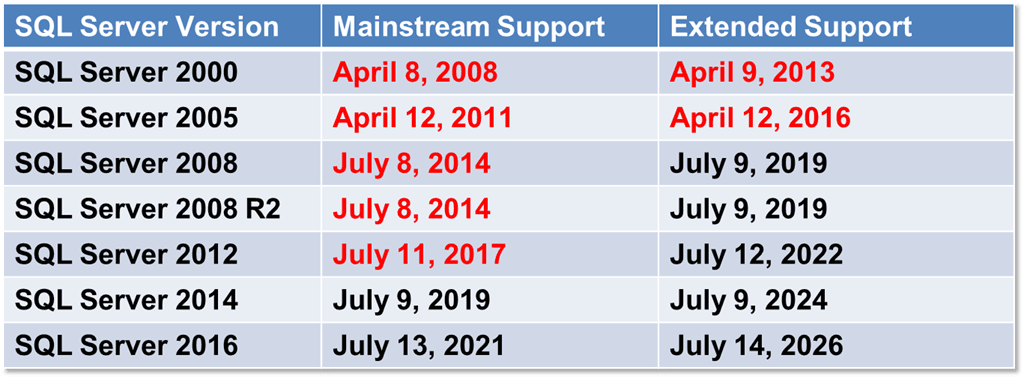
Figure 1: SQL Server Support Dates
If your SQL Server version is out of support, it is also likely that the version of Windows that it is running on will be out of support. Figure 2 shows the support end dates for Windows Server 2003 up to Windows Server 2016. Both Windows Server 2012 and Windows Server 2012 R2 will fall out of mainstream support on October 9, 2018, which is not that far away as I write this. From a support perspective, Windows Server 2016 gives you a lot more time in a supported state.
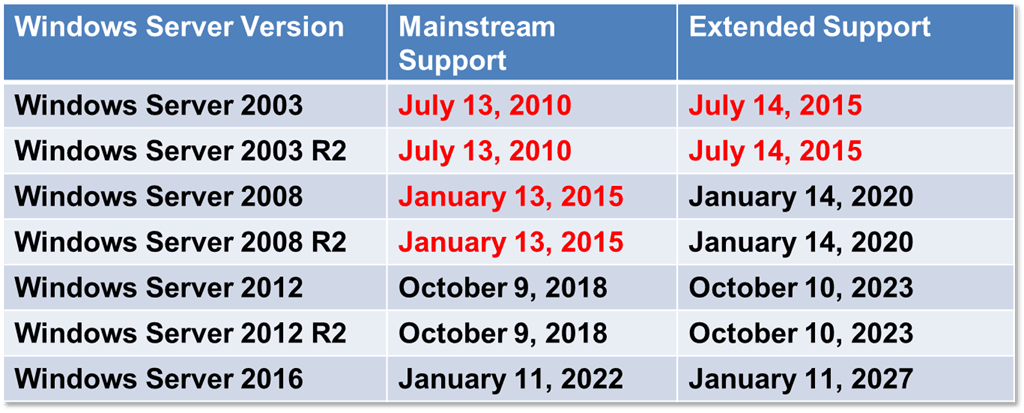
Figure 2: Windows Server Support Dates
Microsoft recently announced a new program called Premium Assurance, which lets you add six more years of product support to 2008 or newer versions of SQL Server or Windows Server, for an escalating annual cost (based on when you purchase it). The annual cost is a percentage of the original total license cost, that went up to 7% on August 1, 2017. The cots will go up to 9% on July1, 2018. This program is an add-on to Software Assurance. This is a pretty expensive option that I would not prefer to use, for both economic and technical reasons, unless I had no other choice.
Additional Resources
My new Pluralsight course, SQL Server: Upgrading and Migrating to SQL Server 2016 has just been published. This is my eleventh course for Pluralsight, but the complete list of my courses is here.
Building on this online course is a new three day class, IEUpgrade: Immersion Event on Upgrading SQL Server, taught by myself and Tim Radney. The first round of this course will be taught in Chicago from October 11-13, 2017.
Finally, I will be presenting a half-day session called Migrating to SQL Server 2017 at the PASS Summit 2017 in Seattle, WA from October 31- November 3, 2017.
Here is a link to the complete series about upgrading SQL Server.
The post Upgrading SQL Server– SQL Server Support Dates appeared first on Glenn Berry.
]]>The post Upgrading SQL Server– Database Compatibility Levels appeared first on Glenn Berry.
]]>Here is an example of how to set the database compatibility level in T-SQL:
ALTER DATABASE AdventureWorks2014 SET COMPATIBILITY_LEVEL = 120;
Figure 1 shows the supported database compatibility levels by major SQL Server version.
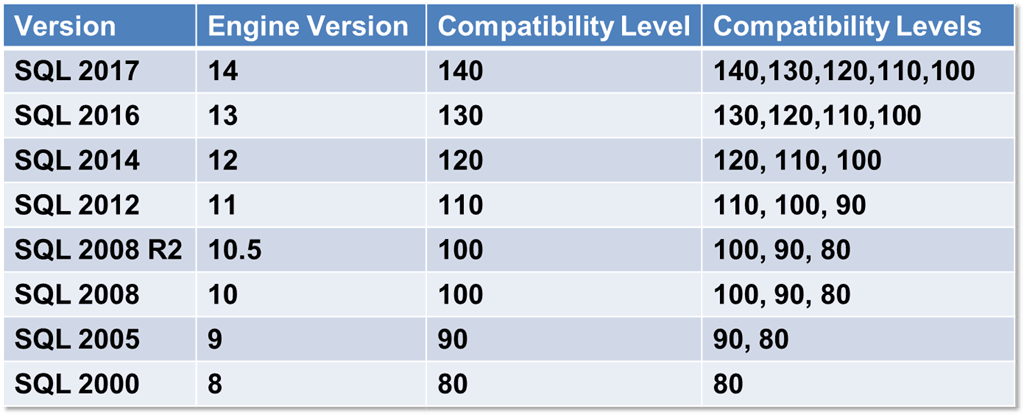
Figure 1: Supported Database Compatibility Levels By Version
By default, new user databases that are created in an instance of SQL Server are set to the version of the SQL Server instance (so a new user database in SQL Server 2017 would have a database compatibility level of 140). The exception would be if the model database has a lower database compatibility level. Upgrading a database with a database compatibility level lower than the lowest allowed level, sets the database compatibility level to the lowest compatibility level allowed for that version (as shown in Figure 1).
The classic scenario for why you might want to use an older database compatibility level after an upgrade to a newer version of SQL Server is to use it as an interim migration aid to work around some application compatibility issues that might surface after a migration (which you hopefully discovered during your pre-migration testing efforts). After further testing and possible database/application changes, it is pretty common to eventually change the database compatibility level to match the database engine version of the instance, which lets you take advantage of some of the new features and behavior differences in that version.
With SQL Server 2014 and newer, the database compatibility level also controls whether the new cardinality estimator or the legacy cardinality estimator is used. The new cardinality estimator gives equivalent or better query performance for many to most queries, but it sometimes has very significant performance regressions. It is very important to do as much testing as possible before you change the compatibility level to 120 or higher. My post Upgrading SQL Server–Diagnosing Performance Regressions goes into much more detail about this issue.
Additional Resources
My new Pluralsight course, SQL Server: Upgrading and Migrating to SQL Server 2016 has just been published. This is my eleventh course for Pluralsight, but the complete list of my courses is here.
Building on this online course is a new three day class, IEUpgrade: Immersion Event on Upgrading SQL Server, taught by myself and Tim Radney. The first round of this course will be taught in Chicago from October 11-13, 2017.
Finally, I will be presenting a half-day session called Migrating to SQL Server 2017 at the PASS Summit 2017 in Seattle, WA from October 31- November 3, 2017.
Here is a link to the complete series about upgrading SQL Server.
The post Upgrading SQL Server– Database Compatibility Levels appeared first on Glenn Berry.
]]>The post Upgrading SQL Server–Replacing Slow Hardware Part 2 appeared first on Glenn Berry.
]]>There was a $746.00 increase in the cost of the processor itself, and perhaps a $500.00 difference in the cost of a base Dell PowerEdge R620 compared to a base Dell PowerEdge R320 server. The SQL Server license cost would have been identical in either case, based on the number of physical cores.
Since the legacy hardware choice was so poor, that makes it even easier to get a significant increase in single-threaded CPU performance and overall CPU capacity by purchasing a brand new model server, using the best available processor at the same physical core count. A new model server will also have higher memory density and capacity and more PCIe 3.0 lanes available. It will also have a number of manageability advantages.
Dell’s 14th generation servers support the new 14nm Intel Xeon Scalable Processors (Skylake-SP) processors that have anywhere from four to 28 physical cores. In our case, we want to replace a legacy Dell PowerEdge R320 server that had one Intel Xeon E5-2407 v2 processor that had four physical cores, a base clock speed of 2.4GHz, no Turbo Boost, no Hyper-Threading, a relatively small 10MB L3 cache, a slow 6.4 GT/s QPI speed, three channels of DDR3-1066 memory support and 24 PCIe 3.0 lanes.
The best quad-core Intel Xeon Scalable processor SKU for a two-socket server is the Intel Xeon Gold 5122 processor, which has a base clock speed of 3.6GHz, a Turbo clock speed of 3.7GHz, Hyper-Threading, 16.5MB of L3 cache, six channels of DDR4-2666 memory support, and 48 PCIe 3.0 lanes, and a price of $1,221.00.
A bad choice at the same physical core count is the Intel Xeon Silver 4112 processor that has a base clock speed of just 2.6Ghz, a Turbo clock speed of only 3.0GHz, Hyper-Threading, 8.25MB of L3 cache, six channels of slower DDR4-2400 memory support, 48 PCIe 3.0 lanes, and a price of $473.00. Saving $748.00 by getting the cheaper processor is foolish, false economy for SQL Server usage.
A good server for a Xeon Gold 5122 processor is the new Dell PowerEdge R740 two-socket server. Even though this is a two-socket server, you can choose to only populate one socket to start with (which is what we will do here). One trade-off when you only use one processor in a two-socket server is that you cut the overall memory capacity of the server in half (until you add another processor later).
The main point here is that you should do this type of analysis when looking at new servers and selecting a particular processor for SQL Server 2016/2017 usage. You should definitely avoid the Intel Xeon Silver and Bronze lines for SQL Server usage, since you give up so much performance and scalability for a relatively small hardware cost reduction.
Additional Resources
My new Pluralsight course, SQL Server: Upgrading and Migrating to SQL Server 2016 has just been published. This is my eleventh course for Pluralsight, but the complete list of my courses is here.
Building on this online course is a new three day class, IEUpgrade: Immersion Event on Upgrading SQL Server, taught by myself and Tim Radney. The first round of this course will be taught in Chicago from October 11-13, 2017.
Finally, I will be presenting a half-day session called Migrating to SQL Server 2017 at the PASS Summit 2017 in Seattle, WA from October 31- November 3, 2017.
Here is a link to the complete series about upgrading SQL Server.
The post Upgrading SQL Server–Replacing Slow Hardware Part 2 appeared first on Glenn Berry.
]]>