
Back in 2009 I ran a survey about methods of running consistency checks. I recently re-ran the survey to get a better idea of the prevailing methodologies – hoping that more people were offloading consistency checks in concert with testing backups.
The results are very interesting.
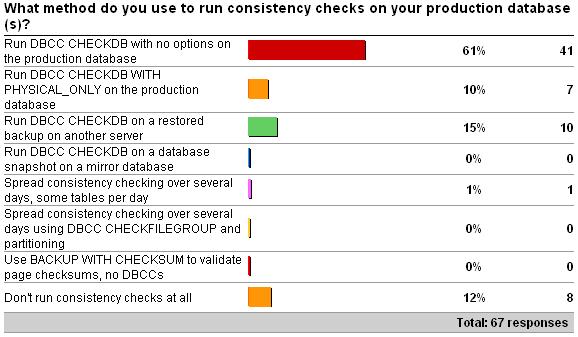
2009 survey results:
Check It Out!

2012 survey results:
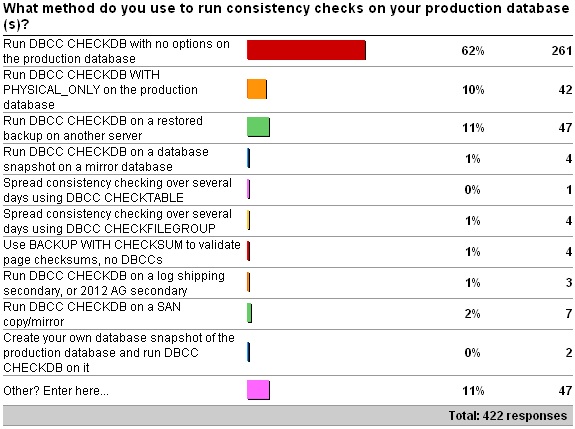
The results are almost *exactly* the same. This is quite surprising to me as I expected more people to be offloading the consistency checks because of resource constraints on the production systems. However, it does show that my previous survey was statistically accurate, even with only 67 responses.
The Other results for this year’s survey don’t really change the distribution of answers, but add a few percent to the first answer. They are:
- 11 x DBCC with NO_INFOMSGS, ALL_ERRORMSGS on production database.
- 8 x Combination of 1 and 2.
- 7 x Run DBCC CHECKDB with NO_INFOMSGS on the production database.
- 5 x Combination of 1 and 3. where maintenance windows permit DBCC CHECKDB with no options on the production server, otherwise on a restored backup on another server.
- 4 x It depends.
- 3 x A mix of PHYSICAL_ONLY and DATA_PURITY depending on server and day of week.
- 3 x Run DBCC CHECKDB with no options after backup and restore to a test environment.
- 2 x DBCC CHECKDB WITH DATA_PURITY on production database.
- Combination of option 1, 2 and.
- Most are option 1, a few option 2, and we are considering CHECKTABLE for our largest instance
- Mostly CHECKDB with PHYSICAL_ONLY; one instance with CHECKTABLE over multiple days.
- What is DBCC CHECKDB
Any of the answers where DBCC CHECKDB is being run on a continually updating copy of a database (e.g. through a database mirror, SAN mirror, log-shipping or Availability Group secondary) are incorrect. This method tells you nothing about the state of the main database on the production system as two different I/O subsystems are involved. I’ve discussed this many times before so I won’t labor the point, but you either have to run the consistency checks on the production database, or on a restored backup of it, or you’re not testing the production database. Nothing else is good enough.
For the people using BACKUP … WITH CHECKSUM instead of doing regular consistency checks, you’re running the risk of bad memory chips corrupting your database – see A SQL Server DBA myth a day: (27/30) use BACKUP WITH CHECKSUM to replace DBCC CHECKDB.
Thanks to all who participated in the survey!
32 thoughts on “Importance of how you run consistency checks”
What is your opinion of third party solutions that use "Virtual" copies of the Database for DBCC?
Interesting, perhaps resource constraints aren’t as prevalent on production systems as you thought?
I’d be curious if you correlated this data with the size of the production DB, and with some other performance metric. Be nice to know why people run on or off a production system.
Interesting to see some people regularly use DATA_PURITY. I was under the impression that was something to be done after upgrading to a newer version of SQL Server and wasn’t really needed after that (assuming any errors found the first time were fixed). I thought that if dbi_dbccFlags = 2, you didn’t need to run DATA_PURITY any more.
Hey Steve – nope, two dimensional surveys aren’t possible with the free thing.
Hey Ray – as long as they’re based on the live database or a virtually-restored full backup then I’m cool with that.
@Shaun – yup, that’s correct.
How about a SAN snapshot? It isn’t continually updating.
A SAN snapshot is fine as long as it’s being snapped regularly. E.g. Once a week snapshot with daily CHECKDB isn’t correct but daily snapshot with daily CHECKDB is good.
I apologize if I’m beating a dead horse, but I just want to be absolutely clear. If I take a full backup and restore it on my [for example] local machine and run CHECKDB, will that suffice? Thank you
Yup
In offloading CHECKDB using backup & restore to a non-production server is there a chance we could be risking a false-positive, where the restore operation, or something else, causes corruption on the non-production server before or as we’re running CHECKDB?
Yes – that’s always a risk – then you’re forced to go back to the prod system to run the CHECKDB. But that should be a *very* rare occurence.
Add one to the "3 x A mix of PHYSICAL_ONLY and DATA_PURITY depending on server and day of week." add-on; PHYSICAL_ONLY daily, DATA_PURITY weekly (with EXTENDED_LOGICAL_CHECKS when server version allows it).
As I understand it, integrity checks contain a logical and physical component. The logical component can be checked independent of the IO subsystem. Am I correct to say that the following methods could be used to check for logical consistency, regardless if the IO system is the same as production?
– SAN replicated or mirrored database
– Full database restore
– Database snapshot of a mirrored database
– Readable replica (either log-shipped or part of an availability group)
For the physical check it sounds like you suggest the only method available is checking the production database. Is this an incorrect assumption? Would the process of backing up the database carry with it any physical corruption even if it is restored on a different IO subsystem or different blocks of the same IO subsystem?
Database integrity checks are a constant headache for us given that they are designed to run as fast as possible and therefore punish even our fastest SANs. Why are there no methods to significantly reduce the IO created from the process?
No – both the logical and physical components need the prod database or a restored copy of it. Corruptions that occur on the prod I/O subsystem are not shipped to a redundant copy (mirror, SAN mirror, AG replica) and so you’re not checking the exact same physical database.
Either the prod database or a restored backup of it works fine – there’s no other way to ensure you’re looking at the database as it exists on prod.
Only thing you can do to reduce the I/O load is to force single-threaded execution with documented TF 2528.
Thanks
So am I correct in assuming that restoring a copy of the database backup to a different physical location is still valid because the physical corruption would be contained within the backup file? IF that is valid, could the same be accomplished by using SAN replication which simply copies physical blocks and would therefore replicate any physical corruption to the replicated SAN?
We are aware of TF 2528 but we’ve found that it can still overwhelm the IO system. Are there any plans to add functionality to reduce the IO usage at the cost of longer runtime? This is our single largest issue with many of our clients that need to run in 24/7 environments and performance suffers from the increased latency introduced by these checks.
Yes – the restored database would exhibit corruption. No – SAN replication only replicates blocks that are written to the I/O subsystem, not blocks that become corrupt once written.
I don’t know of any plans to make any enhancements to CHECKDB to reduce the I/O load.
Hi Paul,
Is it possible/safe to run DBCC CHECKDB against a database which is also set to do transactional replication or would it be best to do a full restore on a different server and run it against that?
Regards,
Andy
Running DBCC CHECKDB is always safe on any database.
Hi Paul, what if I have two asynchronous replications. If I pause replication to one of them and run a DBCC on the database would that be a good way of performing it, or would the backup still be better because the backup tells SQL to quiesce the database?
No – it’s nothing to do with quiescing – the database snapshot that’s created does that. It’s making sure that you’re pulling the data from the source database, otherwise you’re not checking the I/O subsystem on the source system. There’s no way to avoid doing this.
Thanks for all the good info. For EXTENDED_LOGICAL_CHECKS, starting some testing, but can’t find discussion of degree of performance impact of using this option to be sure to capture any spatial/xml indexes in my regular DBCC checks. Should this option always be set? BOL says can be costly, but looks like even OLA’s maintenance script doesn’t give fine control of when it is applied.
No – don’t use EXTENDED_LOGICAL_CHECKS by default.
Wow, if run checkalloc, checktable, checkcatalog on db with many spatial indexes and add extended_logical_checks to each checktable call only when the table has spatial indexes, overall time goes from 1 to 5 hours vs checkdb without the option, but when run checkdb globally on same db with the extended_logical_checks option, the overall time is about 3.5 hours. Running more trials to see if this holds true, but would that be expected?
Yes – that’s why the spatial index checks were turned off by default in 2008.
Thanks! Will continue my customization of OLA script, we missed some corruption in table with spatial index during checks since were not using it. Will post to OLA’s site for him to see.
Hi Paul,
Do you have some special recommendations for Azure SQL (Singleton/Managed Instance)? Azure SQL Business Critical tier has a secondary replica where we can run DBCC CHECKDB. Although we might get false positive results and miss some corruptions on primary, eventually that secondary will became primary (after some fail-over in the future), so I guess that it would be good to run DBCC there to know that it will land on the valid replica. The question is is this enough? As an alternative – do you think that doing point-in time restore on the same (or different server) and running DBCC on the copy would be the only recommended solution?
I personally wouldn’t do anything different on Azure as on-prem. All instances should be consistency checked for your peace of mind and to limit downtime and data loss.
I’ve been running PHYSICAL_ONLY daily for some time now. However, I was required to encrypt a database via TDE and the encrypting of the database was aborting. I finally ran a DBCC CHECKDB with no options and discovered database consistency errors on a table. I went ahead with repair_allow_data_loss option since this was a QA environment, but after this I am going to reconsider PHYSICAL_ONLY …
Hi, paul!
Do we need to perform DBCC CHECKDB for TempDB?
Yes – as it can show storage subsystem issues, although it’s quite limited in what checks it can perform.
Hi Paul!
When I run DBCC checkdb for tempdb.
there is a problem :
Object ID 194099732 (object ‘dbo.##Tbl’): DBCC could not obtain a lock on this object because the lock request timeout period was exceeded. This object has been skipped and will not be processed.
or
I get the deadlock error.
By design.