
I have gotten a lot of email questions recently about TDE and SQL Server, specifically around the encryption hierarchy involved in protecting the encrypted data inside of a TDE enabled database in SQL Server. So, rather than continuing to write long emails that explain this fully, I figured this would be a great blog post topic for future reference as a way to reboot getting back to posting content more regularly on my blog. For an overview of TDE in SQL Server see the following topic in the Books Online (Transparent Data Encryption (TDE) – SQL Server | Microsoft Learn).
SQL Server Encryption Hierarchy
The link referenced above shows the hierarchy of encryption for TDE, and the six layers on top of the data encryption specifically.
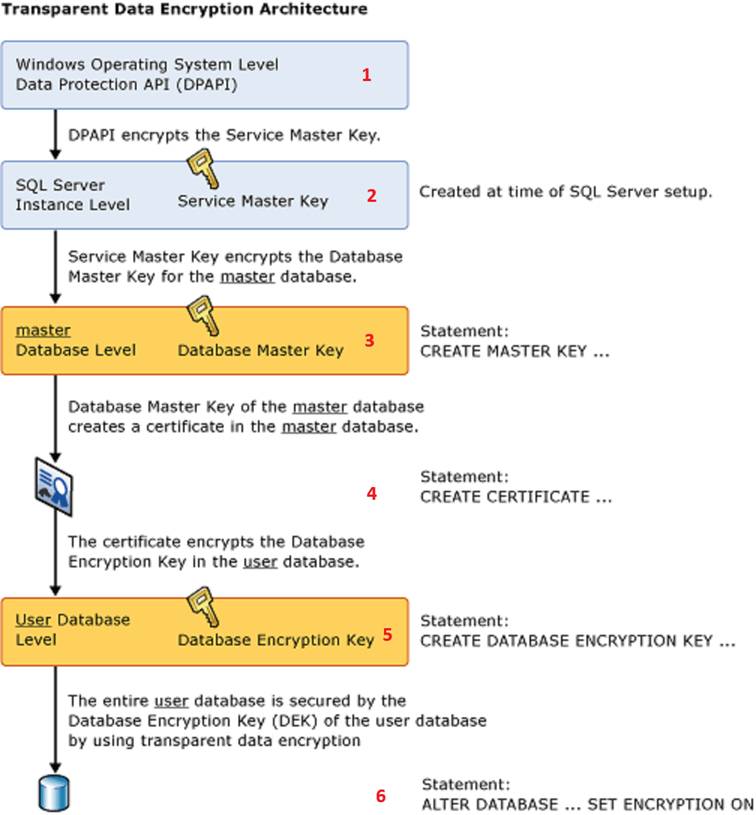
Really this is just a slightly modified version of the overall encryption hierarchy in SQL Server, since the keys for TDE are just at the bottom of that hierarchy. The red numbers I added above simply show the layers of the hierarchy as a reference point for the purposes of this post.
Check It Out!
Service Master Key
The Service Master Key (SMK) is generated when SQL Server first starts after installation. Every instance of SQL Server has a SMK, and it is generally speaking unique to the instance. You can backup an SMK from one instance of SQL Server and restore it to another instance of SQL Server, but for a lot of reasons this is not necessary and not recommended. The SMK is encrypted by DPAPI using the Service Account the database engine runs under. This is why you have to use SQL Server Configuration Manager to change service accounts, or it breaks this entire hierarchy. The services.msc snapin in windows doesn’t connect to SQL Server through WMI and change the DPAPI encryption of the SMK for the instance when it is used to change the service account, and this is the most common way to break the encryption hierarchy in SQL Server. When the database engine starts, the SMK for the instance is decrypted by the service account, and when things are working correctly, the SMK provides encryption of each Database Master Key (DBMK) created in one of the databases in the instance.
Database Master Key
The DBMK of the database is used to encrypt any certificates, symmetric and asymmetric keys contained in the database. This includes the master database, specifically for certificate-based TDE since the certificate used to protect the Database Encryption Key of the database is stored in master. The DBMK is protected in two very specific ways. First, it is protected by a password which must be specified when creating the DBMK. This password exists to allow the DBMK to be opened when it is not encrypted by the SMK. It is not necessary to explicitly ALTER a master key after creating it to add encryption by the SMK. A lot of examples online include an ALTER MASTER KEY ADD ENCRYPTION BY SERVICE MASTER KEY command after creating a DBMK. The BOL (CREATE MASTER KEY (Transact-SQL) – SQL Server | Microsoft Learn) actually specifies that this is automatically done internally by SQL Server:
“To enable the automatic decryption of the master key, a copy of the key is encrypted by using the service master key and stored in both the database and in master.”
A special case exists for Availability Groups and DBMK’s since the SMK of each replica instance participating in the Availability Group has a different SMK. After a failover occurs, the DBMK is no longer protected by the SMK of the instance that is assuming the role of Primary for the AG. A system stored procedure named sp_control_dbmasterkey_password exists for this exact situation, which creates a credential on each AG replica that contains the password to the DBMK of the database and allows SQL Server to decrypt the DBMK using that stored credential and automatically encrypt it under the SMK of the new Primary replica instance after a failover. Generally speaking, you don’t need to have a backup of the DBMK, but you do need to have at least the password that protects it stored safely so that you can open the DBMK and add encryption by the SMK if the database is restored from backup on another server.
Certificates, Symmetric and Asymmetric Keys
These are stored inside of the database where they were created and are protected by the DBMK of the database. Generally speaking, you don’t have to maintain separate backups of these keys as long as you know the password to the DBMK to be able to OPEN the DBMK and gain access to them. However, I would certainly maintain the passwords that provide secondary encryption of these to provide a means of opening them to reestablish encryption by the DBMK if it is broken.
Database Encryption Key used by TDE
The DEK is a symmetric key that is stored inside of the database and used to encrypt/decrypt the data. A symmetric key is used for performance reasons. There are two options of encryption of the DEK, one is a certificate created in the master database, the other is using an asymmetric key stored in an Extensible Key Management (EKM) provider from an external key management system, such as Hardware Security Module (HSM) or Azure Key Vault. The benefit of using an EKM to provide the encryption of the DEK is physical separation of the protector from the data and separation of duties for higher levels of security. Someone with the right access, knowledge, and a little googlefu (see The Anatomy and (In)Security of Microsoft SQL Server Transparent Data Encryption (TDE), or How to Break TDE | by Simon McAuliffe | Medium) can get everything necessary to access the database and decrypt the data when the protector is a certificate stored in the master database. Since the only way to gain access to the data in a TDE enabled database is to also have access to the protector of the DEK, moving the protector outside of SQL Server provides a significantly higher level of protection of the data. If the protector is a certificate created in the master database, then that certificate must be backed up and protected. Without it there is no way to decrypt the data. If the protector is an asymmetric key provided by an EKM, then the EKM configuration must be functioning properly to gain access to the key to decrypt the data.
What Do I Need to Backup?
I would say that having a backup of the SMK, while not necessary to recover from an issue, would be a good idea to protect against having someone change the service account using Services.msc and breaking the entire hierarchy. That is really the only thing within the hierarchy that doesn’t have secondary protection available through a password. However, an option does exist in ALTER SERVICE MASTER KEY that allows for recovery by specifying the OLD_ACCOUNT and OLD_PASSWORD to access the key so long as those are known:
ALTER SERVICE MASTER KEY
    WITH OLD_ACCOUNT = 'DOMAIN\OldServiceAccount',
         OLD_PASSWORD = 'OldPassword';
Then you can change the encryption using:
ALTER SERVICE MASTER KEY
    WITH NEW_ACCOUNT = 'DOMAIN\NewServiceAccount',
         NEW_PASSWORD = 'NewPassword';
However, note that this is marked as obsolete in the BOL topic and the proper way to fully avoid having any issues with this is to simply use SQL Server Configuration Manager to manage Service Account changes for SQL Server services entirely.
When it comes to TDE enabled databases, at the bare minimum you HAVE to have:
- Access to the protector of the DEK available, which will be one of the following:
- A backup of the Certificate that protects the DEK and the password to that certificate and backup file so that it can be restored to the master database before you restore the encrypted database from backup
- The EKM configuration necessary to access the asymmetric key that protects the DEK
- Backup of the encrypted database
- This is where SQL Server can be annoying, since RESTORE DATABASE doesn’t validate that the certificate required to decrypt the DEK exists until after it has done the entire copy operation of the restore.
- If the user database does have a DBMK, required for certificates, symmetric and asymmetric keys stored for things like column level encryption of data, CLR assembly signing, etc. you need to have the password to that DBMK at the very minimum as it is required to open the DBMK and add encryption by the SMK after the restore is done to reestablish the hierarchy of the DBMK under the SMK
- In an AG, you would use sp_control_dbmasterkey_password to add this password as a credential on all of the replicas so that the database engine can automatically reestablish the hierarchy after failing over the AG to another replica since each replica has a different SMK.
Conclusion
Protecting Transparent Data Encryption enabled databases is not overly difficult. It simply requires having backups of the database and access to the protector of the DEK, whether that be an asymmetric key stored in an EKM or a backup and password to the certificate used from the master database on the instance. The encryption hierarchy inside of SQL Server provides multiple layers of protection and also provides multiple methods of recovering access to things when something does go wrong and the hierarchy gets broken. The most common error is someone changing Service Account information outside of SQL Server Configuration Manager using the services.msc snapin in Windows. When that happens everything in the hierarchy is broken, linked servers fail, database mail can be impacted, and encryption/decryption fails. While there are methods to recover from this, it is much easier to just use SQL Server Configuration Manager for all Service Account management of SQL Server services.