
(This post first appeared on SQLperformance.com four years ago as part of a blog series, before that website was mothballed later in 2022 and the series was curtailed. Reposted here with permission, with a few tweaks.)
In the first part of this series I introduced basic terminology around logging so I recommend you read that before continuing with this post. Everything else I’ll cover in the series requires knowing some of the architecture of the transaction log, so that’s what I’m going to discuss this time. Even if you’re not going to follow the series, some of the concepts I’m going to explain below are worth knowing for everyday tasks that DBAs handle in production.
Note: as I progress through this series and talk about aspects of the log, there are often little edge-cases or weird behaviors in niche circumstances that have been added or changed over the years. I’ll ignore those unless I specifically want to call them out, otherwise the posts would be riddled with rat-holes and mazes of twisty-turny little passages (yes, I loved ’80s text-based adventure games :-) that would distract from the main things to learn about in each post.
Check It Out!

Structural Hierarchy
The transaction log is internally organized using a three-level hierarchy as shown in figure 1 below.
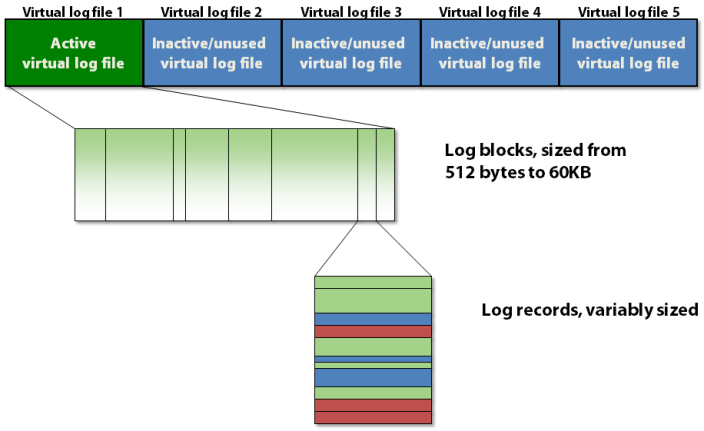
(Figure 1: The three-level structural hierarchy of the transaction log (my image))
The transaction log contains a number of virtual log files, which contain log blocks, which store the actual log records.
Virtual Log Files
The transaction log is split up into sections called virtual log files, commonly just called VLFs. This is done to make managing operations in the transaction log easier for the log manager in SQL Server. You can’t specify how many VLFs are created by SQL Server when the database is first created or the log file automatically grows, but you can influence it. The algorithm for how many VLFs are created is as follows:
- Log file size less than 64MB: create 4 VLFs, each roughly 16 MB in size
- Log file size from 64MB to 1GB : create 8 VLFs, each roughly 1/8 of the total size
- Log file size greater than 1GB: create 16 VLFs, each roughly 1/16 of the total size
Prior to SQL Server 2014, when the log file auto grows, the number of new VLFs added to the end of the log file is determined by the algorithm above, based on the auto-grow size. However, using that algorithm, if the auto-grow size is small, and the log file undergoes many auto-growths, that can lead to a very large number of small VLFs (called VLF fragmentation) that can be a big performance issue for some operations (see here).
Due to this problem, in SQL Server 2014 the algorithm changed for auto-growth of the log file. If the auto-grow size is less than 1/8 of the total log file size, only 1 new VLF is created, otherwise the old algorithm is used. This drastically reduces the number of VLFs for a log file that has undergone a large amount of auto-growth and I explained an example of the difference in this blog post.
Each VLF has a sequence number that uniquely identifies it, and is used in a variety of places, which I’ll explain below and in future posts. You would think that the sequence numbers would start at 1 for a brand new database, but that is not the case.
On a SQL Server 2019 instance, I created a new database, without specifying any file sizes, and then checked the VLFs using the code below:
CREATE DATABASE NewDB;
GO

SELECT
    [file_id],
    [vlf_begin_offset],
    [vlf_size_mb],
    [vlf_sequence_number]
FROM
    sys.dm_db_log_info (DB_ID (N'NewDB'));
GO
Note that the sys.dm_db_log_info DMV was added in SQL Server 2016 SP2. Before that (and also today, because it still exists) you can use the undocumented DBCC LOGINFO command, but you can’t give it a select list – just do DBCC LOGINFO (N’NewDB’) and the VLF sequence numbers are in the FSeqNo column of the result set.
Anyway, the results from querying sys.dm_db_log_info were:
file_id vlf_begin_offset vlf_size_mb vlf_sequence_number
------- ---------------- ----------- -------------------
2       8192             1.93        37
2       2039808          1.93        0
2       4071424          1.93        0
2       6103040          2.17        0
Note that the first VLF starts at offset 8,192 bytes into the log file. This is because all database files, including the transaction log, have a file header page that takes up the first 8KB, and stores various metadata about the file.
So why does SQL Server pick 37 and not 1 for the first VLF sequence number? The answer is that it finds the highest VLF sequence number in the model database and then for any new database, the transaction log’s first VLF uses that number plus 1 for its sequence number. I don’t know why that algorithm was chosen back in the mists of time, but it’s been that way since at least SQL Server 7.0.
To prove it, I ran this code:
SELECT
    MAX ([vlf_sequence_number]) AS [Max_VLF_SeqNo]
FROM
    sys.dm_db_log_info (DB_ID (N'model'));
GO
And the results were:
Max_VLF_SeqNo
-------------
36
So there you have it.
There’s more to discuss about VLFs and how they’re used, but for now it’s enough to know that each VLF has a sequence number, which increases by one for each VLF.
Log Blocks
Each VLF contains a small metadata header and the rest of the space is filled with log blocks. Each log block starts out at 512 bytes and will grow in 512-byte increments to a maximum size of 60KB, at which point it must be written to disk. A log block might be written to disk before it reaches its maximum size if one of the following occurs:
- A transaction commits, and delayed durability is not being used for this transaction, so the log block must be written to disk so the transaction is durable
- Delayed durability is in use and the background ‘flush the current log block to disk’ 1ms timer task fires
- A data file page is being written to disk by a checkpoint or the lazy writer, and there are one or more log records in the current log block that affect the page that’s about to be written (remember write-ahead logging must be guaranteed)
You can consider a log block as something like a variable-sized page that stores log records in the order that they’re created by transactions changing the database. There isn’t a log block for each transaction; the log records for multiple concurrent transactions can be intermingled in a log block. You might think this would present difficulties for operations that need to find all the log records for a single transaction, but it doesn’t, as I’ll explain when I cover how transaction rollbacks work in a later post.
Furthermore, when a log block is written to disk, it’s entirely possible that it contains log records from uncommitted transactions. This also is not a problem because of the way crash recovery works – which is a good few posts in the series future.
Log Sequence Numbers
Log blocks have an ID within a VLF, starting at 1 and increasing by 1 for each new log block in the VLF. Log records also have an ID within a log block, starting at 1 and increasing by 1 for each new log record in the log block. So all three elements in the structural hierarchy of the transaction log have an ID and they are pulled together into a tripartite identifier called a log sequence number, more commonly referred to simply as an LSN.
An LSN is defined as <VLF sequence number>:<log block ID>:<log record ID> (4 bytes: 4 bytes: 2 bytes) and uniquely identifies a single log record. It’s an ever-increasing identifier, because the VLF sequence numbers increase forever.
Groundwork Done!
While VLFs are important to know about, in my opinion the LSN is the most important concept to understand around SQL Server’s implementation of logging as LSNs are the cornerstone on which transaction rollback and crash recovery are built, and LSNs will crop up again and again as I progress through the series. In the next post I’ll cover log truncation and the circular nature of the transaction log, which is all to do with VLFs and how they get reused.
2 thoughts on “The SQL Server Transaction Log, Part 2: Log Architecture”