
Many times I'm asked whether having multiple data files can lead to an improvement in performance. The answer, as with all things SQL (except concerning auto-shrink) is a big, fat "it depends." It depends on what you're using the database for, and the layout of the files on the IO subsystem, and the IO subsystem capabilities. I've heard examples of "yes" and I've heard examples of "no."
Just for kicks, I put some of my test hardware to use to do some experimentation. (You can get to all my other Benchmarking posts using this link.)
My setup for this series of tests is:
Check It Out!

- Log file pre-sized to 8GB (to avoid log growth) on 8 x 1TB 7.2k SATA RAID-10 array, one iSCSI NIC, 128 KB stripe size
-
160GB database, variously setup as (all in the PRIMARY filegroup):
-
1 x 160GB file
-
2 x 80GB files
-
4 x 40GB files
-
8 x 20GB files
-
16 x 10GB files
-
-
16 connections inserting 100/16GB each, no other activity, all code executing on the server, no data transfer from clients
Each test was run 5 times and then the time-for-test calculated as the average of the 5 test runs, so the two tests together represent 50 test runs. Luckily I wrote a test harness that will tear down and setup the database automatically each time in the different configurations, so just double click a cmd file and then a day or so later I get an email saying the test has finished. Great when we're traveling!
Here are the test results:
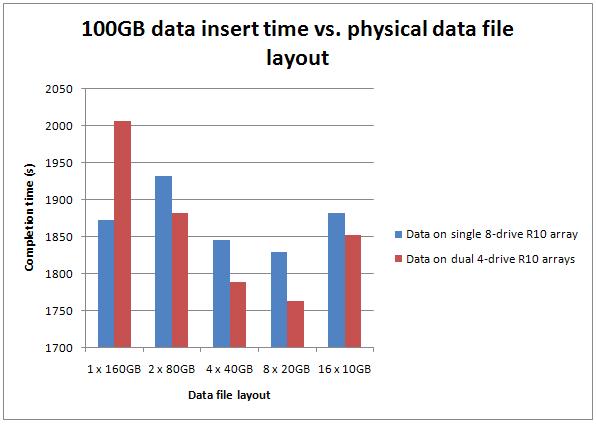
As you can see, it's pretty clear that with both test setups, having more data files definitely does produce a performance improvement, but only up to a point.
Test 1: Data files on 8 x 300GB 15k SCSI RAID-10 array, two iSCSI NICs, 128KB stripe size
Test 2: Data files round-robin between two 4 x 300GB 15k SCSI RAID-10 array, one iSCSI NIC each, 128KB stripe size
In both cases, the performance increases up to eight data files, and then begins to decrease again with sixteen data files. The single data file case was bound to be slower on the SCSI array with fewer drives, and we see that in the results (left-most result in red).
In the best case, the eight-file case on two arrays was just over 6% faster than the single-file case on the single array. Hardly earth-shattering, but still a non-trivial gain.
Where's the gain coming from? I ran wait stats analysis for a few test variations – for example, between the eight data files test and the single data file test using two arrays, the cumulative wait stats were almost identical – 38/39% PAGELATCH_EX, 19/21% PAGELATCH_SH, 12/13% WRITELOG. The gain is mostly coming from the IO subsystem, but the SCSI arrays are still overloaded, as I showed in plenty of the previous benchmarking tests.
Now, this is a very contrived test, with a single operation in my workload – it's definitely NOT representative of a mixed-operation OLTP workload. However, I did see a gain from having multiple data files – and I believe I would have seen more gain had the SCSI array(s) not been pretty much maxed out already.
I've heard plenty of anecdotal evidence that adding a few more data files for user databases can lead to performance improvements, but your mileage is definitely going to vary. I'd be very interested to hear your observations in production as comments to this post (but please keep the comments constructive – don't give me a laundry-list of tests/settings you want me to try, or rant about real-life vs. lab tests).
Enjoy!
PS The next post on SSDs is forthcoming – just finishing up the (extensive) tests – and also the post on how you all have your log files configured, from the survey I did a while ago. Thanks for being patient!
50 thoughts on “Benchmarking: do multiple data files make a difference?”
Great post! I read somewhere that NUMA servers get an IO thread per node. Do you think NUMA or server architecture in general would change these test results at all?
Hi, Thanks for the post. I have a question.
Why there is an increase in time for dual RAID when 160 GB single file is used?
Thanks Paul. Its a simple truth, I didn’t see it first!
Thanks Paul. It is good to see a test and data that match the observations I have made in an environment where we implemented multiple data files and saw performance improvements.
Interesting to see this too: A single 160 GB file on single RAID works marginally better than two 80 GB files in dual RAID.
@Preethi – because the 160GB file is being hosted by a RAID array with only 4 drives instead of 8, so the avg disk secs/write goes up
@Dave – not sure to be honest. Even on an SMP box, setting IO affinity might make a difference. I’ll maybe give it a try and report.
It’s been my experience that alignment between data files and cores is useful. So, if you have 8 cores, you should have at least 8 data files. If there are more paths to the data, either via HBAs or DAS storage connections, then there should be another entire set of data files matching the core count. But, if the data file to core count exceeds a 1:1 ratio, then a lot of context switches are going to occur, which slows the overall I/O.
My question related to this is, I’ve heard arguments both for and against having index and data on separate files gets a boost, because key lookups can be done in parallel to the index lookup (and I know Kim is going to read this…not everything has a covering index. ;)) So, can we get more out of the disk by splitting index and data to separate files?
The number of IO Completion threads is dependant on the NUMA configuration (both soft and hard NUMA). The number of Lazy Writer threads is dependant on the number of Hardware NUMA nodes on the box. And the number of IO Completion threads will depend on the number of Soft NUMA nodes, if configured. If not configurd, then it will be equal to the Hardware NUMA nodes.
Rob Dorr talks about this in his blog post: http://blogs.msdn.com/b/psssql/archive/2010/04/02/how-it-works-soft-numa-i-o-completion-thread-lazy-writer-workers-and-memory-nodes.aspx
Hi Paul,
Can you elaborate on how you performed the insert test?
Was this different files in the same filegroup but on different drives?
thanks
r
@Rich yes – different number of files but all in the primary filegroup.
@Don Thought I’d remembered to reply to this – sometimes you can get a gain by splitting indexes out – totally depends on the workload.
Hello Paul,
Thank you for sharing the very useful R & D information.
So by reading above data can we conclude that if the data file is between 12.5% to 25% of the Total Database size we can get comparatively good performance?
Sure, still it depends on types of transactions and other hardware and software configurations.
Appreciate your thoughts on this.
Thank you in advance.
I would really like to see these tests rerun in a RAID 5 scenario, the 8 vs 4 situation might favor the single array situation due to the IO improvement in increasing disks in a RAID 5 array.
Great article Paul.
Any plans to run similar tests in cloud (aws, azure etc.)??
Thanks
No – I don’t deal with cloud systems yet.
Hi Paul,
I would really love to understand how the creation of multiple files in one file group works, I guess this is more towards i/o optimization and not partitioning.
Reference mmaterials would be appreciated…
What do you mean how it works? It can make I/O performance better through I/O parallelism during reads/writes.
Paul,
Does it still relevant with 2008 R2 and upwards? I am hearing it is not matter anymore with the newer SQL Server Engine?
Is it true?
Thanks!
Yes, still relevant. Whoever told you that isn’t correct. There is no change around that in the Storage Engine.
Hi, great set of tests.
I have some questions if you would be good enough to theories about.
I assume regardless of the RAID config [1, 5, 6, 10, 50, or 60] if your test data is always maxing out the subsystems IO, then the relative results for the number of data files [1, 2, 4, 8, 16] in a test will be the same for each set of tests conducted on the same RAID config, 8 data files is always the sweet spot?
If the subsystems IO was not being maxed out in a set of tests varying the number of data files on a single array (say none of them exceeded 70%), can you reasonably say that the relative results would be the same?
It was surprising to see that the 2 data files on the 8 drive array was considerably worse than the single file, can you explain what the reason behind this may be?
Our system currently uses SQL 2012 SP2 and 2 data files (pre expanded to the required capacity) and a small number of data read/write threads, we are looking at upscaling the read/write threads to +20 (and do less reading than before). Based on your results we may experiment with increasing the number of data files to 4 or 8.
Our largest systems will probably have the data files on a 6 or 8 15K drives in RAID 5, but smaller systems (admittedly with lower data throughput) will probably only have 3 or 4 15K drives in RAID 5. Do you know if there is a relationship between the number of drives in the array and the optimum number of data files.
In your tests (just looking at the single array) was 8 data files the sweat spot because there was 8 drives in the array, if there were only [3, 4 or 6] drives in the array would 8 data files still be better than 2 or 4 or 6? or as you exceed the number of drives in the array do start to lose the benefit?
Thanks
Simple answer to all your questions is that I don’t have empirical data to answer them with any degree of certainty. Especially question 1 – entirely depends on the type of I/O being done, the pattern of the I/Os across the various files, cache settings, etc. Unless one is an I/O subsystem expert (which I’m not), predicting the results is very hard, so testing is the way to go.
For the two-file question, it’s only about 3% worse and I don’t have the data around any more so I can’t investigate. At the time that wasn’t important to me as I was interested in finding the sweet spot.
As far as optimum number of data files vs drives in the array, go by your vendor’s guidance (always) and experiment. There’s no one-size-fits-all answer.
As far as why 8 was the sweet spot, in that case it’s linked to the number of processor cores. The same pattern shows up with varying numbers of data files on an SSD – 8 files is the sweet spot for that test on that server. Again, just one contrived test showing that it’s possible to get better performance in some scenarios with more than 1 data file. Your mileage will vary.
Hi Paul,
Did you test with all data files in the same partition, or each on a different partition (or mount point)?
For a BACKUP DATABASE, two data files on the same or two partitions makes a difference (backed up one after each other, or in parallel). This can be seen with from Resource Monitor -> Disk.
I believe it’s the same for a SELECT that generates a table scan, but you can likely confirm or deny this?
Thanks, Michel
They were all on the same partition. Yes, backup will spin up multiple threads if necessary. For a select, it depends whether the plan is parallel or not – the action of doing the reads won’t go parallel itself (in the same way that backup does) unless the scan is a parallel scan in the query plan. Backup uses a separate I/O mechanism from the buffer pool. And my test wasn’t doing selects, so that would have been a factor in the results.
Likely not a true test.. but
– We have a table that is partitioned. All partitions (separate data files) sit in the same drive.
– All other tables are not partitioned. There is a single data file that sits in the same drive as the partitioned table
I noticed that scanning the partitioned table results in much higher throughput on the I/O subsystem than the non-partition table. Things seemed faster however the higher throughput was enough to put our Avg disk sec read into bad territory (>0.2 sec). Not sure it’s worth the risk.
This is good when you have Direct attached storage. How about SAN based drives where SAN fabric promise the same response times even the drives are in the same LUN or multiple LUNs? Do you have any benchmarks single drive vs. multiple drives on SAN? My assumption was that multiple disks configuration at least give better performance at OS file system level. I may be wrong too.
Thanks,
SP
These numbers *are* for a SAN. Your mileage will vary depending on the configuration and performance of your SAN.
Hi Paul,
Does MS (or Oracle) says something about the number of files? I mean, is there an official recommendation?
Also I am wondering if the benefit comes from the number of files or from its size? Would I see the same increase in performance with smaller files… let’s say a 8 files of 2GB each?
Great post!
There’s official MS recommendation that I know of (and I don’t know anything about Oracle). The benefits are from the number of files, not the file size.
I’d be interested to see the results for SELECT statements.
Was just thinking the same
Hi Paul,
Thanks for doing these tests, I love reading all your results and findings.
I have a question if you don’t mind regarding the setup. I note that you created these databases with the multiple files setup from the start. What would happen if you created a database with a single MDF, performed an insert, and then created additional MDF’s? Would the engine spread out the existing data onto the additional datafiles and then the performance gains be noted on repeating the task, or would it require the original set of data to be dropped and re-inserted to notice any performance gain?
Regards,
Andy
No – there’s no automatic rebalancing of allocations so you’d get different results because of proportional fill (see https://www.sqlskills.com/blogs/paul/investigating-the-proportional-fill-algorithm/)
Are you planning to re-run these tests on SQL Server 2016 or 2017 and current hardware?
Yes – at some point later this year.
Did you ever get around to redoing this bench mark test for the newer SQL Servers versions?
Not yet. Maybe in October or November.
Hi Paul,
Apologies if this is a dumb question but would appreciate clarification – why would multiple data files improve write performance (INSERT in your test) when my understanding data is modified first in memory and then flushed to disk (to the multiple data files) async during a checkpoint. I can understand the TLOG being a bottleneck but I’m lacking some understanding about the interaction of the data files and the insert operation. At we reading from the data from the files into memory first before we insert?
Many Thanks
Carlo
It’s because of the better performance of the checkpoint operation, in this case, where it’s making use of the hardware parallelism to effect the checkpoint writes faster.
Thanks Paul. Appreciated.
On a SAN storage,
How many files should I create for each filegroup? (one filegroup for nonclustered indexes and another filegroup for records of tables)
No one-size-fits-all answer as it depends on workload and storage. The old advice of separate storage for nonclustered indexes is very old and no longer applicable. Usually more than one file in a filegroup gives better I/O perf.
Hi Paul.
It would still seem logical to me to separate nonclus seek/scan activity from clus scans and lookups.
Can you expand on why the “old advice” to separate clus & nonclus indexes on separate filegroups is no longer applicable please ?
Because modern I/O subsystems are so fast that you don’t get any gain, especially with many drives underpinning a logical volume. And with buffer pool sizing increases, more data stays in memory.
Ok that makes sense, thanks.
So presumably the main advantage of having multiple files in a filegroup is to get a potential increase in throughput due to there being less latching contention on allocation bitmaps (PFS, GAM & SGAM) ?
Are there any other performance advantages to having multi-file filegroups in a fairly standard OLTP database (typically <= 250gb) ?
Great Post Paul. Any inputs on why you used 128KB stripe size instead of 64KB Stripe? understood that there is no one-size fits all but is there any ‘initial’ guideline/formula to use?
Thanks. The MD3000i GUI doesn’t allow anything lower than 64KB to be used. No formula – I always recommend going with whatever guidelines the I/O subsystem vendor recommends for SQL Server and your workload classification.
@Paul Davies: A bit of that, yes, and it was also to make use of inherent drive parallelism at the I/O subsystem level. Nowadays, it doesn’t seem so important. YMMV so it’s always best to follow the I/O subsystem vendor’s SQL Server guidelines, and then test various configs to see what’s best for you.
Perf advantages, no. But availability and manageability advantages as data volumes increase and you want current data online as fast as possible after a disaster – partial database availability and peicemeal restore don’t work without multiple filegroups.
I just tried this by splitting a 1TB mdf into 4 files on two drives per our “Best Practices Guide.” I ran our analytics job against the data and it actually took twice as long processing the queries against the 4 files than it did against the single 1TB file. Any pointers on what I may have done wrong?
So many variables – drive type, drive speed, what the workload is doing, file size, caching, for instance. Also note that I was using RAID arrays, not single drives. And remember that better perf isn’t a guarantee, as it depends on all those variables. With only two drives (and assuming the two drives are exactly the same as the original drive) I’d try benchmarking two files, one on each drive.
Excellent post and relevant to a problem encountered recently.
As is usual when discussing performance, the answer seems to be “it depends”.